
No matter which ad platform you’re using, if you’re depending on traditional browser pixels for tracking, you are dealing with misleading, incomplete, and low-quality conversion data.
For any marketer who wants to manage and optimize ad campaigns properly, they need to start using multi-channel, server-side tracking tools that offer Conversion API integrations.
This is the one thing that will help you maintain accurate optimisation and make sure you’re getting a true picture of how your ads are performing.
Challenge: Lost Conversion Data Due to Browser & Ad Platform Limitations
Traditional conversion tracking relies on browser pixels placed on websites. In these cases, every time a user clicks or completes a conversion action (purchase, sign-up, or lead submission), these pixels fire and collect that action as conversion data.
However, the problem with this method is that some of the conversions are missed due to:
- Blockers applied by users to tracking scripts
- Browser restrictions on third-party cookies
- Network interruptions that stop pixels from firing
- Privacy settings that limit client-side tracking
- Users switching devices before converting
What you have, then, is incomplete and inaccurate conversion data within your ad platforms that is misleading for both the platforms’ algorithms and your reporting.
Why Browser Pixels & Ad Platforms Alone are Not Good Enough
Many years ago, browser pixels may have been enough to get decent campaign reporting for optimization.
But today, depending solely on the user’s browser pixels to transmit the full customer journey and conversion data is simply not good enough.
Due to various privacy regulations, user protections, and conflicting platform attribution logic, there will be a bunch of conversions that will never show up in your platform reporting if you continue to rely on browser pixels.
Let’s take a look at a fairly common customer journey:
- A user clicks a Meta ad for hiking boots on their mobile
- An hour later, they Google-search the same boots and click on a Google ad via their desktop at work
- Later that evening, they use their phone to purchase the boots through Amazon
This particular user has ad tracking disabled on his phone. He also uses Safari for web browsing, where he has enabled ‘Prevent Cross-Site Tracking’.
So no matter which ad platform report you go to, you won’t find this conversion. It’s like it never happened.
But let’s say the same customer journey happened, but the user never enabled any of the tracking restrictions. In that case, you come face-to-face with another problem: you have one customer who made one purchase, yet the three ad platforms would each attribute the conversion to themselves.
So you have 1 actual conversion, which has been recorded as 3 separate conversions in your reporting.
What you have here is multi-platform over attribution and conversion duplication.
Because partial browser signals conflict with platform attribution logic, you end up with:
- Duplicated conversions
- Poor optimization signals
- Ad platform algorithm instability
But this is just part of the reason why performance marketers and media buyers are turning to server-side tracking tools like RedTrack, which use Conversion API to help them land accurate conversion and attribution data.
Why Accurate and Complete Conversion Data Matters
Now, let’s take a step back and consider why accurate and complete conversion data matters for businesses that spend thousands of dollars on paid ad campaigns.
Ad platforms use the conversion data they have to train and run the algorithms that optimize ad campaigns.
If the conversion data they are using is inaccurate or incomplete, that means their optimization will be skewed, misaligned, and, quite frankly, inaccurate.
Suddenly, you’ll have ad campaigns being optimized towards users who aren’t necessarily the ones most likely to convert.
This creates a serious problem when it comes to:
- Effective campaign optimization
- Best utilization of your ad budget spend
So, having accurate and complete conversion data in your ad platforms directly impacts your campaign success and profitability.
Now, let’s imagine the opposite. Imagine all your ad platforms had spotlessly clean, complete, validated, and accurate conversion data being fed to their systems.
As a result of having all this complete data (instead of the one with gaps and duplicates), ad campaign managers and performance marketers could:
- Have their ad platforms automatically improve audience targeting accuracy
- Reduce CPA and wasted ad budget spend
- Scale winning campaigns faster
- Cancel campaigns that are not delivering
- Make faster, more effective optimization decisions that deliver visible profit results
So reliable conversion data is not just a must-have for reporting accuracy.
It’s a must-have if you want your ad algorithms to work properly and drive the best possible campaign results.
Now lets take a look at how RedTrack solves this problem.
Solution: RedTrack’s Server-Side Tracking With CAPI Integrations
The best and easiest way to avoid all the limitations of ad platform reporting and conversion signal loss is through a platform like RedTrack, which lets you integrate directly with advertising platforms through Conversion APIs (CAPI).
So instead of relying on browser pixels, RedTrack sends conversion events server-to-server.
That way, all your clean conversion data is transmitted directly from your backend or tracking environment to the ad platforms you use.
RedTrack offers direct CAPI integrations for conversions attributed to the following ad networks:
- Meta Ads
- Google Ads
- Bing Ads
- TikTok Ads
- Snapchat Ads
However, RedTrack also has direct CAPI integrations to send all conversions (from all platforms) for the two major ad platforms:
- Meta Ads
- Google Ads
When you choose RedTrack, it becomes your central tracking layer for accurate conversion data gathering and redistribution.
In this way, RedTrack:
- Collects click and conversion data
- Validates and deduplicates conversion events across platforms
- Sends clean, server-side signals back to ad platforms
- Maintains attribution consistency across your ad channels
It basically cleans and re-feeds all your ad platforms with the accurate conversion data you need to optimize your campaigns effectively.
How to Set Up CAPI Integrations in RedTrack
CAPI integrations basically let you send conversions from your server to the servers of ad platforms to restore the signals that were not tracked by pixels. This means your ad platforms will have accurate and complete conversion signals, which will help refine targeting and deliver more aligned algorithms for your campaign optimization.
When you use RedTrack, it captures precise and accurate event conversions (which you define) and stores them within RedTrack’s server, under your domain name. These event conversions are further enriched with first-party data, and they are then directly sent back to platforms like Meta, Google, TikTok, and Snapchat via the CAPI.
In this example, we’ll show you how to set up a CAPI integration with Meta.
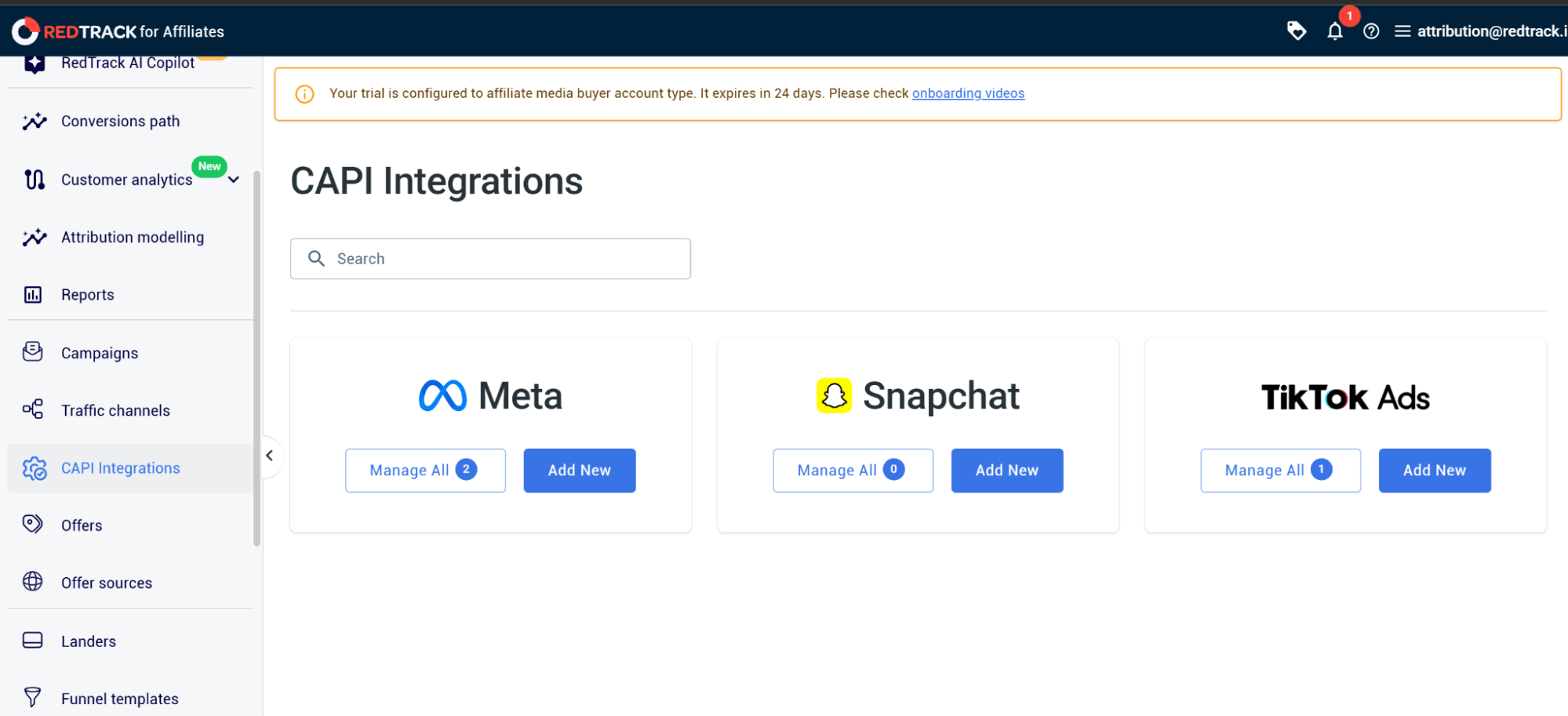
Step 1: Select the Ad Platform You Want to Integrate
When you open the RedTrack dashboard:
- Navigate to CAPI Integrations in the side menu
- Hover over the Meta option and click on Manage All
Note: You can add as many pixels as you like and as many ad managers as you need. This is why the tool is so great for agencies that deal across multiple platforms and have many clients.
Step 2: View your added pixels
On the Meta Pixels page, you’ll be able to see all the pixels added to your Meta Pixels Hub.
- Click on View details to view the traffic channels, the date they were connected, and the ID of the traffic channel.
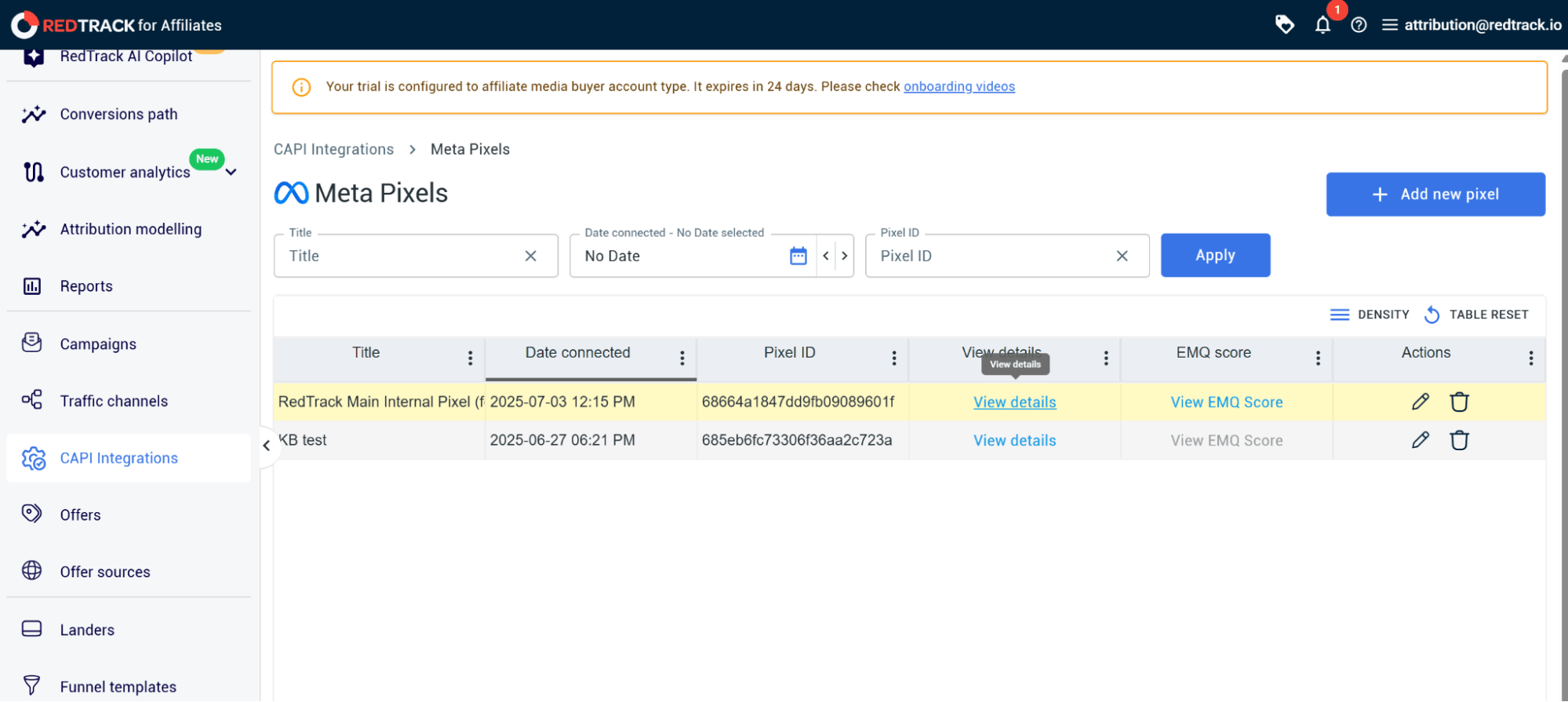
Note: When you set it on the traffic channel level, you isolate the CAPI setup to send only the conversions that happened on Facebook (for example). However, when you choose to set up the CAPI on the level of the website offers, you tell RedTrack to send all the conversions to Meta, regardless of the source those conversions came from. They could have been from Reddit, Google, TikTok, or whichever other platform you have campaigns on.
Step 3: View Conversion Events Being Sent by RedTrack
To view which conversion events RedTrack is sending back to your ad platform (in this case, Meta), go back to the Meta Pixels page.
- Click on View EMQ Score
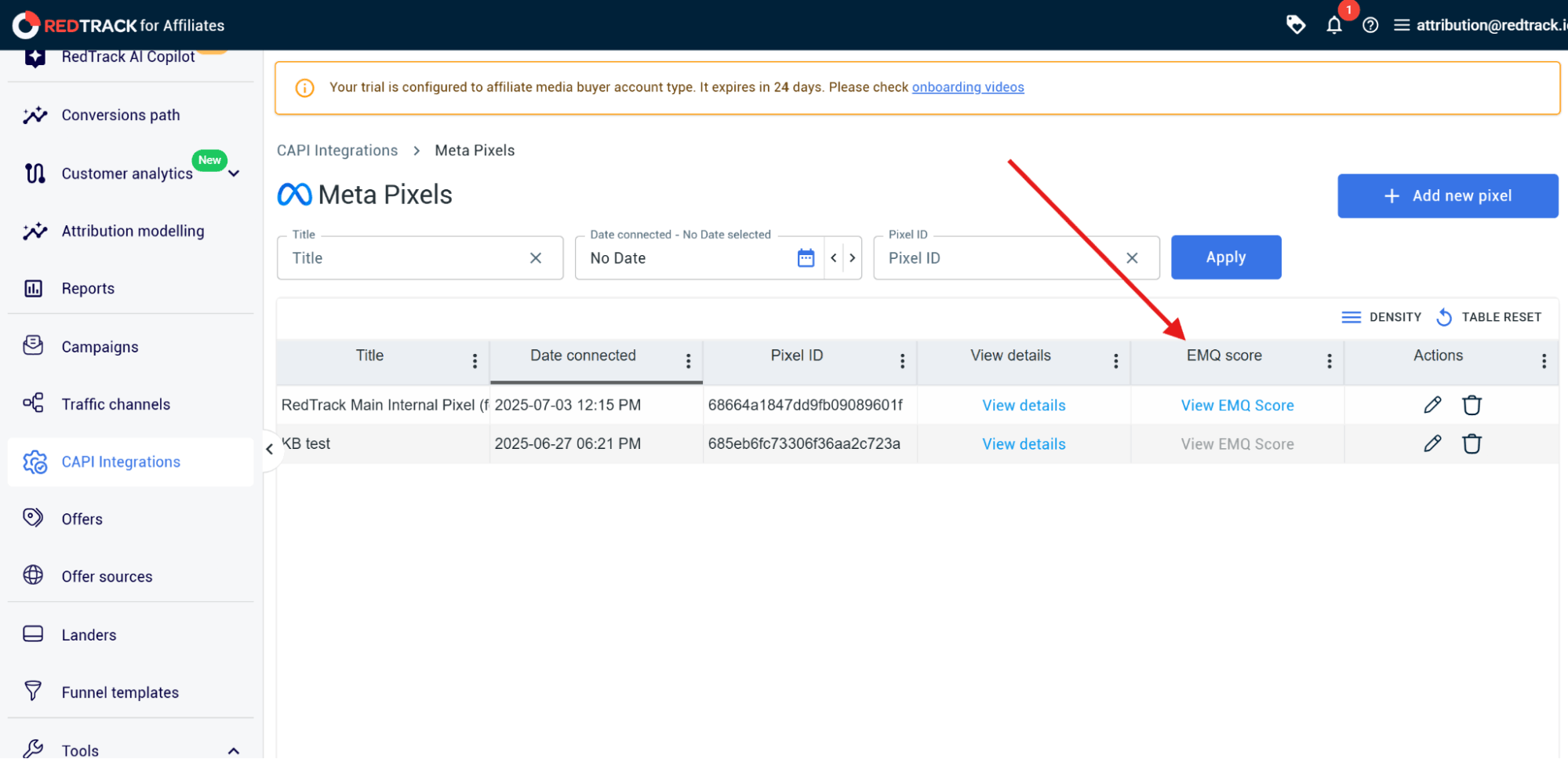
You’ll see a chart pop up with a pixel ID.
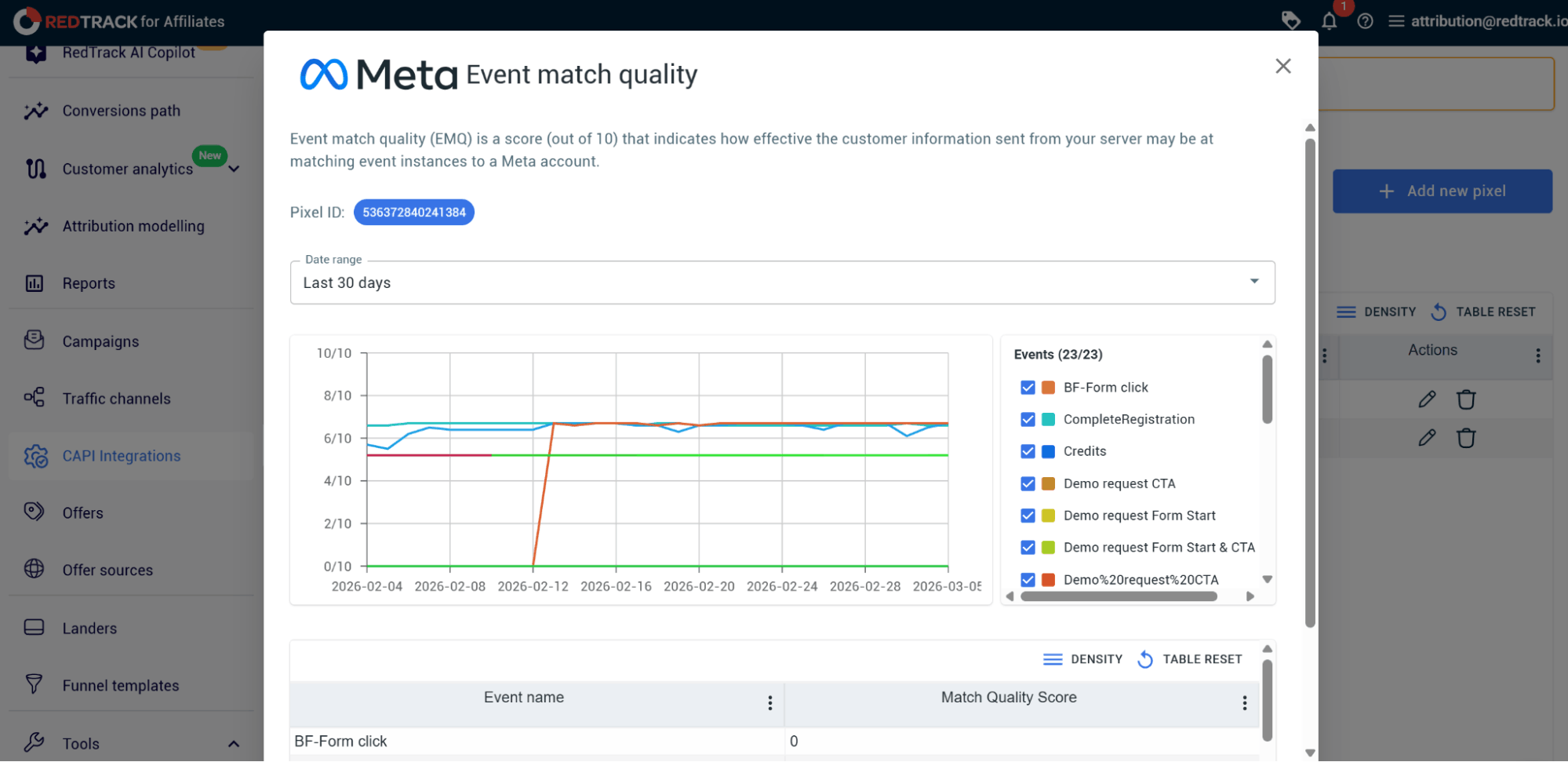
This chart displays all the results in real-time.
Here you can:
- Select a Date range
- See which events were sent, when they were sent, and how many conversion events were sent
- View the Match Quality Score, which indicates how successfully RedTracked matched the conversions
A higher match score means the platform can refine and target your audience better to optimize your campaigns.
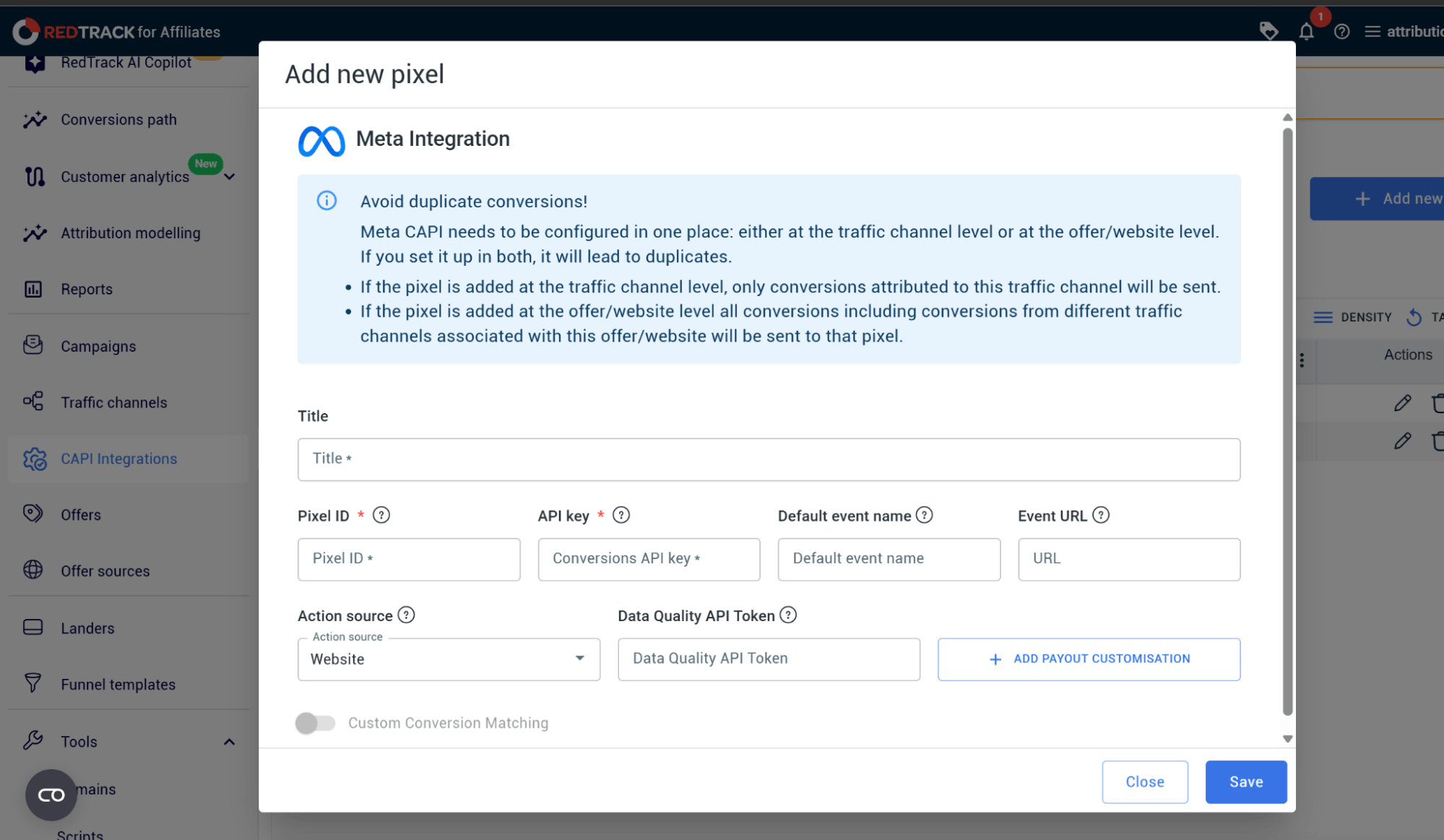
Step 4: Add a New Pixel
Once you’ve set up the integration, you can add a new pixel. To do that, go back to the Meta Pixel page.
- Fill in the Title of your new pixel, insert the Pixel ID, and API key
- Give it a Default event name and insert the Event URL
- Select your Action source from the drop-down menu
- Insert the Data Quality API Token
- If needed, add payout customisation
- Click Save
RedTrack: Accurate Conversion Data for Better Optimization
With browser restrictions, ad blockers, and privacy rules messing with your conversion and attribution data, it’s become extremely difficult for performance marketers to optimize their campaigns effectively.
RedTrack’s Conversion API integrations solve this problem by sending verified conversion data straight to your ad platforms via server-side connections. This means platforms get cleaner, more reliable signals that better reflect what real users are actually doing.
By avoiding data loss and making conversion event data more reliable, marketers give ad algorithms the guidance they need to deliver better targeting so marketers and media buyers can scale campaigns faster and with more certainty.
If accurate reporting and campaign optimization are a must-have for your agency or e-commerce brand, then implementing Conversion API tracking through RedTrack will give you the infrastructure you need to streamline your processes and deliver better ROAS.
Book a demo with one of our people from RedTrack to see how the tool works, or sign up for the 14-day free trial to test drive the tool.


