
How many times have you opened up your ad platform reports and tried to match up which channel actually deserves credit for the purchases that come through in your backend dashboard?
Probably multiple. But chances are, you could never make sense of the data you had.
Your store backend shows the sale on the date the purchase was made. However, Meta or Google claims the conversion to a click that happened two or three weeks ago. So you have one sale with different conversion dates on different reports.
This is a common issue many performance marketers and e-commerce businesses face, and it’s one that ignites frustration.
In this article, we explain why this happens and how delayed conversion data mismatches can become a thing of the past if you move to a new reporting system like RedTrack.
Challenge: Why Your Platform-Native Reports Keep Crediting the Wrong Campaigns
When you only use platform-native reports to make budget allocation and campaign optimization decisions, you’re going to run into problems.
First of all, these platforms don’t pick up entire customer journeys. They only pick up part of the journey that happened on their individual platform. To make things worse, ad platforms are also susceptible to various privacy settings that prevent them from tracking all customer activity online.
But this gets even more ineffective when you are dealing with delayed conversions, because your platforms disagree on when the actual conversion should appear.
This is the reality:
- Shopify, store backend & CRMs – Normally log conversions on the day the purchase or lead actually happened.
- Meta, Google, TikTok & ad platforms – Normally attribute conversions back to the original ad click date.
Now, neither one of these platform reports nor the logic is incorrect. They are simply incompatible. That means you can’t look at this data, compare it fairly, and make effective optimization decisions.
There are three reasons why this happens.
Reason #1: Your Store Backend & Ad Platforms Use Different Dates
Online store backends operate on conversion time.
- If a customer buys your product today, the sale appears in today’s date and report because that’s when the money hits your account. Makes perfect sense.
Ad platforms, on the other hand, operate on click-time attribution.
- If a customer clicks a Google ad today and then makes the actual purchase 10 days later, Google can rightfully claim that conversion as its own, but on the date the customer clicked the ad (not the date the purchase was made).
So what you have here is one sale, which is recorded on two different dates across different platforms and reports.
The thing you have to keep in mind is this:
- Your store backend tells you when the revenue arrives in your account
- Your ad platform tells you which click generated the conversion
And that’s why you get this constant data mismatch.
Reason #2: Misalignment Gets Worse With Longer Consideration Cycles
Now you might not notice this issue with impulse purchases and smaller sales cycles, where customers click an ad and make the purchase within a few hours.
But as soon as the buying journey stretches across several days or weeks, the reporting mismatch becomes hard to manage.
Key industries and businesses where this misalignment becomes a greater problem are:
- High-ticket e-commerce product
- B2B lead generation
- Subscription businesses
- Consultation funnels
- SaaS free-trial upgrades
- iGaming first-time deposit flows
In all of these scenarios, the campaign and date that generated demand normally don’t equal the date the conversion takes place. In most cases, the purchase is made weeks later.
So what you have is a wide reporting gap.
In reality, a campaign may look unprofitable today because the conversions haven’t landed yet, but they will in a week or two.
Similarly, another campaign you have running now may look like it’s profitable, but that’s only because conversions from older clicks are landing now.
The point is, if you don’t have a way to connect revenue back to the original ad click, every optimization and budget decision you make becomes a guess, or at best, a decision based on the wrong data.
Reason #3: Attribution Windows Hide Part of the Answer
The first two reasons are only one part of the problem. The third is that each ad platform works to their own attribution window. This is the time span a platform uses to decide if a conversion belongs to their click.
For example:
- Meta uses a 7-day click, 1-day view attribution window
- Google defaults to a 30-day click, but also has shorter windows for faster-converting campaigns, and longer windows for higher-consideration purchases
So if someone clicks your ad today and then purchases 3 weeks later:
- Meta’s 7-day attribution window means it won’t connect that conversion back to the original click
- Google’s 30-day attribution will capture it as their conversion and will take the credit
- Your store backend will record the sale on the day the purchase was made
This means different systems will give you different versions of the one customer conversion journey, and you won’t know which one to follow as true.
On top of that, some conversions will appear with a delay, others will disappear entirely and get recorded as direct, unattributed, or organic traffic, even though they weren’t.
And this is why businesses with longer sales cycles (like the ones mentioned above) struggle to fully reconcile their reports.
The Impact: Bad Optimization & Wrong Budget Decisions
First and foremost, this is a reporting problem. But because you base your budget and optimization decisions on these reports, it also becomes a bigger business cost problem.
If you use reports that misrepresent campaign performance to determine how you’re going to manage your ad spend, you are making decisions on bad data.
So you end up doing the following.
You Pause Campaigns That Actually Work
This is one of the most common practices with longer sales cycles.
Say you launch a campaign on Monday, spend aggressively boosting the ad throughout the week, and by Friday:
- You see zero or few conversions in your backend
- Meta hasn’t credited any conversions
- ROAS looks weak
- CPA looks too high
Common sense would say you need to pause this campaign because it isn’t giving you any signs that it’s a success.
However, three weeks later, the conversions from this campaign start rolling into your store backend. The campaign, in fact, was working (and working well), but because you didn’t have all the accurate click and conversion numbers at the time you made the decision, you made the wrong choice. Had you kept the campaign going, you would have seen another influx of sales in the coming three weeks.
To make things worse, by the time you see the true picture, not only has the campaign been cut, but you also miss out on:
- Accurate algorithm learning
- Taking advantage of the campaign’s momentum when it’s at its peak
You Scale Campaigns That Don’t Deliver
Then you have the opposite and equal damage being caused when you scale the wrong campaigns.
You see a revenue spike in your store backend, so you automatically assume it’s because of the active campaigns you have running at that moment.
Logic tells you you need to “take advantage of this momentum,” so you scale them all.
However, when you check the click-time attribution later down the line, you realize all those conversions actually came from campaigns that ran weeks earlier.
Your active campaigns looked like they were working because they happened to be active the moment delayed conversion came through to your backend. That’s all it was.
So what you’ve now done is:
- Increased spend on weak campaigns
- Landed a worse CPA
- Seen a drop in ROAS
Because you didn’t have a true picture of delayed conversions and the full customer journey, you’ve actually wasted valuable ad budget on the wrong campaigns.
The Solution: A Tool That Connects All Your Data & Brings Numbers and Dates Into Alignment
If you want to track all your conversions, including delayed conversions properly, you can’t depend on platform-native reports.
You need an independent tool that:
- Connects all your data and integrates ad spend with conversion data
- Records and tracks long click-to-conversion customer journeys
- Aligns and applies consistent attribution windows
- Switch between conversion-time and click-time reporting
But most importantly, you need a tool that can align revenue to the click that originated or generated the sale in the first place.
This is exactly what RedTrack does. It’s a third-party ad tracking software that helps performance marketers, media buyers, and e-commerce businesses see and understand entire customer journeys, so they can make more efficient use of their budgets and apply more effective strategies.
How RedTrack Solves the Delayed Conversions Problem
The simple way in which RedTrack solves the problem of delayed conversion is by letting you view the same conversion data through two different attribution timelines.
In RedTrack, reports are defaulted to conversion-time attribution.
This means:
- Spend appears on the date it happened
- Conversions appear on the date they happened
However, RedTrack also gives you a setting option called “Show conversions by click time”.
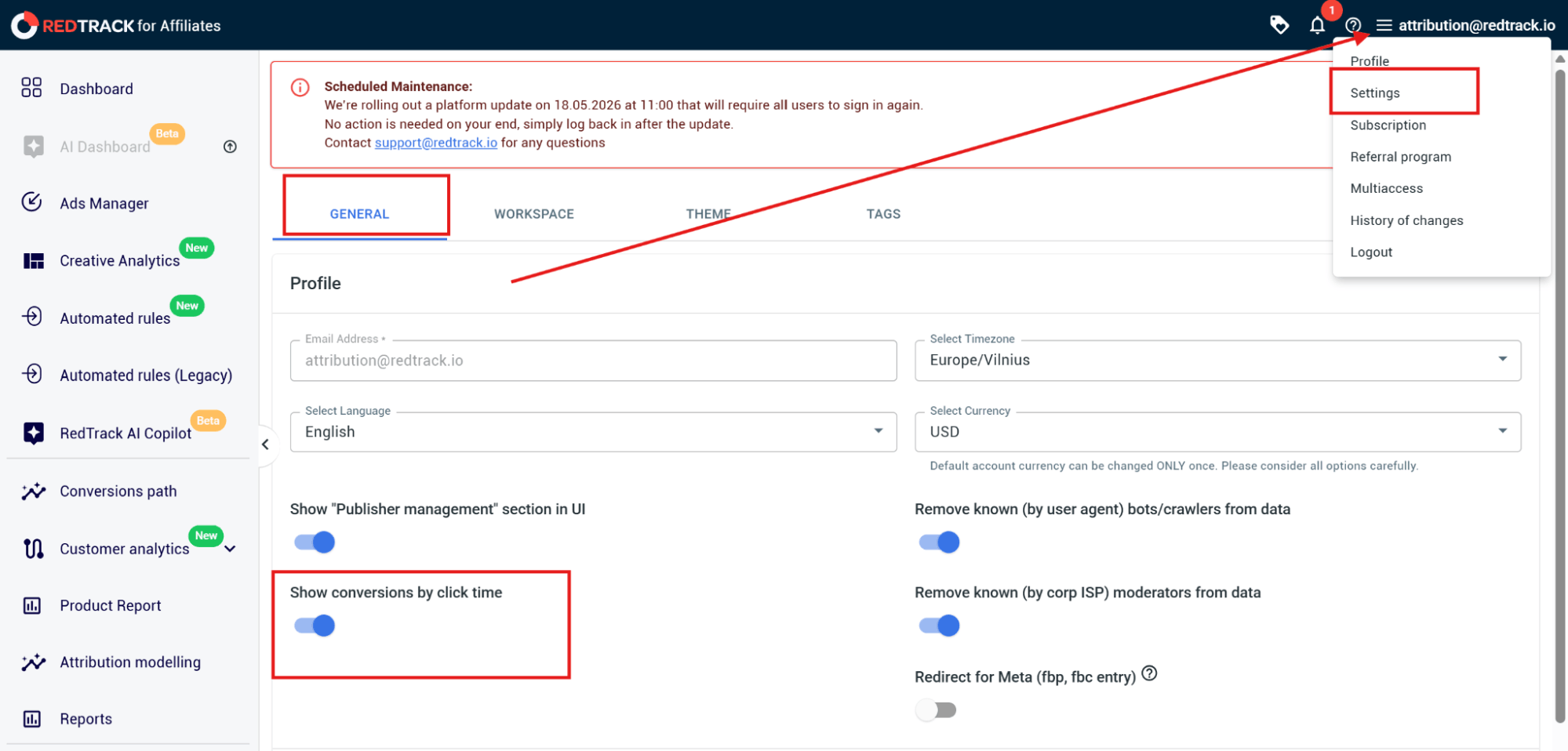
When you enable this feature, you can finally link the conversions that were generated on a particular date from an ad click.
This means you will see:
- The ad click that happened 15 days ago, which initiated the purchase that happened today
- All the conversions alongside the spend that produced them originally
- True ROAS, which reflects the actual campaign that was responsible for the revenue
So instead of guessing or assuming which campaigns deliver the sales landing in your backend today, you can actually identify the exact campaign that was responsible for all your revenue.
How to Switch Your Reports to Click Attribution in RedTrack
To switch your RedTrack reports to click-attribution, you need to follow a couple of simple steps.
Step 1: Go to Settings
- Log in to RedTrack, and go to the profile settings in the top right-hand corner
- In the General tab, toggle the Show conversions by click time, which is located on the left under the Profile section
Step 2: Open your reports
- Go to Reports in the RedTack dashboard navigation menu on the left
- Click on any report, and you’ll see conversions now anchor to the original click date instead of the conversion date
- Note: Any time you want to switch back to conversion-time reporting, simply go back to settings and switch the toggle.
Step 3: When to use which type of reporting setting
- Turn the click-time attribution on for:
- Campaign optimization
- Scaling decisions
- ROAS analysis
- Media buying
- Turn the conversion-time attribution on for:
- Accounting
- Revenue timing
- Finance reports
- Cash-flow tracking
Track Delayed Conversion With RedTrack
If your business runs on longer sales cycles, your conversions will almost always be delayed. This is normal. What isn’t normal is you not being able to track and connect them to the original ad click.
So if you currently operate on a system that doesn’t give you click-time attribution, you don’t have any visibility into the connection and interdependence of your backend conversions and ad clicks.
This results in you and your team making costly optimization decisions on vague and non-existent data. You’ll end up scaling campaigns that aren’t delivering and pausing the ones that prove to be winners later down the line. But by the time you work this out, it will be too late.
RedTrack is an independent, third-party ad tracking and attribution tool that can solve this problem. The way it does that is by aligning conversions with the clicks that actually delivered them.
Curious to find out more about RedTrack? Book a demo with us to get a complete platform walk-through, or sign up for our 14-day free trial if you’re ready to give the tool a go.


