
When you look at your Shopify dashboard, the first thing you’ll notice is that direct traffic, brand search, and retargeting campaigns are delivering most of your sales. But that doesn’t mean those are the channels that initiated them. They were simply the ones who closed the sale.
However, if you want to find out how they got to the purchase page in the first place, you’ll need to get the full picture of all the acquisition work. And that’s something you won’t get from Shopify or your ad platform reports.
For that kind of info, you need an independent tracking and attribution tool that picks up the entire customer journey, which in most cases crosses multiple channels.
In this article, we explain why it’s so difficult for brands and media buyers to know which channels started their sales and how this impacts your ad budgets and performance marketing strategies. And then we tell you how you can overcome all these challenges with a tool like RedTrack.
Challenge: Why It’s So Difficult to Find Out Which Channel Started the Sale
The answer to this question is that neither e-commerce systems nor ad platforms were designed to give you insights into the full customer journey.
But aside from that, there is also the problem of your systems operating in silos. Each one does its own thing, tracking its own interactions, and neither one takes a holistic approach to reporting.
So let’s go through the three main reasons why it’s so hard to find out which channels initiated your sales.
Reason #1: Last-Touch Attribution is the Ad Platform Default
The first reason is that most of your major platforms focus heavily on the last interaction before purchase. Nearly every platform, from Shopify to Meta, Google, and TikTok, defaults to last-touch attribution models.
What this means is that the final interaction (just before the purchase is made) receives 100% of the credit for that conversion.
At first glance, this may seem like it makes sense, but when you look at what your average customer journey actually looks like in reality, you’ll see it doesn’t.
Your average buyer’s journey looks something like this:
- A person discovers your brand through one channel (TikTok)
- They leave the app, and later that day, they scroll through another channel (Instagram), see an ad for that same product
- The next day, they search for your brand or product in a third channel (Google) and click on a retargeting ad
- That night, they go to your online store (Shopify) and make the purchase.
So customer journeys are rarely single-session decisions.
However, with last-touch attribution reporting, the real customer journey gets simplified and ends up telling you a couple of things.
Brand Search is “Best” (Not)
In native platforms, brand search campaigns always turn out to be the best performers because they capture the final click. Now we’re not saying brand search campaigns aren’t important (they certainly are), but in order for a customer to get to the brand search campaign in the first place, they first need to discover your brand and be nurtured.
So there is an entire process that is not captured through the brand search result. The problem is that last-touch attribution actually makes closers look like discoverers, also.
Reason #2: Ad Platforms Operate in Silos
The second reason at the core of why you can’t get the entire customer journey in your platform reports is that every ad and e-commerce platform operates within its own ecosystem, and none of them talk to each other.
So if you use three ad channels and Shopify:
- Shopify shows you the purchases
- Meta shows you Meta clicks
- Google shows you Google clicks
- TikTok shows you TikTok clicks
Every tool operates as a silo, and each one builds its own customer journey based only on the data it has, which is exclusively its own. Nothing from outside their platforms is captured in reporting.
In most cases, for one purchase, each channel may rightfully claim a conversion (based on its attribution logic and conversion definitions).
The problem here is that you can’t reconstruct the full and accurate customer journey that took place. You have the touchpoints that happened on that platform, but not the ones that happened on other platforms.
Reason #3: Retargeting Harvests Demand Other Channels Created
The third reason is retargeting campaigns, which only look like they’re working because other channels already created the “customer” in the first place.
This is because a customer can only be retargeted if they’ve previously:
- Seen or clicked your ad
- Visited your website
- Engaged with your content
Most discovery and initial interactions happen as a result of upper-funnel marketing campaigns. However, when a customer converts through a retargeting campaign, retargeting is the only one that gets full attribution credit.
So this eventually creates a false positive:
- Your prospecting campaigns always look ineffective
- Your retargeting campaigns always look super efficient
What most brands end up doing in this scenario is shifting ad budget from prospecting to retargeting because ROAS looks stronger.
But what happens then is you stop capturing new demand, which means your retargeting audience pool drops, and the performance of these campaigns starts to decline.
The Impact of This Lack of Info for E-Commerce Brands
Now you might think all of this is just a reporting problem, but if you make strategy and budget decisions based on reporting, then you’ve actually got an entire business cost problem.
When you can’t see the real picture of how discovery and closing channels actually work together, you make flawed optimization decisions. What makes it an even bigger problem is that these wrong decisions compound over time.
Problem #1: You Stop Funding Top-Funnel Channels & Scale Converting Channels
The first problem you’ll encounter with your budget allocation is that you’ll start to feed more and more cash to fund your brand search, retargeting, and direct traffic campaigns.
In the first few weeks,s you might not notice the decline, but a month or two down the line, you’ll eventually see:
- Retargeting weakens
- Brand search volume drops
- Direct conversions decline
This is all happening because there are fewer new eyes entering your funnel. And they’re the ones driving all of the above.
Problem #2: You Don’t Have a Rational Answer to Budget Questions
The second big problem you might run into is the financial rationale that you use to make ad budget allocation decisions.
You might get your CEO or CFO asking the question:
- Why is so much money being put towards prospecting campaigns that don’t seem to be delivering results?
If you don’t have any insights on first-touch attribution (and you don’t because your tools and platforms can’t give it to you), you’re going to struggle to answer this question in a way that makes them feel at ease.
You might know why upper-funnel campaigns and channels are important, but without proof, everyone in the room will be doubtful. To avoid this awkward situation, you automatically default to being guided by last-touch attribution.
Here again, in the long run, you end up with the scenario we just described in the previous problem, with nothing generating new demand, bottom-funnel campaigns, and channel performance drops.
The Solution: A Tracking & Attribution Tool That Maps Entire Customer Journeys, Across All Channels
So where’s the solution? It lies in a tool and system that can pick up all your clicks and map out the complete customer journey:
- From the very start (when a potential customer sees your ad or brand for the first time)
- To the very end (when they make a purchase and become a paying customer)
For that, you need an independent tracking and attribution tool like RedTrack.
Unlike ad platforms, which operate in their own silos, RedTrack sits outside these advertising ecosystems, but it can show you the entire customer journey.
So Redtrack does several things:
- Captures every touchpoint across all your traffic channels in real time
- Connects and sequences all these interactions in the order they happened
- Let’s you apply multiple attribution models and compare them in one screen, side by side
Another important thing to mention is that RedTrack uses server-side tracking, tracking scripts,s and URL parameters. This means it’s not restricted by ad blockers and privacy settings, which normally prevent ad platforms from picking up the interactions.
So what you ultimately get (finally) is a unified view of your customer journeys, as they happened across all traffic channels.
Every Touchpoint of a Customer Journey is Recorded
RedTrack records all the clicks and conversions from all major ad platforms,s including:
- Meta
- TikTok
- YouTube
- Organic
- Direct Traffic
- Affiliate Traffic
So instead of only getting your hands on platform-native reporting, you get every touchpoint that took place inside one customer journey. And this is how you get to see not just which channels started the customer journey, but also the ones that continued it (assisted conversions).
Multiple Attribution Models to Understand Which Channels Contribute & How
Next, it also gives you the option to switch between different attribution models. But why is this important?
First, because you can finally align all the clicks to one attribution logic, and second, because different attribution models answer different questions:
- Last-touch tells you which channels closed the sale
- First-touch tells you which channels initiated the sale
- Linear distributed equal credit across all the touchpoints equally, so you know which channels drove the sale to happen
So when you have a tool that can let you build your conversion reports in different models, you can finally compare them to get a better understanding of how your customers think and act.
Path-Level Visibility, Not Just Numbers
Ad platform reports focus on aggregated metrics like impressions, clicks, reach, CTR, CPS, and so on.
RedTrack, on the other hand,d goes deeper. It shows you the actual journey and the path the customer takes to convert. But why is this important? Because this then lets you see customer behavior patterns.
So you might look at your reporting and find that:
- Most of your customers are initiated through TikTok (that’s where their journey starts)
- Google works well in the nurturing phase of the customer journey
- Brand search consistently completes the journey (it’s where the customer finally buys)
When you have this kind of visibility, you can make more effective ad budget allocations, and you know exactly what type of action you’re targeting with each campaign and channel.
How to Find the Channel That Started the Sale Using RedTrack
In RedTrack, two reports can help you work out which channel initiated your sale:
- Conversion Path Report
- Attribution Modelling Report
When you use the two together, the reports will show you:
- The actual customer journey in the order it happened
- The quantified first-touch contribution of each channel
Here are the steps you need to take to run both reports.
How to Set Up the Conversion Path Report in RedTrack
Step 1: Add your website to RedTrack
- In the left-hand navigation, go to Traffic channels
- Click on Websites and then New
- Enter your website name and domain
- Click Save
Step 2: Install the script
- Click on the website you just created, and copy the Universal tracking script.
- Now go to your e-Commerce platform (Shopify, WooCommerce, or other), and find your theme’s main layout file
- Paste the script right before the closing (</head>)
- Click Save
Step 3: Add tracking parameters to ads
- Go back to RedTrack and navigate to Traffic channels
- Select New from template and add your ad platforms (Meta, Google, TikTok, or other)
- Then open each channel to find the automatically generated Tracking parameters string and copy it
- Now log into your ad managers and paste this string into the URL parameters or Tracking template field of every active ad
Step 4: Connect ad platforms via API
- Within each specific Traffic channel settings in RedTrack, find the API Integration or Connect section for the channel
- Click Log in with [platform name] and authorize RedTrack to access your ad accounts
- Then, map the correct ad account ID to your RedTrack channel
- Click Save (this will start syncing cost data)
Step 5: Configure your conversion events
- Go to Tools and then Conversion types
- Click on New to create your standard e-commerce events (Purchase, Add-to-cart, Lead, etc.)
- Set up the tracking method for these events (usually through RedTRack’s S2S AP
I postback or browser-based events mapped from the store) - Make sure your currency setting matches your store so ROAS is calculated accurately
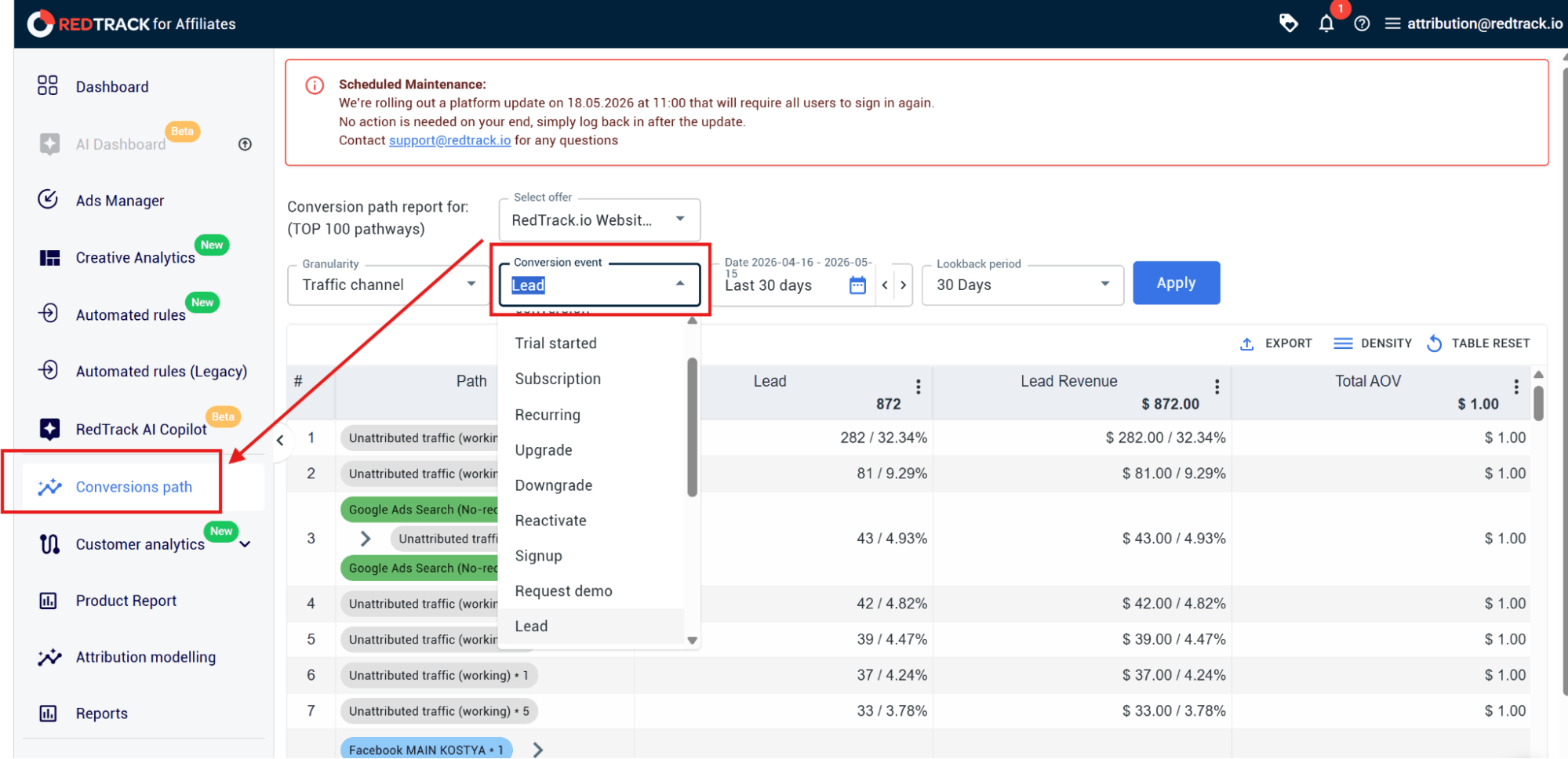
Step 6: Run the Conversion Path Report
- Go to Reports and then select Conversion Path from the left-hand menu
- Then select your store’s website or the specific Offer from the dropdown menu
- Set your Granularity (Source, RT Source, Campaign, or RT Campaign)
- Choose the Conversion event you want to analyze (i.e., Purchase)
- Set the Date range and define the Lookback period
- Click Apply (this will generate the multi-touch attribution journey map)
How to Set Up Attribution Modelling in RedTrack to Quantify First-Touch & Last Touch
Step 1: Initiate the report
- In the left-hand navigation menu, click on Attribution modelling
- At the top of the screen, click the Select website dropdown and select the website you want to analyze
- Then go to the Lockback period on the top, left-hand corner of the screen, and select your date range
Step 2: Set granularity & conversion event
- In the top left, click the Granularity drop-down and select the traffic channel, campaign, or ad set you want to compare.
- Then go to Conversion event, which is the next drop-down to your right, and select Purchase (you can also run the same report for Add to Cart, Initiate Checkout, or a custom event)
Step 3: Select the attribution models you want to compare
- In the top, middle of the screen, go to the Attribution model drop-down and select the two attribution models you want to compare in this report:
- Select First-Touch and Last-Touch
Step 4: Generate the report
- Click Apply in the top-left corner
- Both reports for First-Touch and Last-Touch will be displayed side-by-side for you to see which channels started the sale (First-Touch), and which one closed the sale (Last-Touch)
Use RedTrack & See Where Sales Actually Start
Most e-commerce businesses don’t have the kind of customer journey visibility they need to make effective budget allocation decisions. They all know which channels are best at closing the sale, but few can work out which channels actually started those sales.
Ad platforms will give you the data they have, but that data is incomplete, and it’s also dominated by last-touch attribution models, which only give you the closers. So if you base ad budget allocation decisions on those platform-native reports, you will forever be investing in closing campaigns, but that’s not what drives new demand.
To find out what your customer journeys look like in real life and to see which channels play a key role in initiating new customers, you need an independent ad tracking and attribution tool like RedTrack.
RedTrack sits on top of your existing ad and e-commerce platforms to capture every single touchpoint and interaction customers have with your campaigns. It then strings together the entire customer journey in the order it happened.
So if you want to see exactly which channel your customers discovered you on, which ones nurtured them through the path, and which one finally made them convert, you need to turn to a third-party tool.
Book a demo to find out how RedTrack can help or sign up for the 14-day free trial and test the tool for yourself.


