
Your ad platform reports say your ads are doing a stellar job, but when you try to connect them with your backend sales or CRM data, the numbers don’t make sense.
You’ve faced this problem multiple times, and now you’re frustrated. What is going on?
Here’s the deal: Your ad platforms’ conversion data is incomplete and low quality.
If you want true conversion data, you’ll need to stop relying on ad platforms alone because the way they are built and how they operate makes it impossible for you to understand and optimize your ad campaigns properly.
In this use case, we explain why your conversion data is getting lost or degraded, and tell you how you can overcome this challenge with an independent tool like RedTrack. The power lies in the tool’s system, which operates on a server-side tracking logic to capture all your conversions (without fail) and then fixes your ad platforms’ data through the Conversion API.
Challenge: Why Platform-Reported Conversion Data is Not Good Enough
Ad platforms like Meta and TikTok can only report data that they see and capture. However, due to their structural setup and the way they pick up conversions, they can’t see everything and report on it accurately.
There three main reasons for this are below.
1. Ad Platforms Can’t Capture All Conversions
The first problem is privacy controls. Ad platforms can’t capture all conversions because a significant portion is completely off-bounds due to:
- Ad blockers (they stop pixel scripts from firing)
- iOS privacy settings (prevent tracking across apps and websites)
- Blocked third-party cookies (various browsers block tracking by default)
- GDPR consent banners (users can block tracking entirely)
So even when people see your ad and click on it, if they have any of the above active, your ad platform won’t pick up that data. This means a significant portion of your conversions remains invisible and unaccounted for.
2. Ad Platforms’ Approach Has Become Obsolete
Platforms like Meta and TikTok operate on pixel-based tracking. They rely on JavaScript running in the users’ browsers at the exact moment conversions happen.
This causes another problem in modern browsers, where:
- Scripts are delayed or blocked completely
- Cookies are restricted, or they expire quickly
- Users might switch between devices from click to conversion
- Consent rules prevent tracking from taking place
So the pixel-based approach has become obsolete in the current online environment. Here, again, pixels only capture the conversions that don’t have any of the above in place.
And when ad platforms give you their conversion reports, they’re only giving you a fraction of all the conversions.
3. Ad Platforms’ Signal Quality is Weak
Finally, there is the issue of low-quality signals. Ad platforms depend on match quality to connect conversions back to real users. When the signal is weak (missing identifiers, missing click context, or incomplete data), the platform can’t optimize properly.
In most cases, pixel events only include basic browser data. This then leads to:
- Lower Event Match Quality (EMQ) scores
- Diluted algorithm learning
- Bad budget allocation based on bad data
- Missed and misaligned campaign scaling
So even though you have some data to work with, it’s not the kind of data that ends up being effective and useful for all the optimization decisions you need to make.
Solution: Use Server-Side Tracking With Conversion API (CAPI)
To get the accurate and complete conversion data you need to optimize and manage all your ad campaigns (not just across Facebook and TikTok, but all ad platforms), you need an independent tracking tool like RedTrack.
RedTrack is a tool that works with:
- Server-side (S2S) tracking to capture every conversion directly from your backend
- Conversion API (CAPI) to send clean and accurate conversation data to Meta, TikTok, and any other major ad platform
Before we explain how you can use RedTrack to send better conversion data to your favorite ad platforms, it’s important that you understand how RedTrack helps performance marketers and media buyers optimize campaigns to get the most out of their budgets. But this will only happen when you combine the two things below.
Server-Side Tracking Captures Real Conversions Directly
When we say server-side tracking, what we’re really saying is that there is no need for browser-based tracking to track conversions.
So instead of the traditional approach (which ad platforms use), where they depend on a pixel firing in the user’s browser, tools like RedTrack capture conversions directly from your backend when they happen.
In reality, that would look like this:
- The second a user clicks your ad, RedTrack assigns a unique Click ID
- That Click ID gets stored on RedTrack’s system, which then passes it through your funnel
- When the user makes a purchase, your backend sends a postback to RedTrack
- RedTrack then matches the conversion back to the user’s original click
So, with server-side tracking, ad blockers, and privacy restrictions, cookie loss becomes a non-issue.
Conversion API Sends Accurate Data Back to Your Ad Platforms
Once you have all your conversions coming in consistently, the next thing you want to activate is CAPI.
Conversion API (CAPI) in RedTrack is an integration that lets you connect your backend to your ad platforms. It’s what lets RedTrack send accurate conversions back to platforms like Meta, Google, and TikTok.
But before RedTrack sends conversion data back to the platform,s it enriches that data with:
- Click ID (this is the highest quality attribution signal)
- Hashed customer data (this might include email and phone number, where available)
- Conversion value and currency (this reveals the revenue to the platform so it can optimize for actual ROI)
- Event type mapping (this makes sure the action is correctly identified as a Purchase or a Lead)
When your ad platforms have all this information, it makes it much easier to match conversions to users accurately. And that’s a vital element that will drive more effective optimization across your ad campaigns.
With a higher EMQ score, you’ll see improvements across multiple fronts, including:
- Algorithm learning, speed, and results
- Audience targeting accuracy
- Campaign scaling efficiency
How This Combination Improves & Simplifies Ad Performance Management
When you have an independent source like RedTrack capturing your data and sending it back to ad platforms via CAPI, you end up with one unified source of truth that changes the way you make ad campaign decisions in three ways:
- You stop optimizing and scaling campaigns that looked good, but on incomplete data
- You stop underestimating the power of high-performing campaigns, which were previously hidden due to a lack of attribution
- You start optimizing based on real conversion quality, and complete numbers
How to Use RedTrack to Send Better Conversion Data to Facebook & TikTok
To get better coverage data flowing through to your ad platforms like Meta and TikTok, first, you need to get set up properly.
Here’s a step-by-step guide for setting up your RedTrack account to capture conversions and send them back to ad platforms for stellar optimization potential.
Step 1: Set up Server-Side Tracking in RedTrack for your website
- In the RedTrack dashboard, go to Websites and create a new website profile for your store or landing page.
- Add the RedTrack tracking script to every page of your site by pasting it into the global site header before the closing </head> tag.
- Note: For platforms like Shopify and WooCommerce, which have native integrations, use the one-click app or plugin instead
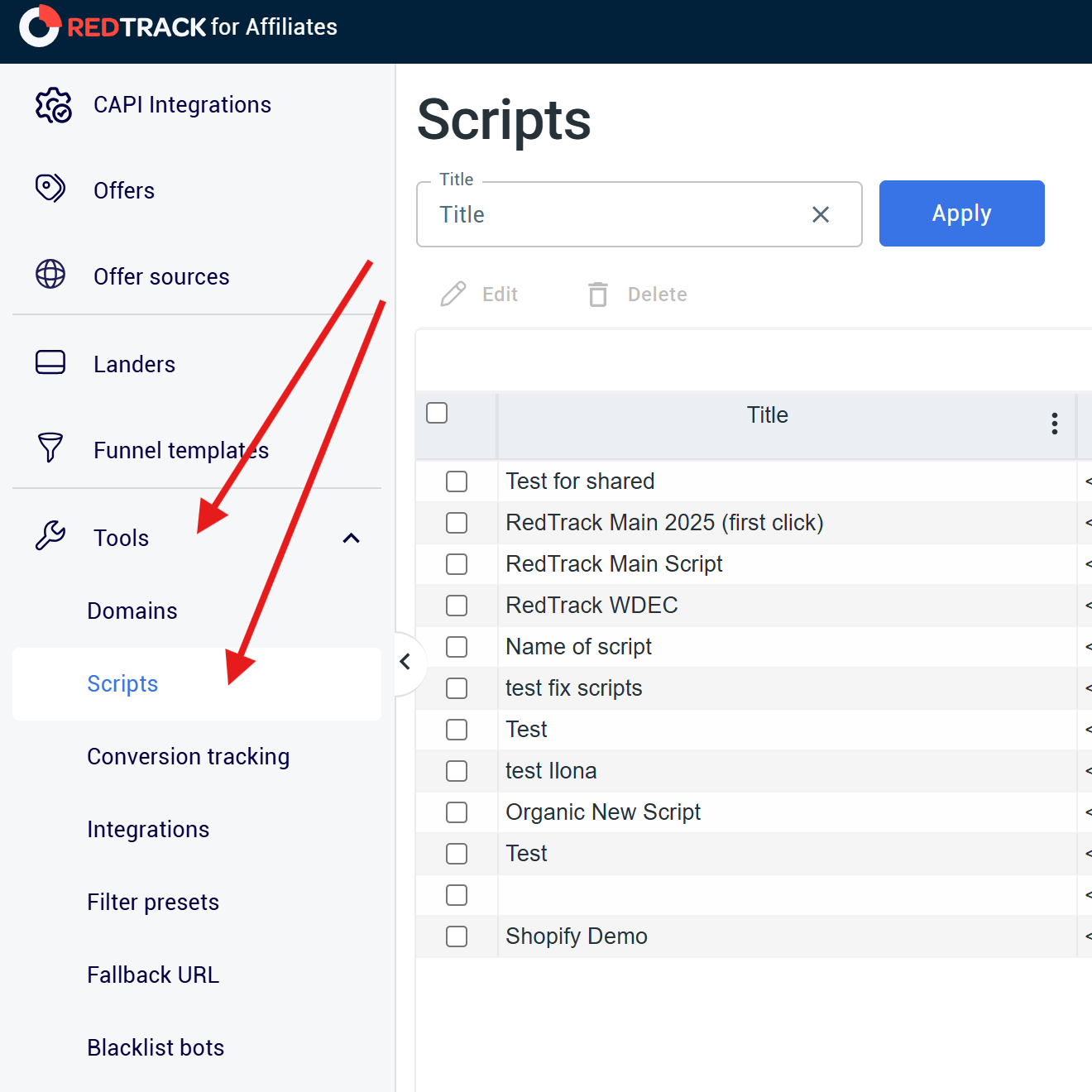
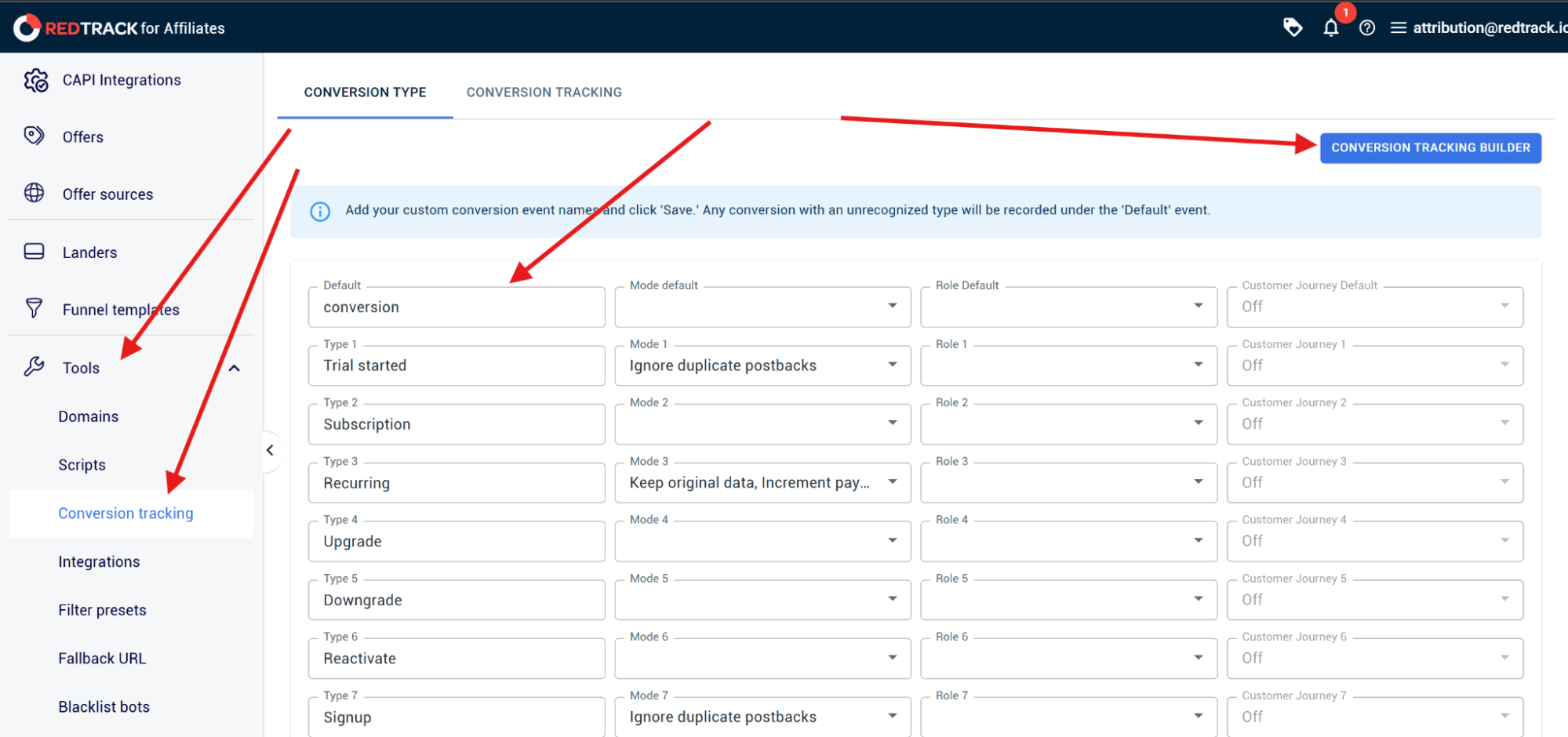
- Then, in your RedTrack website settings, go to Conversion Events and define each of the events you want to track. This can be Purchase, Lead, Registration, Deposit, or any other customer event relevant to your funnel.
- When you’ve done that, copy the postback URL from RedTrack and configure your backend to fire it whenever a conversion happens.
- Note: This can be via a webhook for order completion, a server-side API call from your CRM, or a postback trigger in your affiliate network.
- Pass the RedTack Click ID and conversion value as parameters.s
- Then go and fire a test conversion on your backend and confirm if it appears in your RedTrack dashboard.
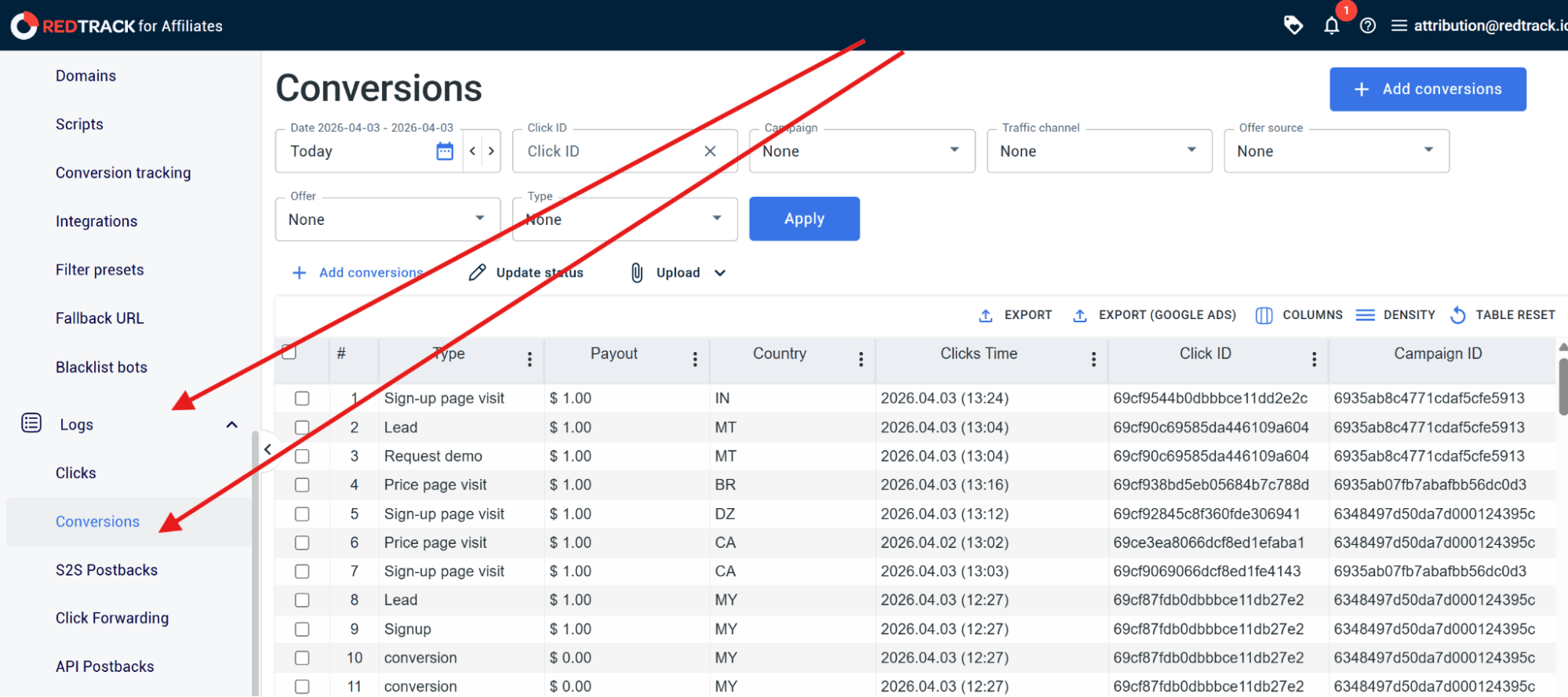
- Note: It should appear instantly with logs and the correct event type and revenue value.
- Now you can test the attributed conversion count in RedTrack with what your ad platforms tell you for the same period.
- Note: The difference you see is the share of real conversions your ad platform is missing.
Step 2: Connect Conversion API Integrations to Your Meta Ad Platform
- In RedTrack, go to Integrations and select Meta Conversions API
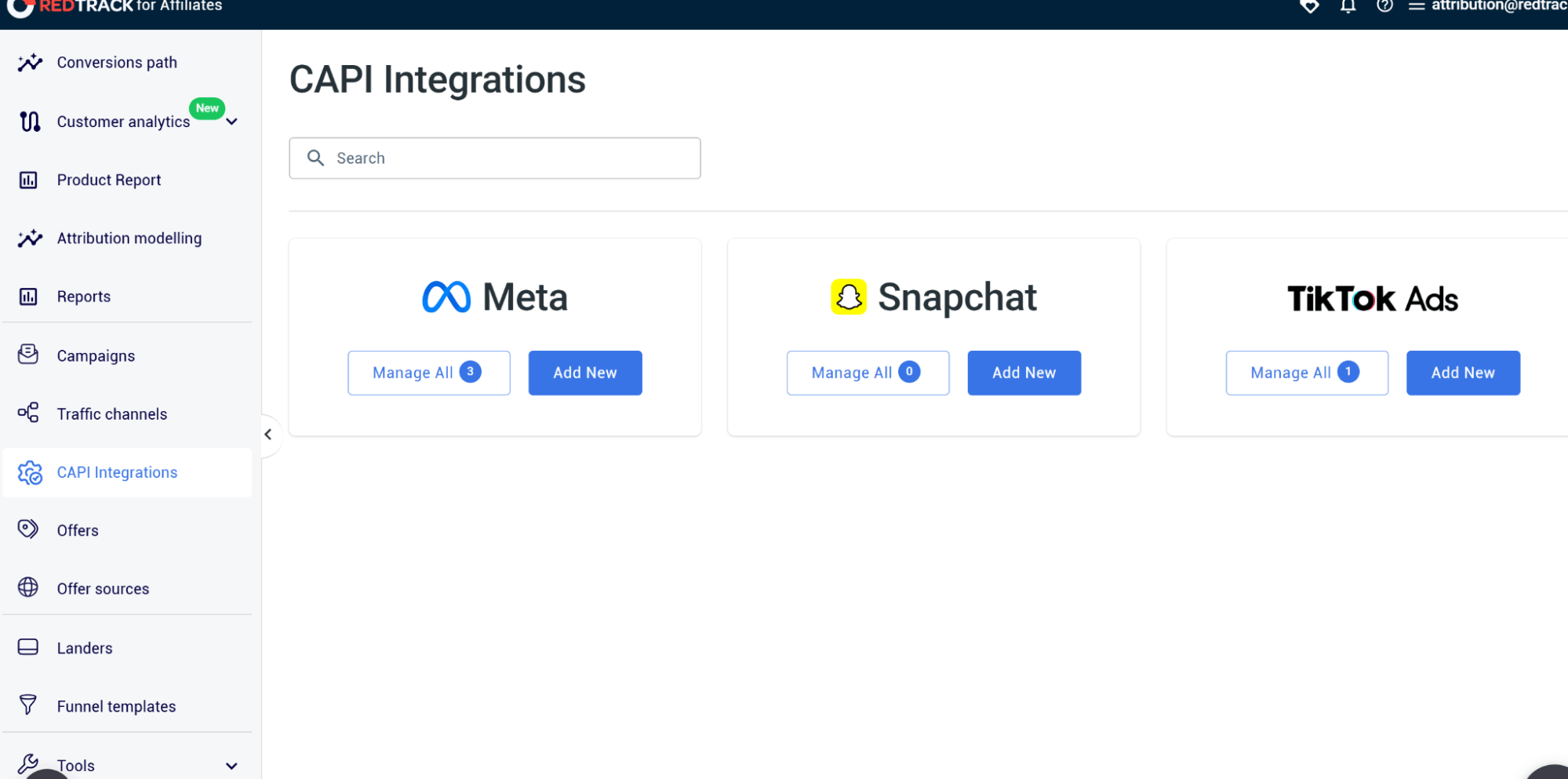
- Click Connect and authenticate with your Meta Business Manager account.
- Select the Pixel and Ad Account you want to send enriched events to
- Map your RedTrack conversation events to the Meta standard events. For example: Purchase to Purchase, Lead to Lead, and so on.
- Then go and configure the event value and currency field.s
- Next, you need to Enable Deduplication.
- Note: RedTrack automatically detects when both the pixel and CAPI fire for the same event, and it suppresses the duplicate before data is sent to Meta.
- Click Save
- Run a test conversion and check Meta Events Manager to see if the event arrived with an Event Match Quality score.
- Note: Any score above 7 is a strong match quality
Follow the same steps to connect CAPI to your TikTok.
Step 3: Monitor Event Match Quality scores in RedTrack
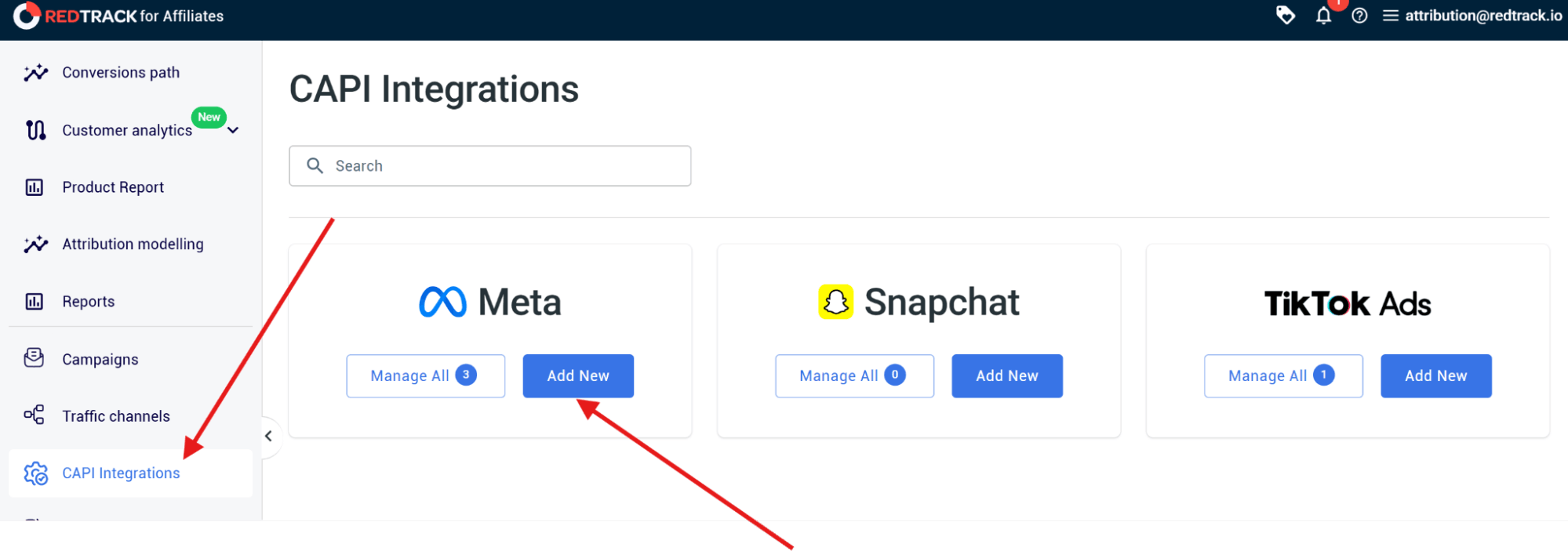
- In RedTrack, go to Integrations.
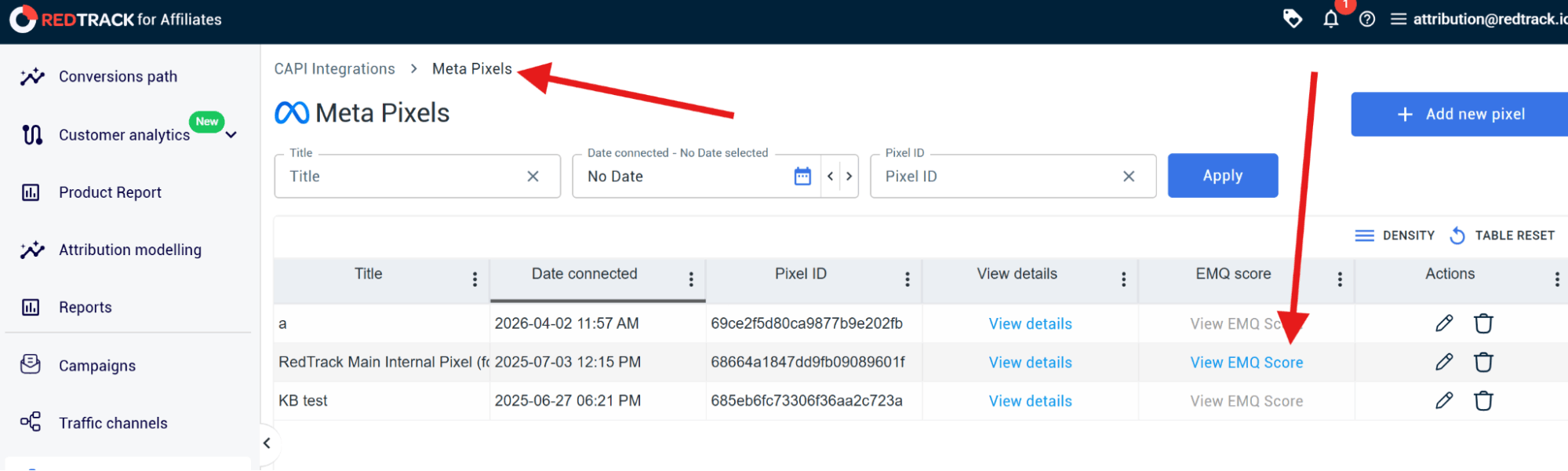
- Open your Meta Conversions API connection.
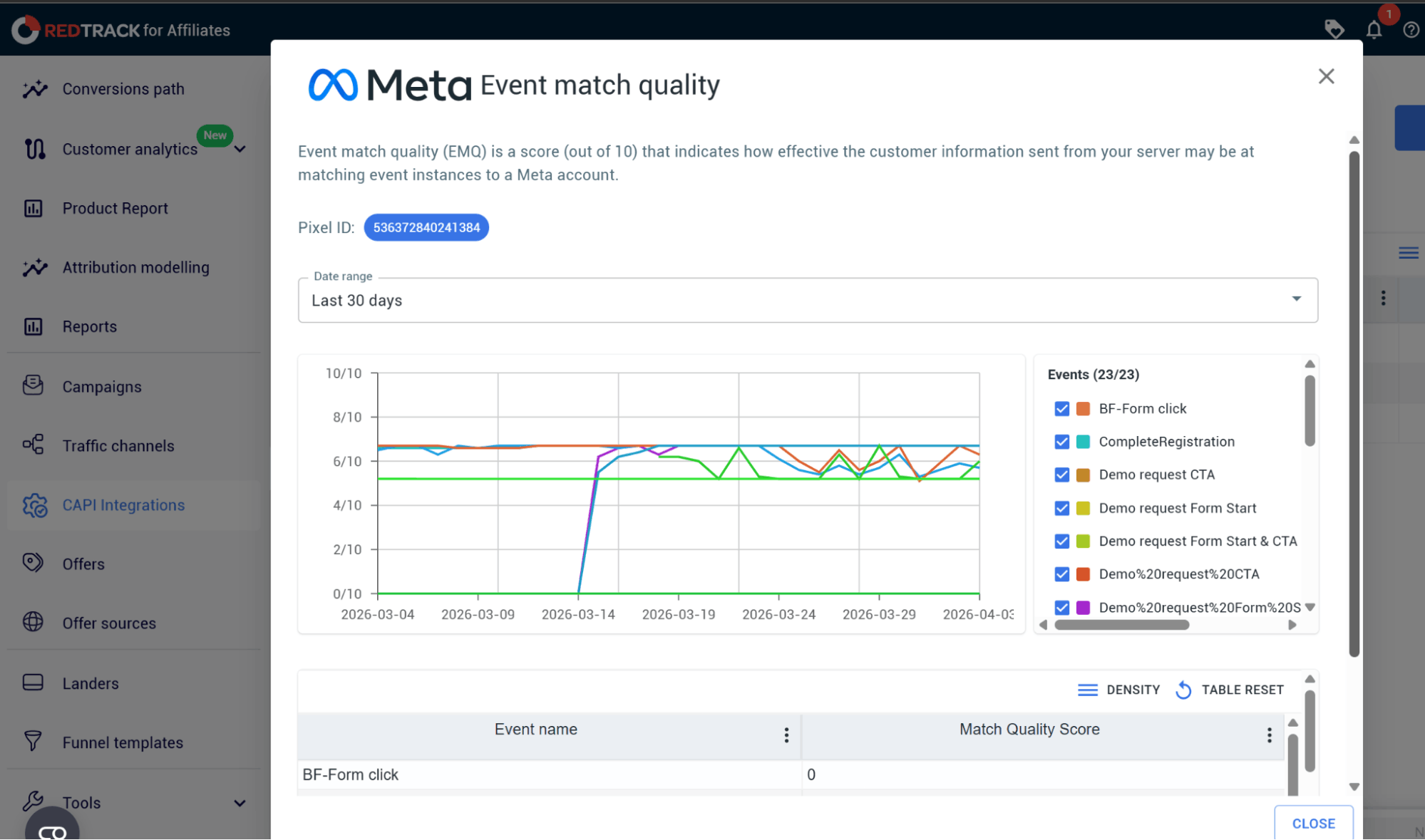
- Look at the integration panel to see your current EMQ score per event type, and use the following to understand the accuracy:
- 7.0 or higher = Strong match quality
- 6.0 or less = Key match parameters (Click ID or hashed customer identifiers) not being passed accurately
- If your score is low, open the event detail view and see which parameters are present and which are missing.g
- Note: Usually, the fix is making sure RedTrack’s Click ID is being passed through your checkout URL and is included in the postback payload
- Make sure you also check your EMQ score after any changes to your tracking setup, such as a new checkout flow, a store migration, or a platform update.
- Note: These changes can quietly degrade match quality without affecting your conversion volume
To check Event Match Quality scores, you don’t need to go to Meta Events Manager because RedTrack shows the score directly in the platform alongside your conversion data.
RedTrack: Takes Fragmented Signals & Turns Them into Reliable Conversion Data
For as long as you let ad platform data alone guide your optimization decisions, you will continue to optimize in the wrong direction. You’ll end up scaling things that don’t deserve the budget, and you’ll scale back campaigns that, in reality, are driving profits, but you can’t see it.
RedTrack can change all that.
When you combine RedTrack’s server-side tracking power with its CAPI integrations, you’ll finally get the real and full picture of your conversions across ad platforms. You’ll also have that real, clean data being fed back to your ad platforms so their algorithms start working in your favor, instead of working with bits and pieces of conversions they have available.
So no more relying on partial and biased data reports.
You get one centralized unified set of conversion data you can trust and use to make optimization and ad budget allocation decisions. On top of that, the clean and enriched data you send back to ad platforms via CAPI can now be used by their algorithms for better audience targeting.
You finally have a way to see exactly how all your ads are performing in reality. This all leads to better algorithm learning, smarter budget allocation, and more effective scaling.
If you’re sick and tired of holes in your conversion reporting, and want to try a new tool, sign up for RedTrack’s 14-day free trial or book a demo with one of our people to show you how the platform works.


