
ChatGPT Ads is the next big thing, so naturally, you’ve set up a campaign in advance, as you wanted in before everyone else.
The budget is live, dashboard shows impressions and clicks climbing, so something is surely happening already.
But…
There’s always that one “but”…
You opened your own backend (sales, leads, deposits), and you can’t draw a clean line from any of them back to ChatGPT Ads.
You’re spending money on something you can’t evaluate if it even works – you don’t know if it produces any conversions, and if it does, which ones actually?
However, that’s not a config mistake, but simply how things go with a brand-new ad channel before the measurement layer catches up to it.
Why you can’t tell if your ChatGPT Ads are working
The reasons are simple and it’s not your fault.
A new channel has no measurement history to lean on
Unlike Meta od Google, ChatGPT doesn’t have mature infrastructure, third party connectors and decade of documentation. The channel is live and working, but the ecosystem that normally tells you whether an ad worked (trackers, integrations, attribution defaults) is still being build around it.
The conversion happens where the channel can’t see it
Someone clicked on your ChatGPT ad and bought the product later on. That purchase fires on your site’s checkout page, not inside ChatGPT. All OpenAI knows is that it sent the click, but it has no idea what happened next. Unless something captures the conversion and reports it back, the channel stays permanently one step behind the actual result, and so do you.
Spend and revenue live in two different places
Your ad spend sits in the ChatGPT interface, but your revenue sits in your store, CRM or affiliate networks. Nothing is putting the two side by side, so even when conversions do happen, you can’t say what they cost, what they returned, or how the channel stacks up against Meta and Google budgets you already trust. It’s impossible to know if the ads are working if there’s no revenue and spend next to each other.
The open loop cost you’re paying right now
Even thought you already know that it costs you, it’s important to elaborate more on specifics.
First, OpenAI’s ad algorithm gets better by learning which clicks turn into conversions. If you never send conversions back to OpenAI, it has nothing to learn from, so it optimizes based on only signal it has and that’s clicks. You end up funding an audience of people who click and leave, not people who actually buy. Logic is simple – the longer it runs without conversion feedback, the more wrong users it finds.
Second, it’s completely wrong to compare ChatGPT ads with Meta or Google because ChatGPT Ads have no profit number as a backbone of evaluation. You might keep it running or shut it down, you’ll never know for sure did you make a smart move or threw away an edge.
Third, being early on a new channel is only worth something if you can scale what works bevore the cost of entry rises and that takes proof. If you can’t show that ChatPGT Ads returns more than it costs, you can’t justify scaling it. As simple as that.
What you actually need to grade the channel
Closing the gap doesn’t take a new strategy, but three specific capabilities working together – the same closed loop you already rely on for your other channels, just applied to this one.
1. A way to capture the click and carry it to the conversion
Simple, eh? ChatGPT hands of a click identified the moment someone clicks your ad. Your job is to catch that identifier when the visitor lands and hold onto it through the conversion, however long it takes. Without a thread connecting click to outcome, every downstream report is nothing but a guess.
2. A way to send real conversions back to the channel
Capturing the conversion on your side is just half the job. The other half is reporting it back to OpenAI so its algorithm optimizes against actual buyers. The trick is, that has to happen server-to-server. You don’t want that to depend on a browser pixel that ad blockers, consent banners or missing tag can quietly break.
3. Ad Spend, Revenue and ROI – One View
Well you might have guessed this one, but yes, finally, you need the channel’s spend pulled in automatically and placed next to the revenue it generated, on the same screen as your other channels. Then, and nnly thenm can you say what ChatGPT Ads cost, what it returned, and whether it has earned more budget, without exporting anything or reconciling two dashboards by hand.
Solution: RedTrack ensures your profitability is monitored and properly reported back
At RedTrack, we added a native ChatGPT Ads integration that delivers exactly what needs to be delivered in order to close the loop.
It captures the click, sends conversions back to OpenAI through the Conversions API, and pulls your spend in so you can see ROI for the channel – three layers that together turn ChatGPT Ads from a black box into a channel you can measure and scale.
Here is how each part works in real life:
1. Capturing every ChatGPT Ads Click
When you run an ad through ChatGPT, Open AI tags each click with a special ID called oppref. It’s basically the equivalent of Facebook’s fbclid.
In its ad tracking software, RedTrack has a built-in “ChatGPT Ads” setting that already knows how to grab that ID, so you just point your ad’s link through RedTrack First, and RedTrack automatically record the ID the moment someone clicks. You basically don’t have to set up anything manually.
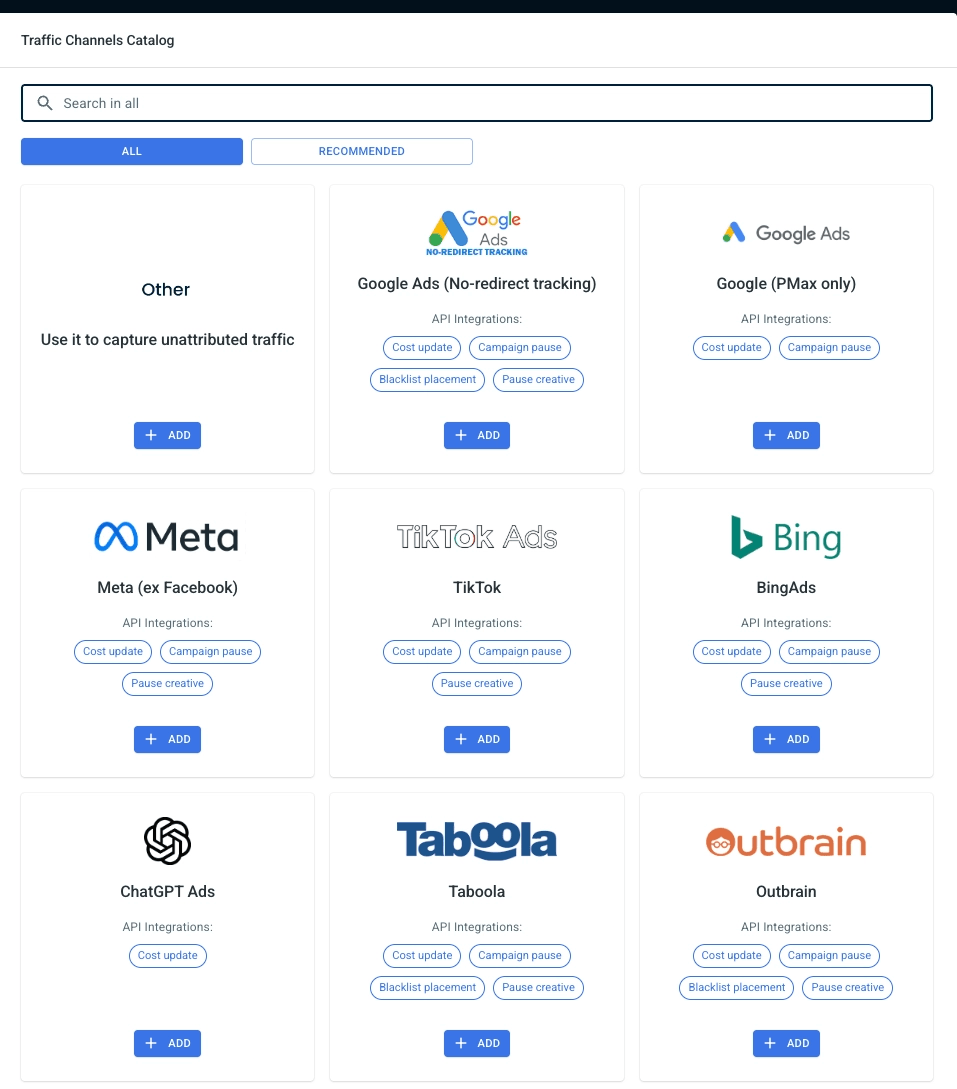
Once that ID is captured, RedTrack can follow that visitor and tie the click to whatever they do afterward, so in case they make a purchase you know exactly which ad worked.
Here’s how to exactly set up ChatGPT Ads click capture in RedTrack:
- In RedTrack, create a new traffic source and choose the “ChatGPT Ads” preset.
- Open your offer or website in RedTrack and copy its tracking link.
- Paste that tracking link as the destination URL in your ChatGPT Ads creative.
- Run a test click and confirm the oppref value appears against the click in your RedTrack logs.
2. Sending conversions back to OpenAI so the algorithm learns
RedTrack uses server to server tracking to record the conversion on its own server when it fires, which means that it survives ad blockers, iOS restrictions and consent opt-outs that break browser pixels.
After it records the conversion, RedTrack matches your conversion type to an OpenAI event type using rules you set on the OpenAI Pixel – a purchase maps to order_created, a lead to lead_created, a trial to trial_created and so on. One thing to bear in mind here: a conversion that doesn’t match a mapped event type won’t be sent, so make sure you map every conversion type you care about. If you mapped identity fields like email and phone, RedTrack hashes them and includes them for matching the same way it does for Facebook CAPI.
With all that being done, RedTrack transmits that conversion to OpenAI through the Conversion API.
So basically, Server to Server technology is how RedTrack learns about the conversion, and CAPI is how it tells OpenAI – two distinct layers doing two distinct jobs.
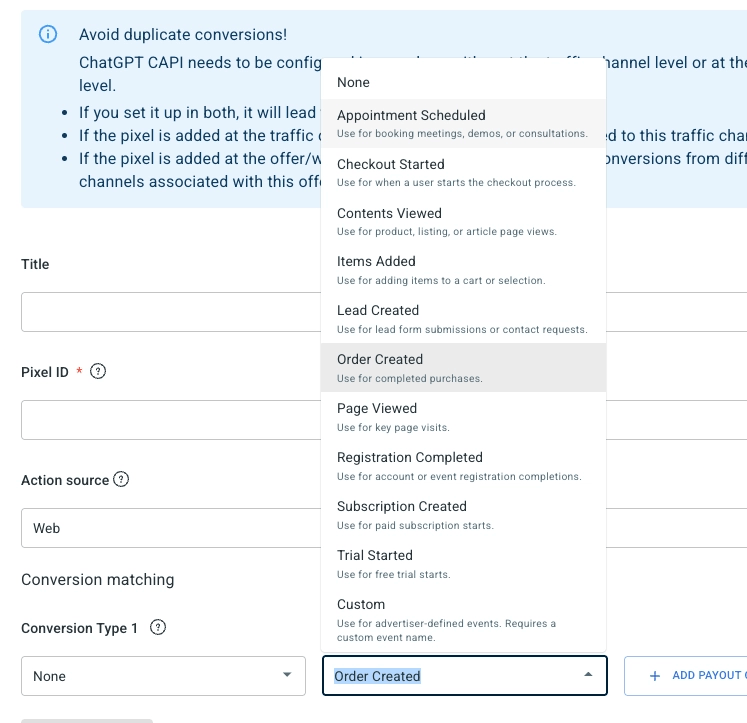
Here’s to to set up OpenAI API and Conversion API connection through Redtrack:
- In your OpenAI account, get your pixel_id and api_key.
- In RedTrack, create the OpenAI pixel and enter the pixel_id and api_key.
- Set your conversion-type matching rules so each conversion maps to an OpenAI event type.
- Set a default source URL on the pixel so web conversions are accepted.
- Attach the pixel to the offer or website you’re running traffic to.
- Fire a test conversion and check your logs for OpenAI’s accepted_events response.
3. Monitor your performance in one view
Knowing a conversion reached OpenAI tells you the plumbing works, but doesn’t tell you the channel is profitable.
RedTrack syncs your ChatGPT Ads spend automatically and places it next to the revenue each campaign generated, so clicks, conversions, cost, and ROI sit in a single view alongside Meta, Google, and every other channel you run.
Cost updates land on their own (no manual entry, no CSV exports) so the profit picture for ChatGPT Ads stays current as you spend.
For the first time you can answer the only question that matters, which is “is this channel making money”, and compare it directly against the channels you already trust.
Conclusion
One view, one dashboard and one technology that runs it all – all you got to do is track the numbers and make smart decisions!
RedTrack gives you insights based on real data and real numbers, so you know exactly if ChatGPT Ads are just a hype or they are the next growth engine of your business – no guesswork, no hallucinations.
Start with your Redtrack logs. After a conversion fires, look for accepted_events response from OpenAI against that event. If you see it, the conversion was captured, matched and delivered.
Switch from ChatGPT Ads dashboard to your RedTrack report and read the channel the way you read Meta or Google: spend against revenue, ROI against your break-even.
Last but not least, scale what pays, fix what doesn’t. If ROI clears your threshold and holds across enough volume, you have your proof to scale, and the spend sync keeps the profit picture honest as you push more budget through. If it doesn’t, you know that too, before you’ve burned a month finding out.
Interested to see how it works in real life? Let us show you on demo call, or try it for yourself on our 14 day free trial!


