
More and more marketers are struggling to optimize ads and rationalize budget spend when incomplete and scattered data creates administrative chaos.
This makes it hard to fine-tune campaigns and scale profitably.
But this isn’t a problem for marketers who use multi-channel tracking tools like RedTrack. These tools bring together all your click and conversion data from Meta, Google, TikTok, and affiliate dashboards, and centralize it into one place, where you can monitor ad performance and build customized reports from accurate data.
This use case explains the challenge marketers face when they don’t use multi-channel tracking, and provides a step-by-step guide on how to set up multi-channel tracking via RedTrack.
The Challenge: Profit Drain Due To Misaligned & Missing Ad Data
One of the biggest issues performance marketers and ad buyers face (whether you’re an agency or an e-commerce brand running your own ads) is having click and reporting data sitting across multiple channels.
But why is this a problem?
At its core, it’s a problem because you never get the full picture on one screen or dashboard, and you are resigned to forever hopping back and forth from platform to platform and trying to make sense of the data.
To get that, you’ll need to hop from platform to platform, get the numbers, and then combine them all into one spreadsheet so you can create an all-encompassing report that tells the full story of your ad campaign marketing efforts (and ROAS).
But let’s take a deeper look at why not having a multi-channel tracking tool is a problem.
Marketing data fragmentation means manual work
You have ad campaign data spread across multiple platforms, from Meta Ads to Google Ads, TikTok, and more. The first problem this creates is a logistical one: manually gathering this data is neither efficient nor accurate.
But the bigger problem is the incompatibility of all this data. Because Meta, Google, and TikTok define metrics differently, it means you can’t just pull figures and aggregate them into one spreadsheet. For example, if you look at conversion metrics, one platform might use “Total Conversions” while another might use “Unique Conversions.”
So, you first need to translate each platform’s data and land on a concise metric (where the definition is the same), before you can aggregate that data.
Now consider how much time (resource cost) this will take your team to gather and sort just for one campaign. It’s more than businesses have to give.
Lack of real-time insights leads to delayed optimization
The above issue leads us to the next problem. By the time you gather all your data and clean it, you miss the opportunity to optimize your ads on time.
In performance marketing, if great ads don’t get boosted on time, and bad ads keep burning the budget, it’s going to result in a snowball effect, and it’s going to have a cumulative negative impact.
For example, if an ad’s performance drops off on Monday at 12 p,m but you don’t get your spreadsheet data sorted by Wednesday, your platform will keep feeding the zombie ad for two entire days before you drop it.
So, ad optimization, momentum, and reaction time are key. If you don’t instantly see an ad’s true performance and don’t instantly act on optimizing or cancelling it, you lose the opportunity to capitalize on the good campaigns and to cancel the bad ones.
Accurate attribution becomes impossible
Every platform wants to claim leads and conversions as purely the result of its ad. But no customer journey is one ad view and an instant conversion. First-click and last-click attribution models only tell the truth if you use one ad platform.
But if you’re using multiple marketing channels, this attribution model approach won’t distribute attribution credit accurately. For omnichannel brands, this will lead to misallocated ad budgets that won’t deliver the results you expect.
So when you don’t get the full picture of all the ad and brand interaction clicks (which helps display multi-touch attribution), you won’t know which collection of touchpoints actually led to a conversion.
Cookie-based tracking platforms result in missed clicks
Most traditional ad channels still operate on pixel (cookie-based) tracking. With privacy and ad blockers, this prevents platforms from catching all clicks and limits them to only include the clicks of users who allow cookies.
On top of that, this causes a flow-on problem. It inflates your Customer Acquisition Cost (CAC) and misreports Return on Ad Spend (ROAS).
So, unless you use the CAPI option on these platforms or a separate multi-channel tracking tool like RedTrack, you won’t get a complete set of click data.
Incomplete & inaccurate data creates algorithms that don’t target the right customers
Ad platforms use algorithms to find new customers. To work out which customers to target, those algorithms use and depend on the data they are being fed. Inaccurate or incomplete data will result in algorithms forming the wrong perception of ideal cusotmers and it will then target the wrong customers.
This is a particular problem if you want to scale your ad campaign reach effectively, because it will cause performance to plateau, even though you’re increasing ad spend.
The Solution: Use a Multi-Channel Tracking Tool Like RedTrack
One of the best ways to resolve profit drain due to misaligned and missing ad data is to sign up for a multi-channel tracking tool like RedTrack.
By implementing multi-channel tracking, you automatically prevent all of the above-mentioned issues that marketers and agencies face when it comes to getting the most out of their ad budgets.
Before we explain how you can use RedTrack to prevent profit drain and loss-making ad campaigns, it’s important you understand what the tool is and how it helps performance media buyers, affiliates, agencies, and e-commerce stores.
What is RedTrack?
RedTrack is a multi-channel tracking and conversion platform that comes with attribution and ad campaign automation tools. It functions as a centralized dashboard for all your ad campaigns and acts as a single source of truth because it consolidates data from all your platforms, cleans it, and gives you accurate reporting.
What makes it better for ad data than common ad platforms is its:
- Server-side & cookieless tracking technology – This lets RedTRack capture conversions that browser-based platforms miss due to ad blockers and privacy restrictions.
- Choice of multiple attribution models: RedTracks’s users can attribute revenue and conversions down to a specific ad or placement level using multiple models, including first-click, last-click, and multi-touch, to display which campaigns are driving sales.
- Two-way Conversion API (CAPI) integration: RedTrack automatically sends clean conversion data back to your ad platforms (Google and Meta), improving their internal optimization algorithms and lowering acquisition costs.
- Automations for media buyers and ad optimizers: RedTrack users can set auto-rules that can automatically pause underperforming ads or scale successful ones based on real-time ROI or CPA benchmarks.
When it comes to reporting, you can use RedTrack not only as the keeper of all your ad data but also as the generator of customized reports. You can build and share these reports with your clients so they can see the benefits of allocating more budget to ads.
How to Set Up Multi-Channel Tracking Using RedTrack
Setting up multi-channel ad tracking in RedTrack involves connecting your ad platforms (like Meta, Google, and TikTok) directly to RedTrack. This is what allows for the transfer of accurate conversion and attribution data.
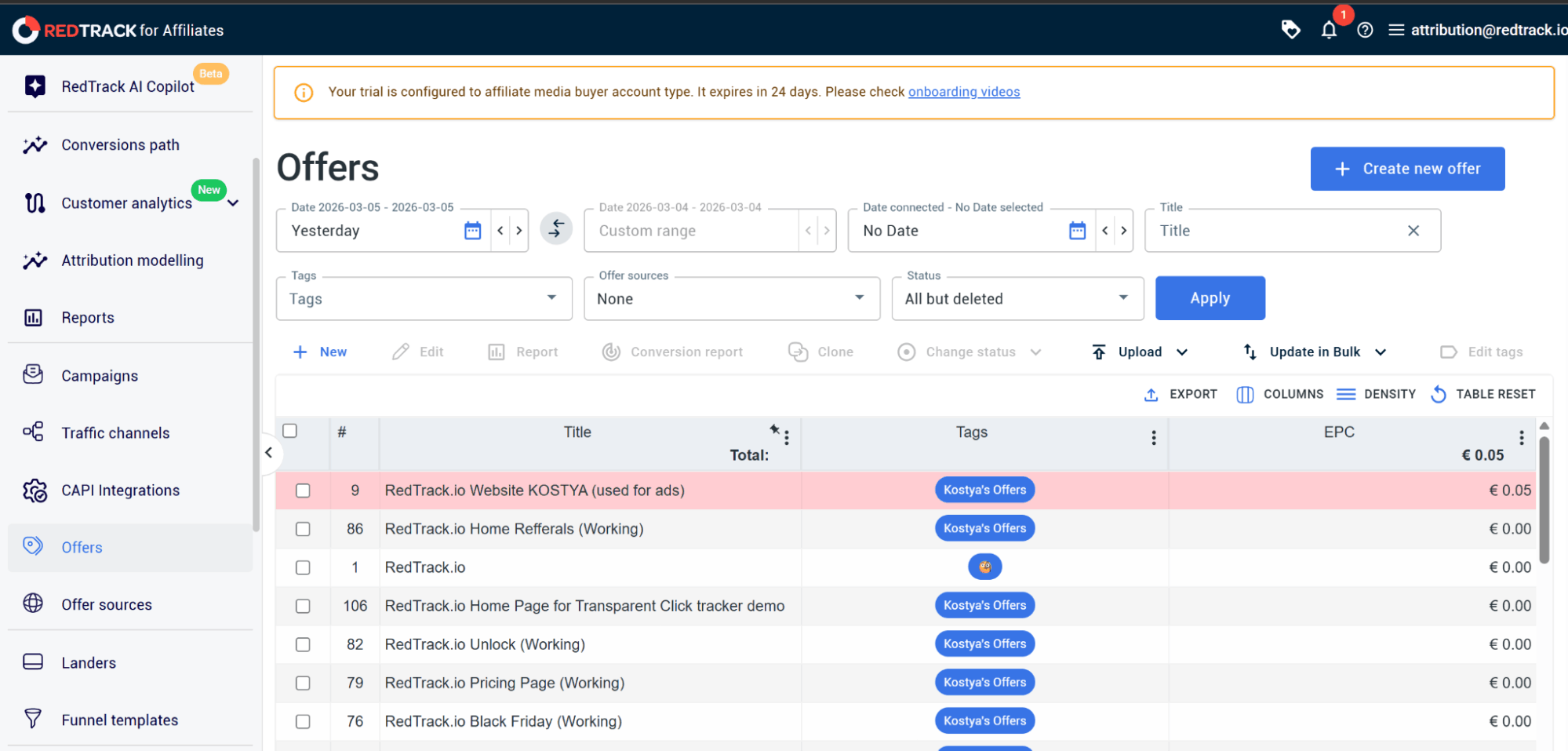
Step 1: Create your offer
Creating your offer involves adding the specific product or page you are promoting to the RedTrack platform.
To do that:
- Go to Offers and select New
- Enter a name for your offer
- Select the source you created above from the dropdown menu
- Paste your affiliate URL or destination link
- Enter the conversion value if it’s a fixed amount, or leave it to be updated dynamically via the postback
Click Save to finalize the offer
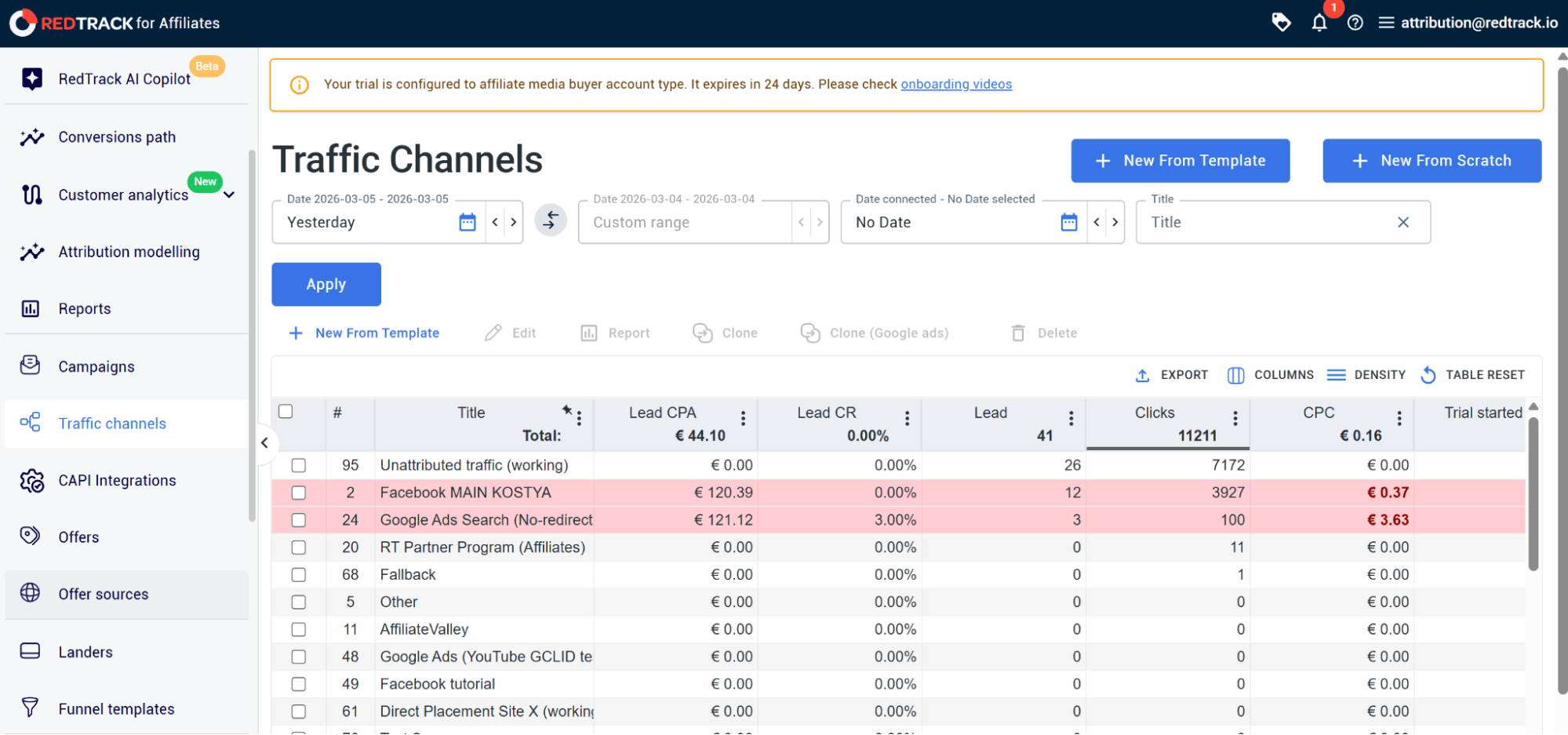
Step 2: Set up the traffic channel
Next up, you need to set up your traffic channel, which will capture click data.
To do that:
- Navigate to Traffic sources, and click on New From Template (RedTrack has pre-configured templates for hundreds of ad networks, which include the correct tracking macros)
- Search for your platform (Google Ads, Facebook, or TikTok)
Click Add
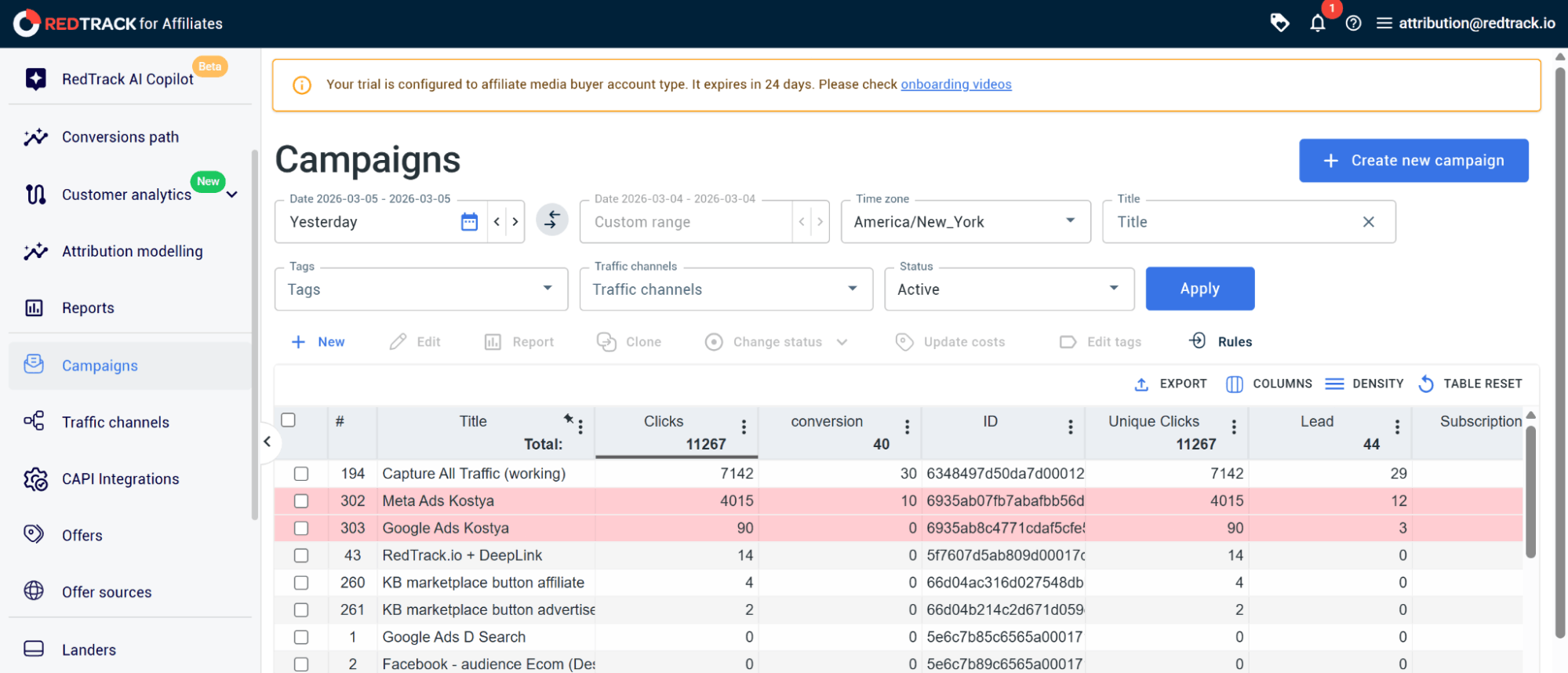
Step 3: Create the campaign
Your campaign is what connects your Traffic Channel to your Offer. Here, you need to take note to create a separate campaign for every tracking channel.
To do that:
- Navigate to Campaigns and click New
- Give your campaign a name
- Click on the Traffic Source dropdown and select the source you previously set up
- Repeat for other channels
Once you’ve done this, RedTrack will automatically populate the tracking parameters needed for that specific channel.
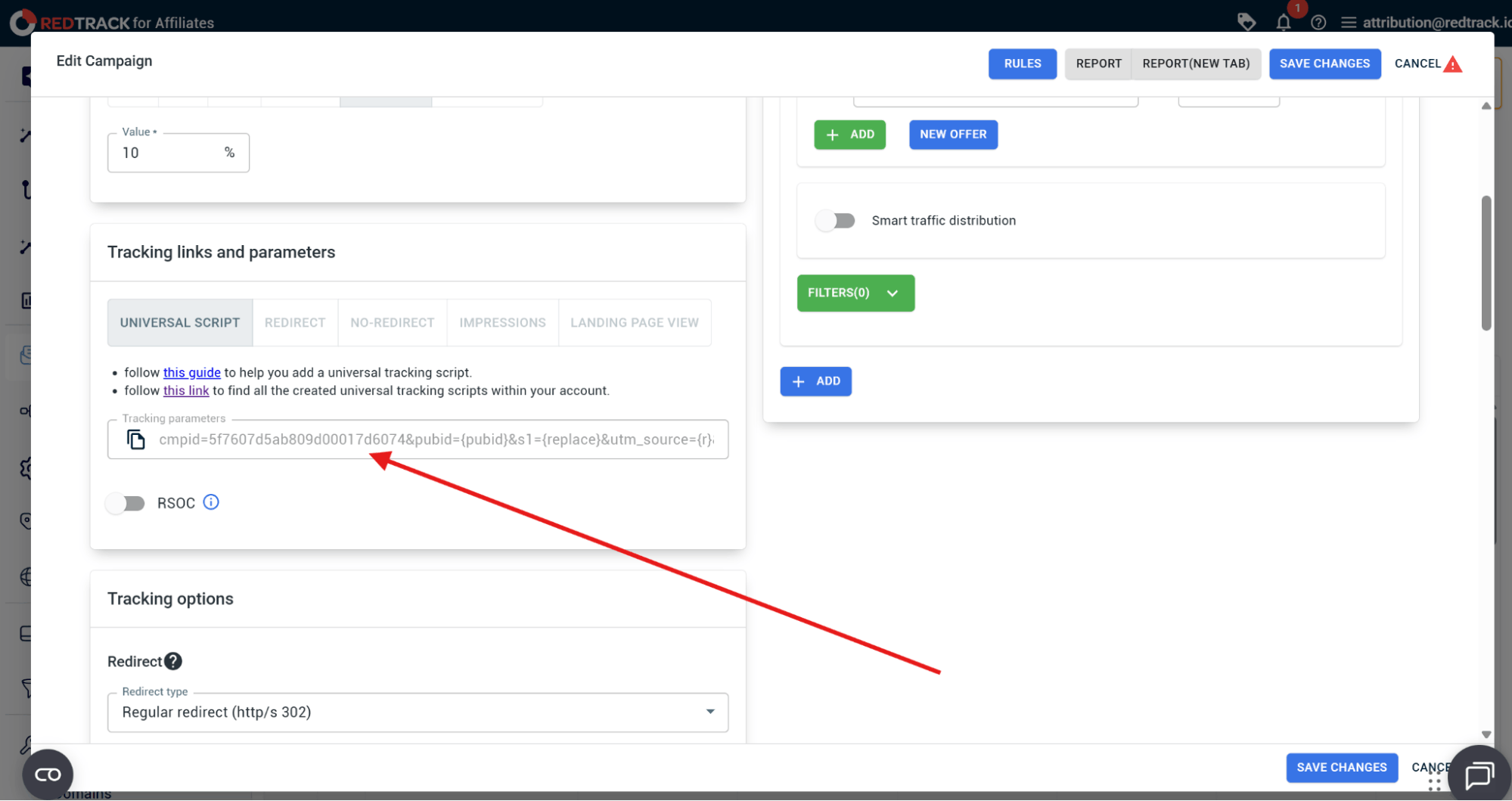
Step 4: Copy the campaign URL parameter to your ad platforms
The next step is to get your campaign URL parameter and add it to your ad platforms.
To do that:
- Navigate to Campaigns and open the specific campaign you just created
- Scroll down to the Tracking links and parameters section
- Copy the Final URL suffix parameters link
- Add separately to each Ad Platform (Google Ads or Meta Ads)
When you’ve covered these steps, RedTrack will start tracking all your clicks across ad platforms and will bring them back to your RedTrack dashboard. Here, you can then go and create reports to get insights on how your ad campaigns are truly performing.
From Missing Clicks to Smarter Optimization With RedTrack
Two of the biggest headaches for any performance marketer are lost optimization opportunities and profits. Both are due to either incomplete, delayed, or badly attributed data.
But if you use multi-channel, server-side, and cookieless tracking tools, this will not happen.
As a conversion tracking platform, RedTrack picks up clicks that browser-based pixels are missing out on, giving you a more accurate picture of how your campaigns are actually performing.
On top of that, because it operates on flexible attribution models, it helps you see just how multiple touch points are working together to drive every conversion. So you don’t get data that over-credits one big channel and undermines another (which might have worked just as hard to deliver the final conversions).
And with two-way CAPI integrations, RedTrack doesn’t just collect complete data; it also sends back clean data. Bt churning out clean, deduplicated data, your ad platforms (and their algorithms) can steer campaigns towards the right audiences, driving acquisition costs down in the long run.
To learn more about RedTrack, book a demo with one of our people so you can see firsthand how the tool works to centralize and manage clean data and support ad campaigns that don’t waste your marketing ad budget.
Ready to give RedTrack a go? Sign up for our 14-day free trial!
While you’re there, make sure you check out some of the automationfeatures that help media buyers make fast decisions.


