
Optimizing the ads usually meant tracking ROAS, CPA, and the cost of every conversion you can attribute.
Then, opportunity score came along, and you had recommendations from Meta in Meta Ads Manager on how you can optimize your ads even better.
That score is actually one of the most useful diagnostic signals from Meta, as it tells you which campaigns and ad accounts have room for improvement, which recommendations would have the biggest impact, and where you should spend your time exactly.
However, there was a problem – your real performance data was not connected to Meta opportunity score, but scattered between Meta and your ad tracker.
So together with Meta, we closed that loop.
Challenge: Disconnected tools are capping how far you can optimize
Opportunity score lives in Meta Ads Manager.
Your performance data lives in your tracking platform.
If you wanted to act on recommendations from Meta, that would mean jumping between tabs, copying account IDs, and trying to remember which campaign you were working on a minute ago.
Not quite the big deal if you have one ad set rolling, but for a scaled campaign with dozens of ad sets, the mess is inevitable.
Why optimization decisions slip through the cracks
Spending time trying to align your ad tracker and Meta means that you’ll probably miss out on having reliable resources for making informed optimization decisions.
The math is simple – when the information needed to make a good decision is split across tools, the cost of pulling it together is high enough that meaningful optimization opportunities go unactioned for days or even weeks.
Your ROAS, CPA, conversions volume, and entire attribution data live in your tracking and reporting platform, while Meta’s opportunity score and its recommendations (Meta Conversions API coverage, adoption of Meta Advantage+ solutions, audience structure, creative variety) live in Meta Ads Manager.
The thing is that both are valuable, but to act on either one, you need context from the other.
If Meta is recommending you improve Conversions API coverage on a specific campaign, the first question you need the answer to is how that campaign is actually performing at the moment – and that answer is in your tracking tool.
There’s also the issue with multi-account complexity because most performance media buyers do not run a single Meta account. eCommerce brands often run separate accounts per region or per brand. Affiliates run multiple accounts for compliance and isolation, while agencies routinely manage 10, 20, or even 50 client accounts at once. Each one has its own opportunity score and set of recommendations, and its own performance profile – in order to get the information you need for optimization decisions, you need to review all of them, and that’s nearly impossible.
Context switching is also one of the problems performance media buyers encounter – one who spends 20 minutes reviewing creative performance in a tracking tool, simply doesn’t want to leave that view, log into Meta Ads Manager, find the right campaign, navigate to the recommendation, apply it, and then go back. It interrupts the flow of optimization work, and a simple time tracker can easily tell you how problematic that is from a time investment perspective.
What missed recommendations cost in real performance terms
Better targeting, lower CPM, faster exit from learning phase, improved Conversions API match quality… All those benefits can be achieved through applying recommendations by Meta to improve opportunity score.
But when recommendations stay unapplied, improvement stays unclaimed, and cost shows up in three places primarily.
Higher CPMs and CPAs than the account is capable of – many of the highest-impact recommendations from Meta are about delivery, and when these are unapplied, your campaigns compete in a narrower auction surface than they need to. CPMs run higher than they should, which pushes CPAs up, which results in compressed ROAS. You might not see it, but the performance loss is real.
Slower exit from learning phase on conversion campaigns – Campaigns running on partial Conversions API feed (where Meta is only receiving a fraction of the conversion events you actually have), take longer to exit learning, optimize less efficiently, and produce volatile results during the period when consistency matters most. Acting on recommendations related to Conversions API early can mean a huge difference between a campaign that scales smoothly and one that stalls.
Last but not least: Lift left on the table across an entire account portfolio, and that’s exactly where multi-account operators feel the burn of cost the most.
If 5/10 of your Meta accounts each have an opportunity score lift of +8, that is 40 points in potential improvement sitting untouched, and to be honest, that’s a meaningful uplift.
Without a consolidated view that lets you act on them in the same session, the lift compounds negatively, being available, but it stays unapplied.
Solution: Meta’s Opportunity Score integrated in RedTrack’s ad manager
Quite a simple solution in a nutshell, but working together with Meta, we managed to consolidate the two biggest opportunities into one place.
Through RedTrack’s partnership with Meta, opportunity score is now a native part of RedTrack Ads Manager. You can review all your Meta accounts connected to RedTrack in the context of your live performance data, and apply them with a click, directly from RedTrack.
Here’s how to do it:
1. Access Opportunity Score from inside RedTrack Ads Manager
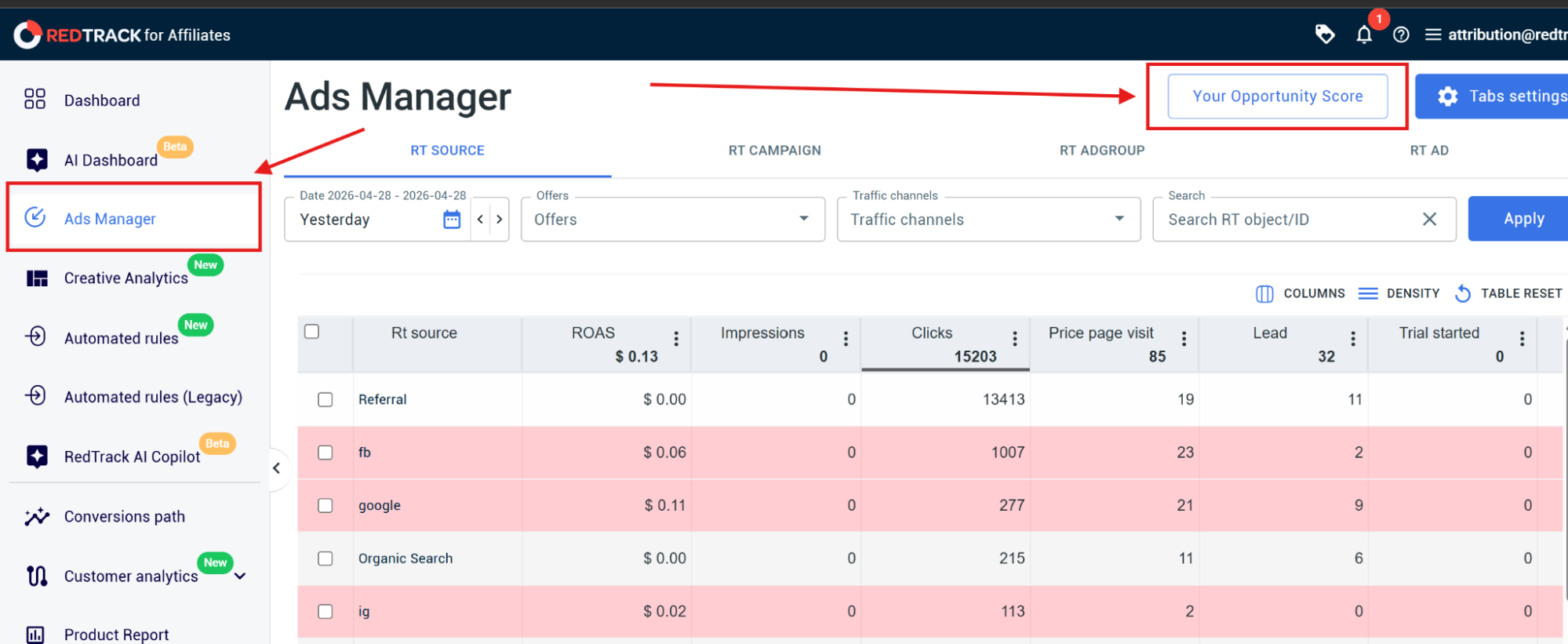
From the main Ads Manager screen, a “Your Opportunity Score” entry point opens the dedicated opportunity score panel.
There is no separate menu, no separate login, and no need to keep Meta Ads Manager open in a second tab to check on the score.
We knew that if you wanted to improve your opportunity score, you would need information such as which campaigns are converting, which channels are scaling and which sets are underperforming, so putting the opportunity Score on the same surface as real performance data made sense.
2. See the current score and available lift across every connected Meta account
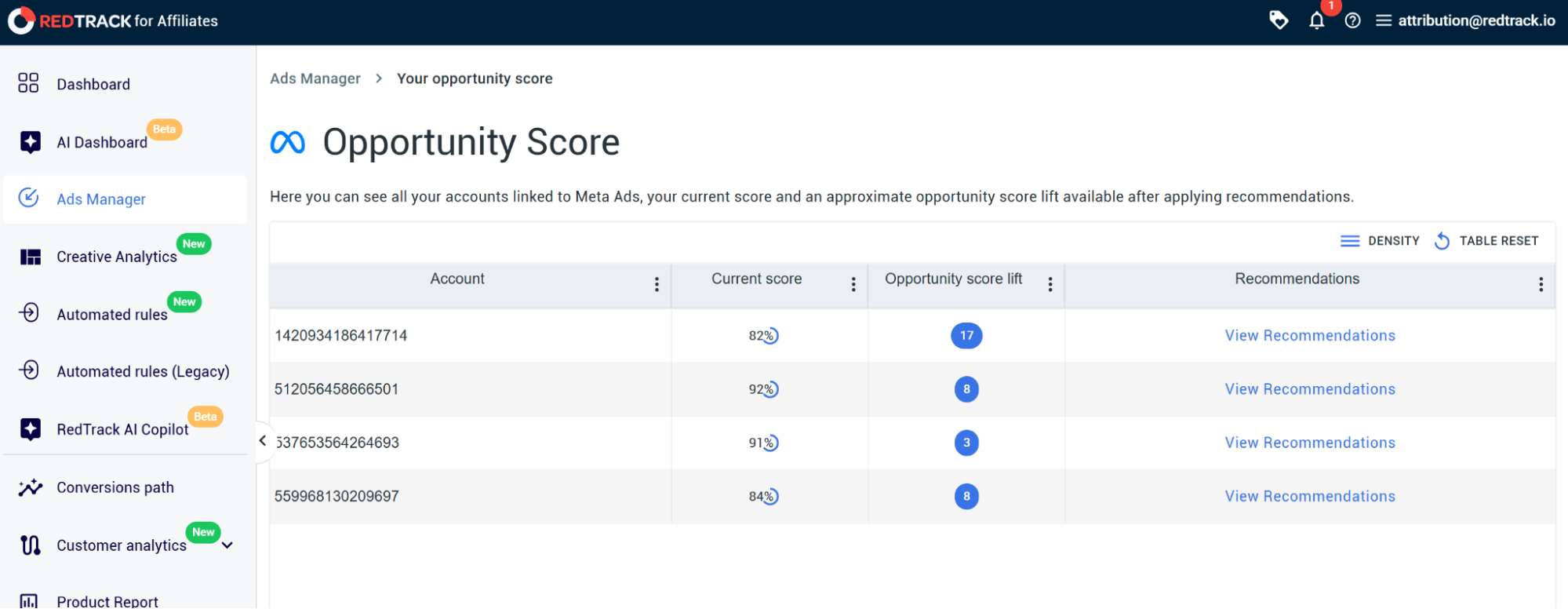
Once you open the panel, you will see it lists every Meta account linked to your RedTrack workspace alongside its current score, the available opportunity score lift, and a direct link to view recommendations.
This consolidated view is particularly valuable for agencies and multi-brand operators – it’s super easy to see which accounts have the largest available lift and which are already well-optimized, which gives you the ability to easily prioritize.
Each account entry is sortable.
3. Review and apply recommendations from Meta without leaving RedTrack
Simple, right?
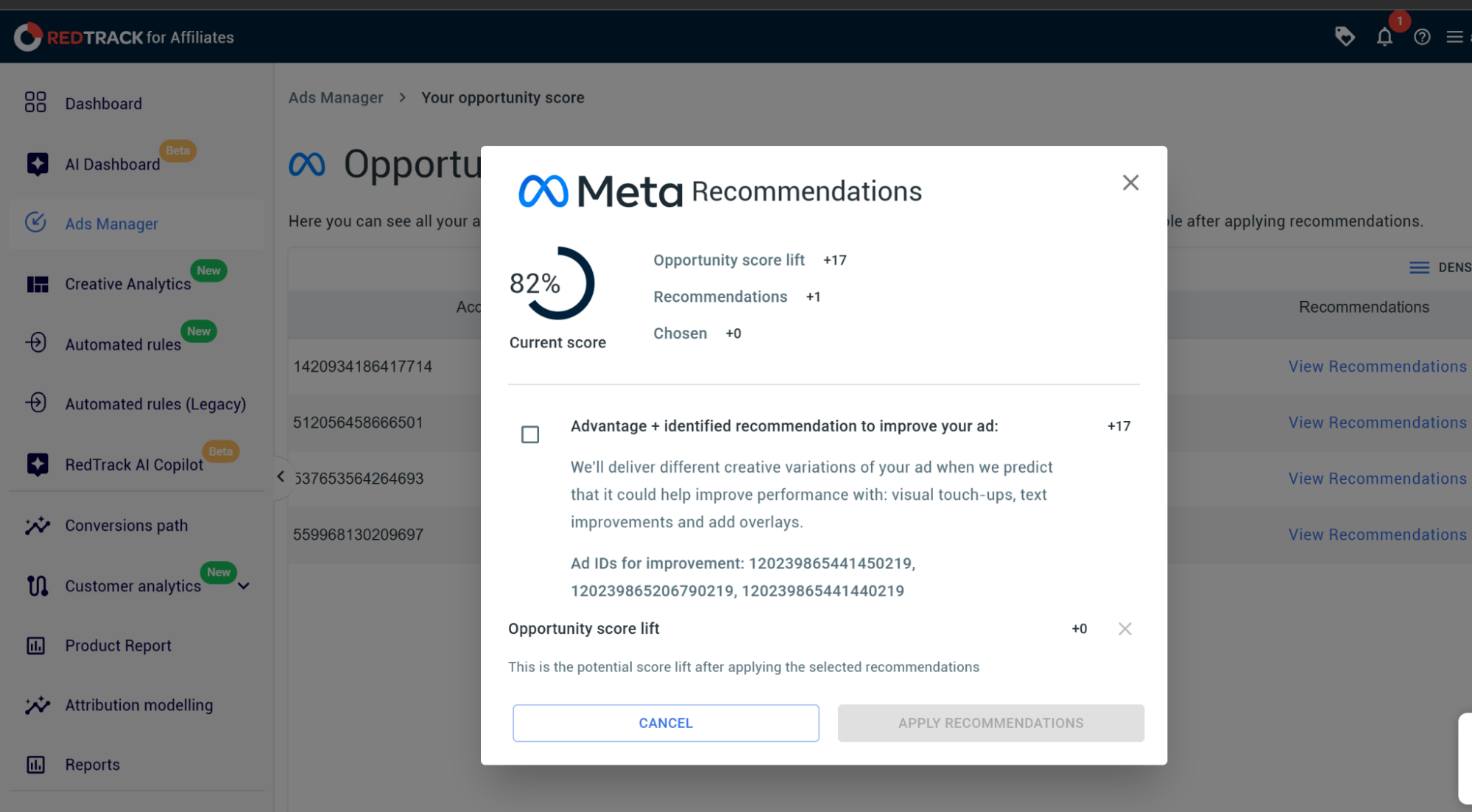
If you click “View Recommendations”, you will open the full set of optimization recommendations from Meta for that account.
Each recommendation shows exactly what Meta is suggesting, the rationale behind it, the campaign or IDs it applies to, and the score lift Meta estimates in case you apply it.
From this same panel, you can select the recommendations you want to apply and simply click “Apply Recommendations”, and RedTrack will push the change to Meta on your behalf. Logically, the recommendations you have not selected stay listed for later, but the ones you have applied disappear from the list as Meta confirms the change.
In a nutshell: How to use Opportunity Score in RedTrack step by step
1. Open RedTrack Ads Manager from the left navigation.
2. Click “Your Opportunity Score” in the top-right of the Ads Manager view.
3. Review the score table – sort by “Opportunity score lift” descending to see which Meta accounts have the most performance headroom available.
4. Click “View Recommendations” on the account you want to optimize first.
5. Read each recommendation alongside the score lift Meta estimates. Cross-reference against the campaign performance you can see in the main Ads Manager view to decide which recommendations align with your current priorities.
6. Tick the recommendations you want to apply and click “Apply Recommendations.” RedTrack pushes the change to Meta and updates the score as Meta processes the action.
7. Return to the main Ads Manager view to monitor the resulting performance change in your live ROAS, CPA, and conversion data over the following days.
Best practices for utilizing Meta Opportunity Score with RedTrack
Campaign performance is always the goal and north star.
What we’ve seen in our community is that the teams that get the most ROAS lift out of this workflow follow a consistent pattern: they prioritize, apply selectively, and verify the impact in their performance data.
That being said, here are a few best practices for getting the most out of your ROAS through opportunity score with RedTrack
1. Prioritize by lift size and account performance, in that order
Always start with the accounts where the available lift is the largest, and within those accounts, look at the performance you are seeing in RedTrack.
An account with +17 lift available is most certainly underperforming, while an account with a +3 lift is probably already running profitably and can wait.
This is the best part about RedTrack and Meta delivering this unified solution – prioritization is possible only when the score and performance data sit together, which is exactly the case now.
2. Apply recommendations selectively, not all at once
Recommendations from Meta vary in type and impact, and not all of them have the same nature. Technical ones are usually the ones with the largest performance changes, but creative variation suggestions are interfering in your testing program.
It’s important to apply them only when they fit your creative strategy.
Reviewing each recommendation against the lift it offers and the campaigns it affects, then applying them selectively, produces better results than applying everything at once.
3. Verify the impact on your live performance data
Once a recommendation is applied, the relevant campaigns will show the effect in your performance metrics over the next several days as the algorithm from Meta adjusts.
You can monitor ROAS, CPA, and conversion volume on the affected campaigns inside RedTrack Ads Manager.
It’s important to confirm the impact because that closes the loop and tells you which types of recommendations work best for your account profile, which then informs how aggressively you act on similar recommendations next time.
Does every ad account I connect to RedTrack become visible in Opportunity Score View?
Yes, every Meta ad account linked to your RedTrack workspace appears in the Opportunity Score view.
Do I need any extra setup to use Meta Opportunity Score in RedTrack?
No, connecting your Meta ad accounts to RedTrack is all you have to do.
As soon as your Meta ad accounts are connected to RedTrack, opportunity score becomes available automatically inside Ads Manager, without additional configuration
How is this different from checking Opportunity Score in Meta Ads Manager directly?
The difference is in the workflow, because the score and the recommendations are the same – both show what Meta has calculated.
Inside RedTrack, your opportunity score sits alongside your live performance data, which means optimization decisions are informed by a full performance picture without context switching.
Every week you spend without a consolidated view of Meta’s opportunity score across your accounts is a week where available performance lift sits unactioned.
Connect your Meta accounts to RedTrack, open the opportunity score view inside Ads Manager, and start applying the recommendations Meta has already identified, alongside the performance data that tells you which ones to act on first.
Start your free RedTrack trial or book a demo to see opportunity score and recommendations from Meta live inside Ads Manager.


