
You’re scaling and pausing ads manually all the time, but it’s taking way too long, and by the time you make your strategic moves, you’ve lost valuable optimization windows.
The only way to move past this problem is to automate your campaign scaling and pausing processes. Now you’ve already tried some of those features on Meta and Google, but you weren’t too impressed with the results, so you’re wondering whether there is a better way.
In this blog, we tell you why those native automation features didn’t work for you. We also explain which types of tools you need to know when to scale or pause campaigns automatically, and show you how to set up this process in RedTrack.
Challenge: Why It’s So Hard to Get Campaign Pausing & Scaling Right
Pausing and scaling ad campaigns manually sounds simple, but in practice, when the time comes to make these costly decisions, you suddenly realize it’s hard to get everything right, on time.
First, there’s the problem of scale. You’re not just running one ad campaign. You’re running several for multiple clients, and they’re running on different platforms.
On top of that, there’s the time factor. Scaling and pausing decisions need to be made quickly, and they need to be made with real-time performance insights.
So you have three blockers here.
1. Performance Changes Too Fast For Manual Pausing & Scaling
Performance marketing moves quickly. The views and clicks of your ads happen much faster than your human brain can monitor and comprehend.
An ad that worked really well yesterday might stop converting throughout the night, but you’ve set it to keep going for the rest of the week. Now, if you don’t stay on top of that ad’s performance in real-time, day and night (and let’s face it, you can’t be there 24 hours a day), you’re going to end up wasting budget.
So if your ad campaigns rely on the manual monitoring of multiple ad managers, you’ll always be late to act in time.
- By the time you notice one campaign has started going downhill, you’ve already spent your budget.
- By the time you notice another campaign starting to spike, you’ll have lost that optimization window.
That’s why this ad pausing and scaling needs to be automated. You want to make the change the minute there is a spike or fall, not when you end up seeing it.
2. Native Ad Platform Performance Data is Unreliable
The second major problem is data quality. All the main ad platforms like Google, Meta, and TikTok offer built-in automation rules.
However, these platforms only have their own performance data to work with, and unfortunately, that data is:
- Delayed – For click and impressions data, Google takes up to 3 hours, Meta takes anywhere from a few minutes to a few hours, and TikTok typically takes 1-2 hours.
- Incomplete – No ad platform can pick up all the conversions because of iOS 14.5 privacy limitations and various ad blockers that users have enabled.
- Inaccurate – Because every platform uses its own attribution logic, multiple platforms will claim one purchase as their own conversion, leaving you with inflated conversion data. You have one purchase, and you’re paying for ads on three different platforms because each one tells you they deserve the credit.
- Irrelevant – This might be too strong a word, but ad platforms ignore essential variables that reflect profit-based ROAS. Ad platforms only calculate gross revenue divided by ad spend, and inflated attribution also leads to misleading data.
So the issue with ad platforms isn’t the automation rules and features they offer, it’s the quality of data they use to apply those rules.
3. You Don’t Have A Centralized Dashboard for Cost & Conversion Data
The final blocker is the lack of a centralized dashboard for cost and conversion data. In reality, the performance metrics you need are scattered across multiple, disconnected systems.
- Ad spend lives in your ad platforms (Meta, Google, TikTok)
- Conversion figures live in your Shopify, WooCommerce, or your CRM
- Profit metrics can only be derived from a combination of both, and they don’t live anywhere (you need to calculate and compile them manually from the above two)
So if you are using campaign automation rules on your ad platforms, their systems are using numbers that haven’t been synced yet. Let us explain this. Say one particular platform’s spend data updates every two hours, but the conversion data updates every fifteen minutes.
This means your automation rules are making decisions on mismatched numbers, and what you ultimately get is the wrong decision being made, even though your automation rules are solid.
The Result: You Make Costly Decisions on Misleading Performance Data
When you continue to turn to manual scaling and pausing decisions or ad platforms’ automation rules, it won’t take too long before you notice the negative impact on your ad account performance.
And if you’re using ad platform automations, even though the automation rules feature is efficient, the fact that it uses misleading and unsynchronized performance data is what eventually leads it to make the wrong decisions.
Here are some of the things you might notice happening.
Precious Budget Goes to Waste
This is the classic scenario we described earlier.
The campaign was doing well for a few days, and then throughout the night, it stopped. But because you’re not monitoring the ad’s performance 24/7, you ended up wasting the money that kept a bad ad going for another 10 or so hours. Had you seen it instantly (or had an automation rule applied), you would have stopped it and moved that ad budget elsewhere.
Now, on small campaigns, that waste may only be a few hundred dollars, but the larger your campaign budgets are, the more you have to lose.
You Miss Scaling Windows on Winning Ads
Winning campaigns have a specific lifecycle and short momentum windows.
Standout creatives usually peak quickly, and then they hit audience fatigue, competition, and rising CPMs, which then pulls performance down.
So, if you don’t scale a winning ad the minute it hits the high momentum, you scale the ad way too late (when it’s already entered its decline).
You Scale Mediocare & Underperforming Ads
Scaling mediocre or underperforming ads is one of the biggest and most common issues with ad platform automation rules.
Since your ad platform’s performance data is delayed and inflated, chances are you’ll always be scaling campaigns that, in reality, are not working well.
They may seem profitable inside that particular ad platform, but if you deduplicated all your ad platform data and applied one attribution model to everything, you might see the ad was not a success at all. It was just a success on that platform’s attribution model.
So you keep scaling weak campaigns, killing the good ones because you can’t see the real numbers, and keep running bad optimizations, which will reflect on your bottom line.
Solution: An Automation Tool That Gathers & Runs on Independent, Real Data, in Real Time
If you want to automate your campaigns properly and across all your channels, you need to expand your horizons.
You need to let ad platforms do their thing, while you set up an independent system that:
- Gathers all the ad tracking data from across your traffic channels
- Cleans that data to remove duplicate conversions and applies one consistent attribution model to make it fairly comparable
- Centralizes all your clean and true performance numbers in one dashboard where you can view, slice, and dice them for insights
- Redistributes clean performance data back to your ad platforms via CAPI so their algorithms can learn on good, clean data, not the incomplete lot they have
Since we’re already here, it’s worth considering RedTrack’s ad automation software, as it can deliver three key things from the get go.
1. Cross-Channel Data Visibility With One Attribution Logic
You don’t want isolated, platform-specific reporting. You want complete, accumulated visibility across all your campaigns and ad traffic channels.
When you sign up to RedTrack and connect all your traffic channels (Meta, Google, TikTok, or whatever other channel you use), you can finally align all your conversion data to a single attribution logic.
Since RedTrack runs on first-party tracking (and isn’t limited to pixels and browser limitations), it collects all your views and clicks in real-time.
And when you have that all lined up nicely in one neat dashboard, that’s when your automation rules can:
- Catch losing campaigns that need to be paused
- Spot winning ones that need to be scaled quickly enough to take advantage of the momentum
2. Independent, Real-Time Performance Data Worth Acting On
Automation rules that depend on half-solid data will only deliver half-good results. But when you have fresh and accurate performance numbers, you have no doubt the rules will deliver the rocking results they should.
Because RedTrack updates all its performance metrics in near real-time, you don’t get the lag you’re used to with ad platforms.
RedTrack’s data processing works on the following windows:
- Click & conversion data – Instant updates thanks to server-side tracking
- Campaign costs & ROAS metrics – Sync from ad platforms every 5-30 minutes
So, because your data updates are working hard in the background, all the time, you can finally trust the process and be certain the campaigns that need to be scaled and paused within the right timeframes for optimal performance.
3. Rules Tied to Profit Metrics
When setting your automation rules, you shouldn’t rely on vanity metrics like:
- Platform-native impressions
- CTR
They’re just not comprehensive enough.
What you should be using are:
- CPA
- ROAS
- Profit
- Conversion volume
- ROI
When you use RedTrack’s Ad Automation to set rules, you’re using all of the above profit-centric metrics that can represent your entire backend funnel (linking ad spend to revenue). This is what can finally up your performance game through scaling and pausing campaigns.
How to Set Up RedTrack’s Automation Rules To Scale & Pause Campaigns Easily
One of the biggest mistakes performance marketers make at the very start when setting up automation rules is scope. To catch everything, they try to build dozens of complicated rules at the very start.
In reality, all you need is a few well-structured rules that work together to protect your ad budget and take advantage of good optimization opportunities.
The 4 Rules You Need to Start With
Here are the four rules you should apply as the foundation. Once you get into the flow, that’s when you can expand on this.
Rule #1: The Pause Rule (For Bleeding Campaigns)
This is the rule that protects your budget from overnight losses and under-performing campaigns.
- The Action: Pause
- The Conditions:
- Cost greater than $100
- RPI less than 0%
- Conversions less than 2
- Measurement Window: Today
- Frequency: 30 minutes
Rule #2: The Early-Warning Notification Rule (For Stalling Campaigns)
This is the rule that alerts you to campaigns that are stalling but might not need to be paused immediately.
- The Action: Notification
- The Conditions:
- Cost greater than $50
- Conversions equal to 0
- Measurement Window: Last 1 day
- Frequency: 30 minutes
Rule #3: The Emerging Winner Notification Rule (For Spotting Winners Early)
This is the rule that helps you spot the campaigns that look like they’re within the peak performance window.
- The Action: Notification
- The Conditions:
- ROI greater than 50%
- Conversions greater than or equal to 5
- Measurement Window: Today
- Frequency: 30 minutes
Rule #4: The Offer or Lander Rotation Rule (For Identifying Weak Assets)
This is the rule that helps you identify weak-performing assets (multiple offers or landing pages) within a single campaign that is otherwise doing well.
- Rule Object: Offer: Remove From Rotation
- The Conditions:
- Total CPA greater than your target
- Clicks greater than or equal to 200
- Measurement Window: Last 3 days
How to Set Up Your First Rule in RedTrack
The actual setup process of automation rules in RedTrack is easy; you just have to understand the logic behind them.
The best approach is to start simple, validate your thresholds, and then slowly build confidence before letting automation rules make big account decisions.
Here are the steps you need to take, one by one, to set up an automation rule for pausing a campaign.
Step 1: Create the rule
In RedTrack’s left-hand navigation bar, go to Automated Rules
Within the Rule object section of the form, give the rule a clear title
For example: Pause – Cost >$100, ROI<0%, last day

Note: A descriptive title helps you see and manage the rules more quickly when you have multiple campaigns and rules to work with.
Step 2: Set the traffic channel & campaign or rule object
Within the same form, click the Traffic channel drop-down and select the ad platform you want to apply the rule for (Meta, Google, TikTok, or other)
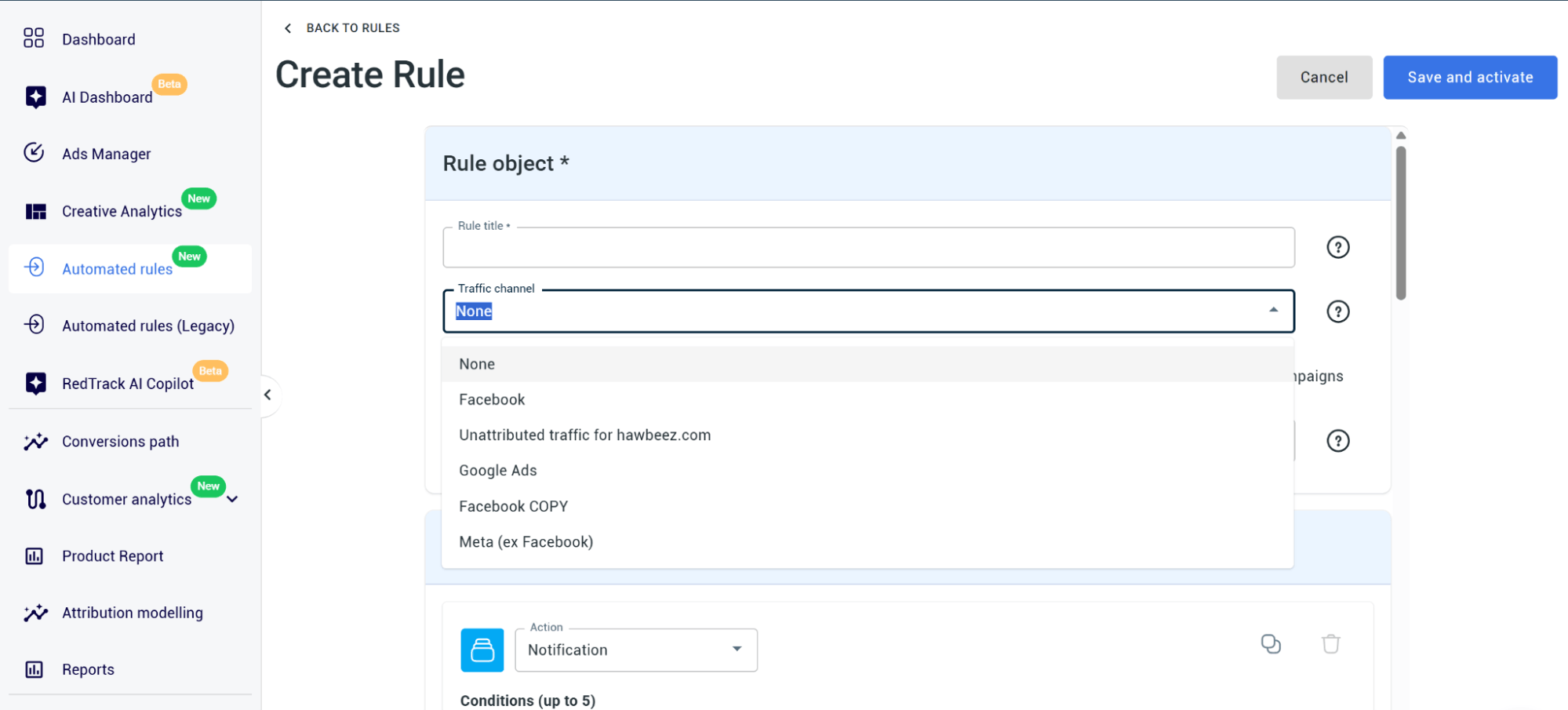
Then, select one or more of the RedTrack campaigns from the drop-down you want to apply the rule to, or choose All campaigns or Only active campaigns
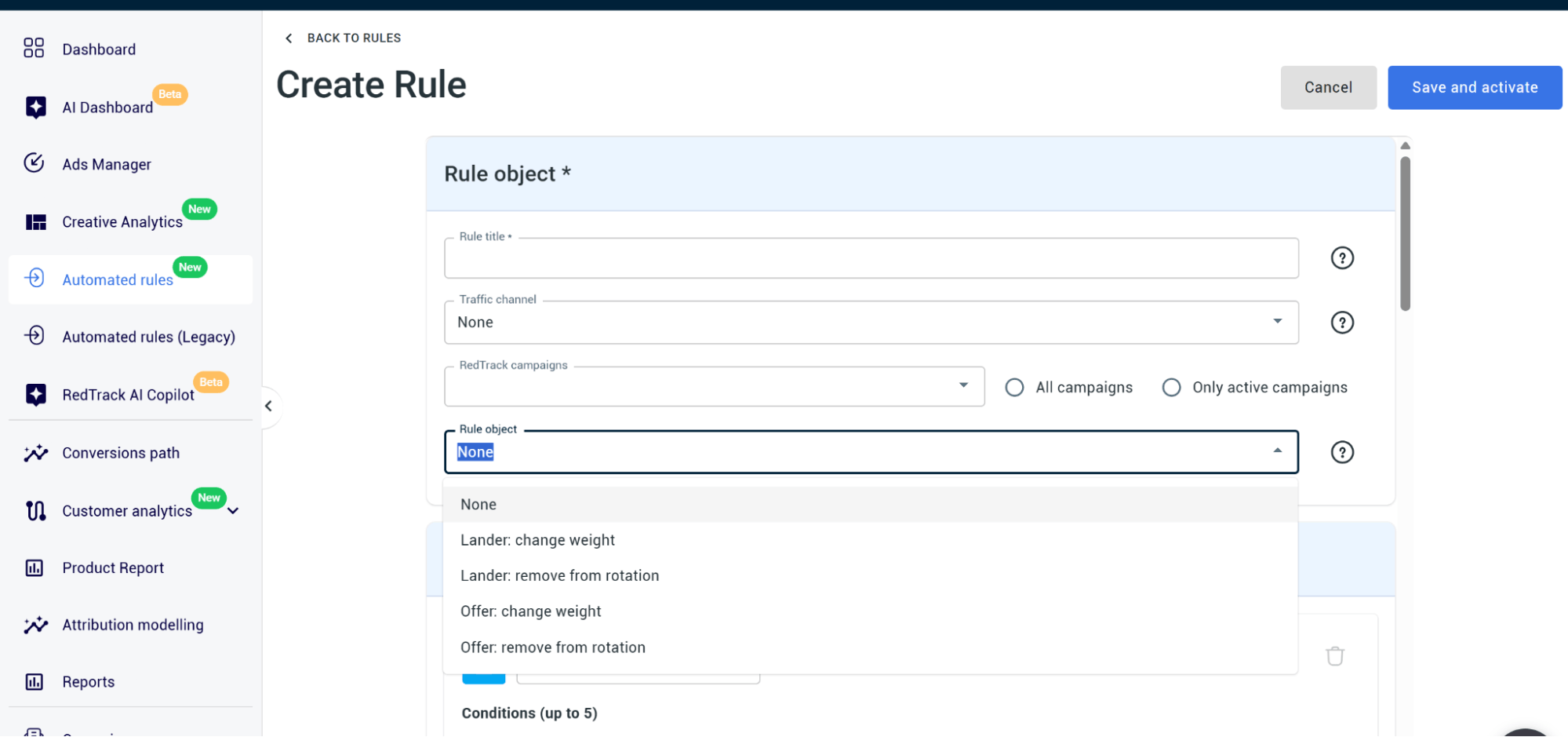
If you want to, you can also set a Rule object:
- Lander: Change weight
- Lander: Remove from rotation
- Offer: Change weight
- Offer: Remove from rotation
Note: Only use the Rule object if the rule needs to act on a specific lander or offer rather than at the entire campaign level. If you don’t have a rule object, leave this section as None.
Step 3: Set the action
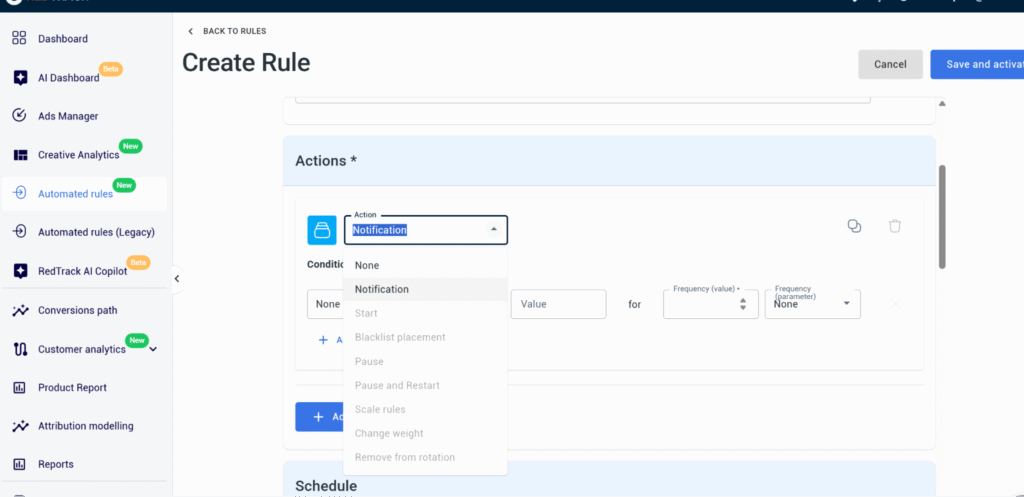
Under the Actions section, select what the rule should do when its conditions are met. You can choose from:
- Notification
- Start
- Pause
- Pause & Restart
- Scale rules
- Change wight
- Remove from rotation
- Blacklilst placement
Note: For your first rule, it’s safest to select Notification; that way, you’ll see what the rule would have done before it does anything irreversible.
Step 4: Set the conditions
In the Conditions section, you can then go and build the threshold logic. First, you need to pick a metric:
- Clicks
- Cost
- CPC
- EPC
- Total CPA
- Total Revenue
- Profit
- ROI %
- Others

- Then pick an Operator:
- Greater than
- Less than
- Greater or equal
- Less or equal
- Equal to
- Select a Value
- Set the Frequency Window the metric is measured over:
- Today
- Yesterday
- Last 3 Days
- Last 7 Days
- Last Days (Custom)
- Volume-based windows (Clicks or Conversions)
Click Add Conditions to stack additional conditions within the same rule (no more than 5 in total)
Note:A rule with 3 conditions only triggers when all 3 are fulfilled. Also, if you want the rule to perform more than one action when it fires, click Add action.
Step 5: Set Frequency
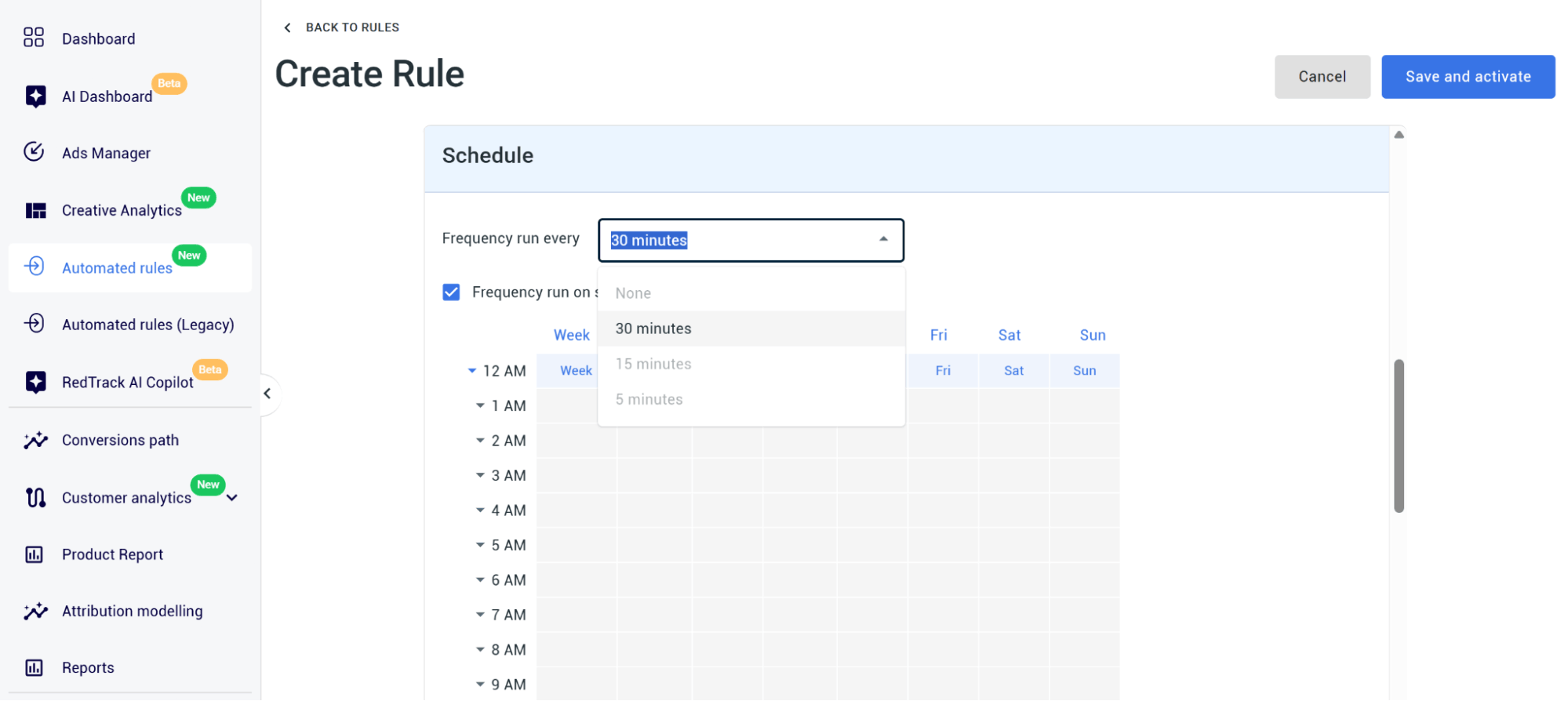
Then, under Schedule, click on Frequency run every drop-down and select your frequency (the default is 30 minutes).
Note: If you want the rule to apply to specific hours, days, or dates:
- Check Frequency run on specific days and times, and make your selections in the cells.
- Check Run within a date range and make your date selections.
Step 6: Set your notification alerts
Go to Notifications and select how you want to be alerted when the rule fires:
- Webhook
- None (only use if the rule’s action is itself a notification)
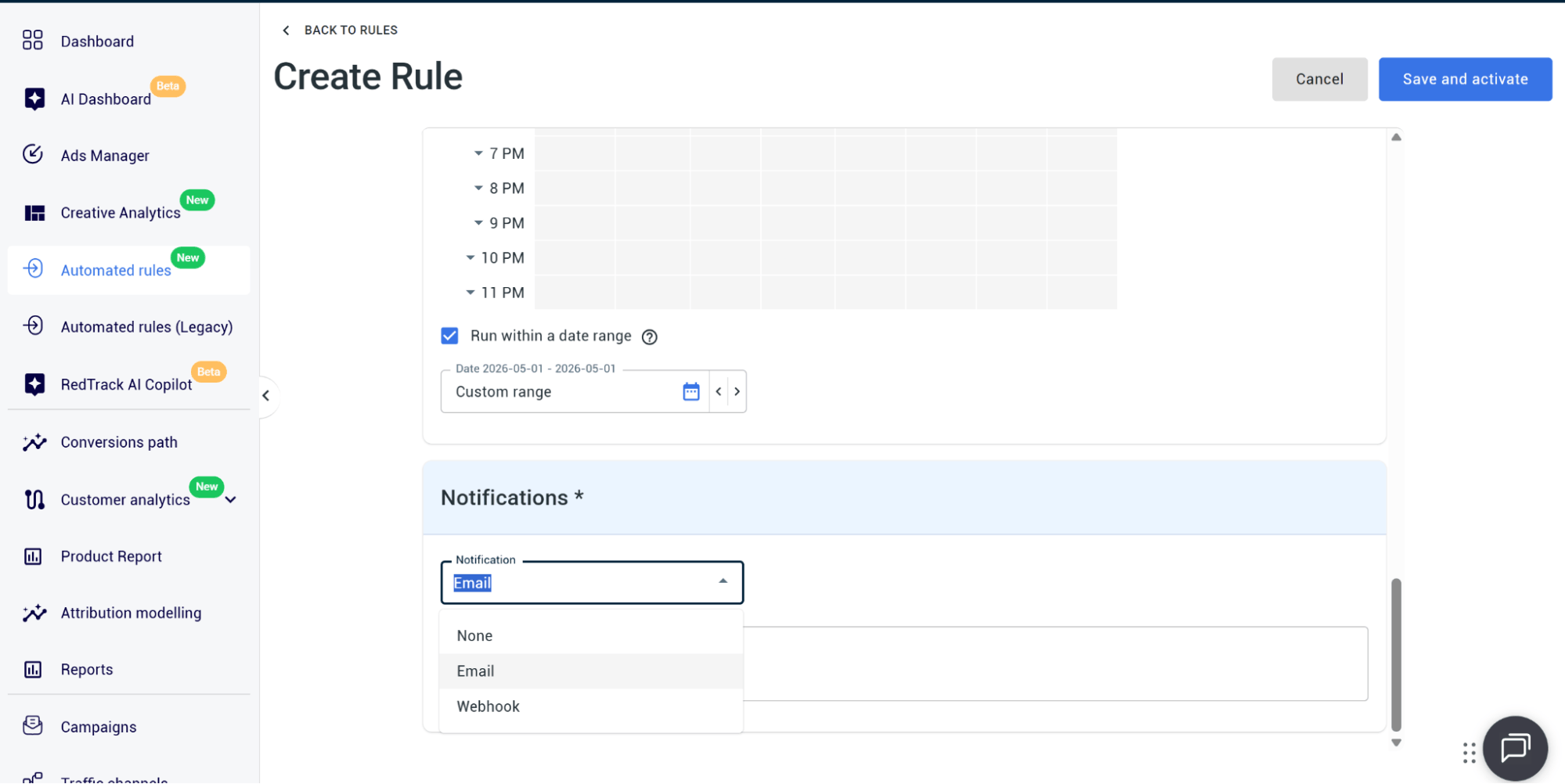
Step 7: Save and activate your rule
Click Save, and the rule should appear in the Automated rules list, along with its status scope, conditions, and actions
RedTrack Campaign Automation: Scale Faster & Waste Less Budget
Campaign automation is great, but it only works properly when it works with clean, accurate, complete, real-time data.
The problem isn’t the actual automation rule functionality within platforms; it’s that your ad platforms don’t have data at that quality level.
Most platforms have varying delays and platform-biased reporting data, so even though you’ve set rules that make sense, the results never actually show.
That’s why so many media buyers and performance marketers switch to a third-party ad tracking software and ad automation tool. These are tools like RedTrack, which give you a clean and unified reporting layer that sits above all your traffic channels. It tracks ad campaigns independently and gathers every view, click, conversion, and customer journey sequence, and stores it in one centralized, trustworthy data dashboard.
And because RedTrack’s rules run on the complete picture (cost, conversion, and profit data), real automation and optimization finally become possible.
So instead of manual campaign monitoring, you have a system that runs the show day and night.
Book a demo to see how the tool speeds up campaign optimization via automation rules, or sign up for the 14-day free trial.


