
Your CPA keeps rising. Your average order value seems to be taking a slow dive. And repeat purchases seem to be disappearing. You think it might be your creatives, so you rework them. When that doesn’t work, you launch to new audiences, hoping something will change, but it doesn’t.
This is a familiar scenario for many businesses running ads on platforms like Meta or Google. When they get to this point, they hit a wall, not knowing what’s continuously causing low campaign success.
In most cases, the problem isn’t your creatives or your offers. It’s low-quality conversion signals that are being fed to your Meta or Google algorithms.
Every platform uses the signals from past conversions to build models of the types of customers future ads should target. When the data in those platforms is low-quality, your ads target the wrong people.
In this use case, we tell you why low-quality conversion data in ad platforms can slowly kill ad performance over time, and we explain how RedTrack’s conditional postback filtering can fix it.
Challenge: Why Meta Keeps Mistargeting Customers
Most advertisers think that more conversion data automatically means better optimization. It doesn’t. But better optimization only happens when algorithms are fed good conversion data, not any kind of data.
Meta’s algorithm is designed to optimize ads based on the conversion signals it’s fed. While this sounds good in theory, in reality, if you’re using unfiltered CAPI or a pixel setup, you’re actually training the algorithm to waste your budget on anything that gets a hit. This “anything” may include low-value traffic, bots, and duplicate data instead of real buyers.
There are three main reasons why this happens.
1. By default Meta Think Every Conversion = A Good Conversion
First, when Meta grabs conversion data, it doesn’t know how good that data is. It can’t differentiate between customers who only buy at a high discount and those who buy at full price.
It also can’t tell which:
- Customers become repeat buyers
- Subscribers churn after a couple of days
- Orders produced and actual profit
- Buyers never return again
All the platform sees is that a conversion event took place. And that’s it.
So if your account sends 1500 purchase events, which mostly include low-value impulse purchases, Meta thinks that’s what success looks like, and it goes on to optimize towards similar users.
And that’s where your problem starts: Your campaigns keep showing strong conversion volume, but your business performance keeps dropping.
It’s not that the algorithm isn’t working; it’s working just fine. The problem is, it’s working well with the wrong data.
2. Many CAPI Setups Don’t Filter Before Sending Back Data to Meta
Second, even though many media buyers and performance marketers have moved on to server-side tracking and CAPI integrations, some providers only focus on improving coverage without improving the quality of the signals.
So it will send all the following events directly back to your Meta:
- Small orders with low margins
- Trial starts
- Flash-sale purchases
- One-time buyers
- Discount-driven buyers
- Customers with no long-term value
Now imagine the customer group that an algorithm will gather up and target with that lot of data. It’s made up of a bunch of all sorts of low-quality signals, which Meta will continue to use to train its algorithms to target low-quality customers.
Those customers might convert, but they are not worth much to your business.
3. The Agorithm Problem Compounds Over Time
Finally, you come face-to-face with the biggest problem of all: bad signals keep gathering, compounding the negative impact on your business results.
Meta doesn’t just optimize for one bad customer. It builds lookalikes from your entire conversion history.
So over time, you end up with:
- Weak customers influencing your audience modelling
- Audience quality gradually deteriorates
- Rising CPA even with stable or high conversion volume
- Weak ROAS
Your Meta algorithm essentially learns to prioritize easy, low-quality conversions instead of truly valuable customers.
And because many media buyers don’t filter their conversion signals, this impact keeps compounding, causing more damage over time.
Solution: Filter & Choose Which Conversions Are Fed To Meta’s Algorithm
The solution to this bad data problem lies in you taking control over which signals your Meta algorithms are fed.
You basically want to be in charge of selecting which conversions become learning signals.
When you use an independent third-party attribution tool, you ultimately want to track all conversions so you can dig into the data and fully understand how your ad campaigns are working.
But, when you want to teach your Meta which types of customers to target, you don’t want to send it the signals from all your good and bad conversions. You only want it to find you the best possible customers that are most likely to buy and keep buying your products.
This is where RedTrack’s conditional postback feature comes in.
How RedTrack’s Conditional Postback Works to Filter Out the Junk
What RedTrack’s conditional postback feature does is it lets you apply specific filter rules before conversion events are sent back to Meta via Conversion API.
Essentially, instead of automatically sending every conversion back to Meta, you can actually decide which conversions meet your specific value conditions.
So, if a conversion passes your specific condition set:
- It’s passed on to be used as learning data for Meta algorithms.
If it doesn’t:
- It still gets stored inside your RedTrack dashboard for other reporting insights, but Meta doesn’t use it as part of its learning algorithm for optimizations
The Filters You Can Use Inside RedTrack
When it comes to the types of filters you can use and apply in RedTrack, you’ve got many options.
Because RedTrack lets you apply filter rules per conversion type, each event can carry its own independent condition.
Here are a few examples:
- You can set a minimum order value for purchase events
- You can require a minimum payout threshold for recurring subscription events
- You can exclude trial events entirely
And you have three filtering moderators:
- Greater than
- Less than
- Equal to
How This Lets You Improve Campaign Performance
The moment Meta starts getting cleaner, better signals, you’ll see your optimization process change dramatically.
So instead of optimizing for easy conversions automatically, Meta’s algorithm will start to prioritize what you feel are your best customers.
And while you might not see this instantly, over time, you will see a dramatic improvement in:
- Customer and audience quality
- Average order value
- Long-term ROAS
- Repeat purchase behavior
- Budget allocation efficiency
On top of that, you’ll also stop wasting time on things that might not be the issue at all, such as:
- Creatives (which you might be reworking continuously)
- Testing audiences (because you think you are mistargeting)
- Rebuilding campaign structures (because there might be a better approach)
- Launching unnecessary offers (thinking you might get more people clicking “Buy”)
The moment you start working with RedTrack’s conditional postbacks, you’ll realize none of the above was the problem. The problem was targeting the right users.
How To Set Up Conditional Postback Filtering in RedTrack
To set up conditional postback filtering in RedTrack, you first need to have your conversion types defined and mapped.
Once that’s done, follow the steps below.
Step 1: Set up your Meta pixel configuration
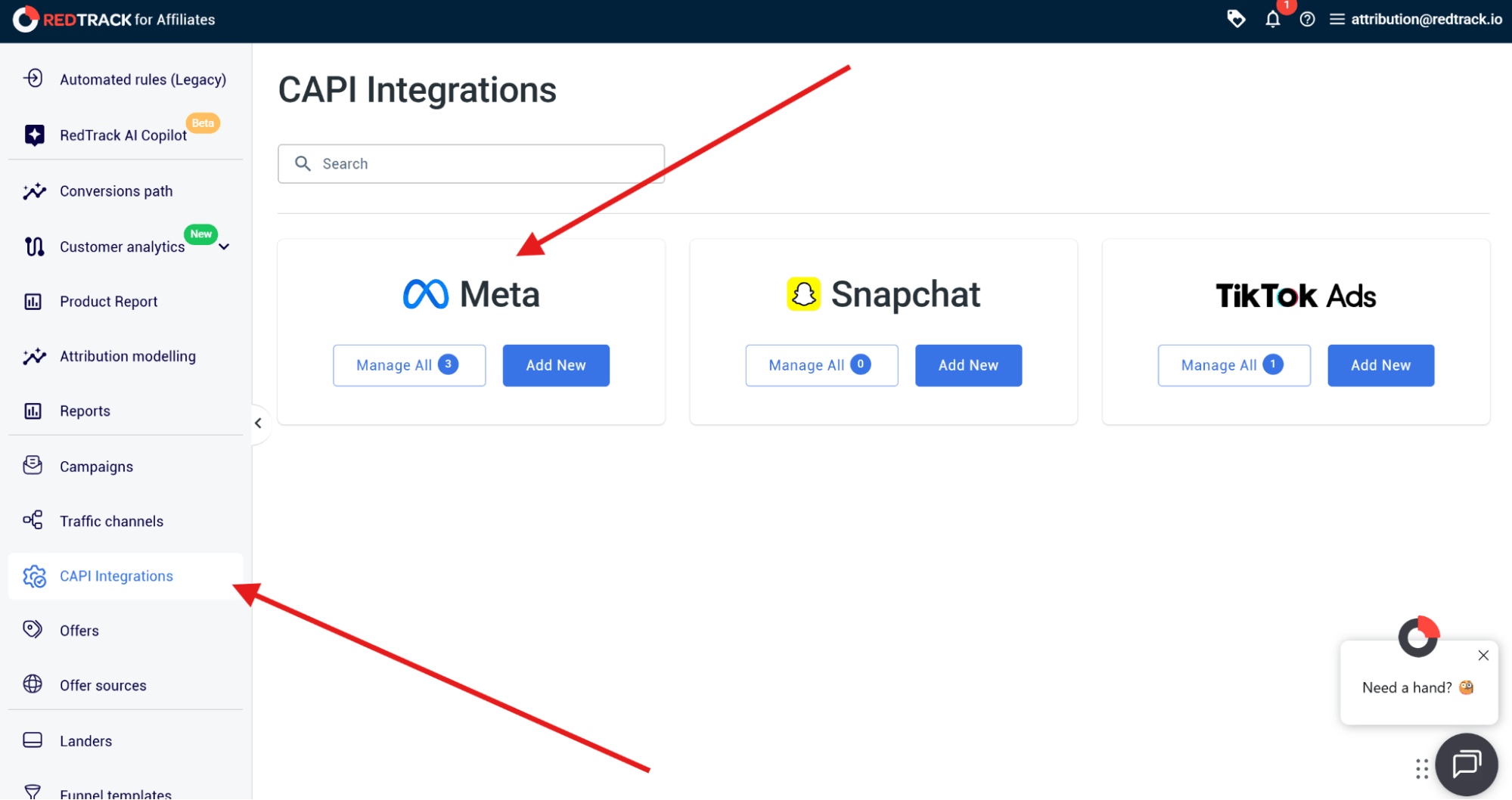
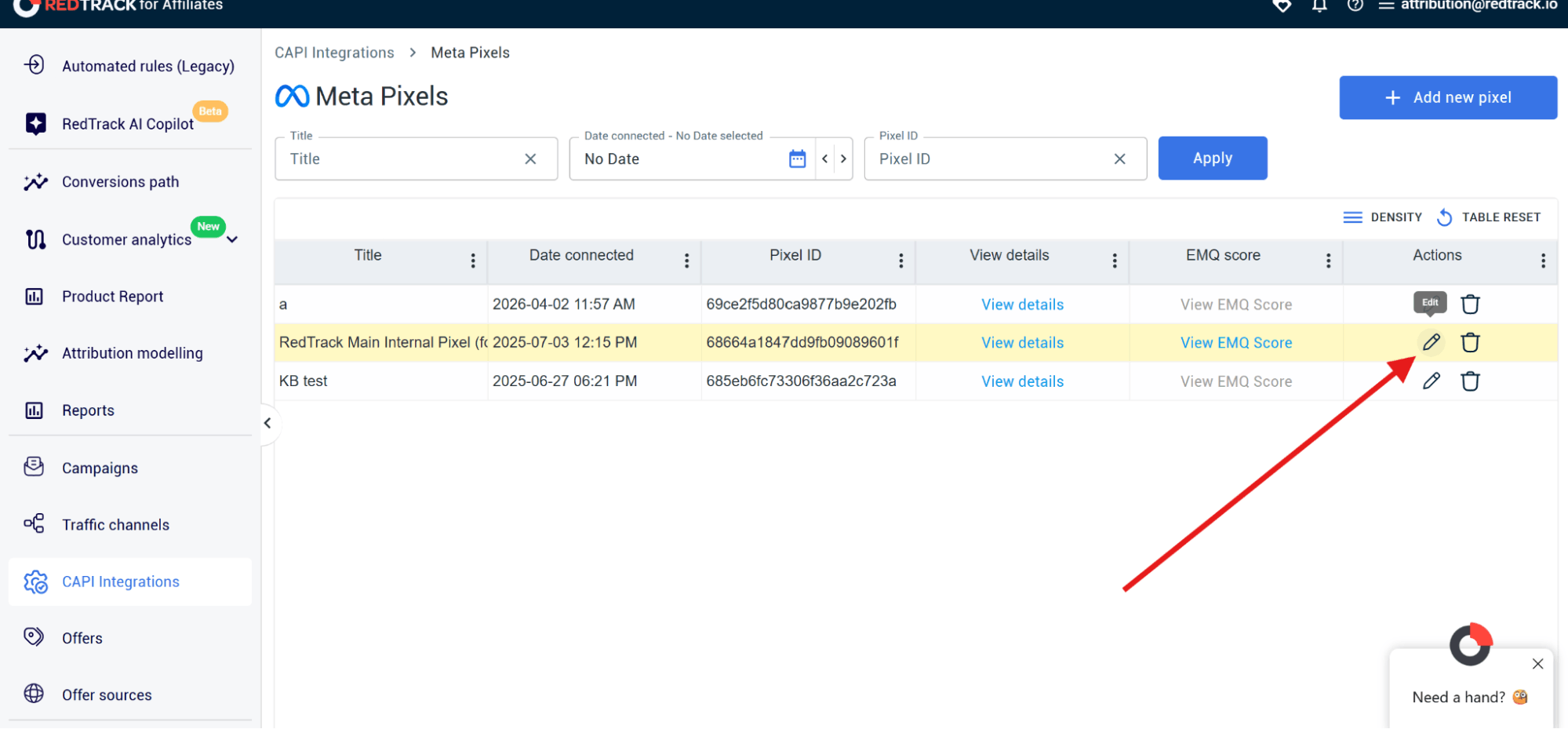
- In the RedTrack dashboard, go to CAPI Integrations
- Select Meta Pixels
- Then click on Manage All
- Select the pixel you want to edit and click Edit
Step 2: Select the conversion event you want to filter
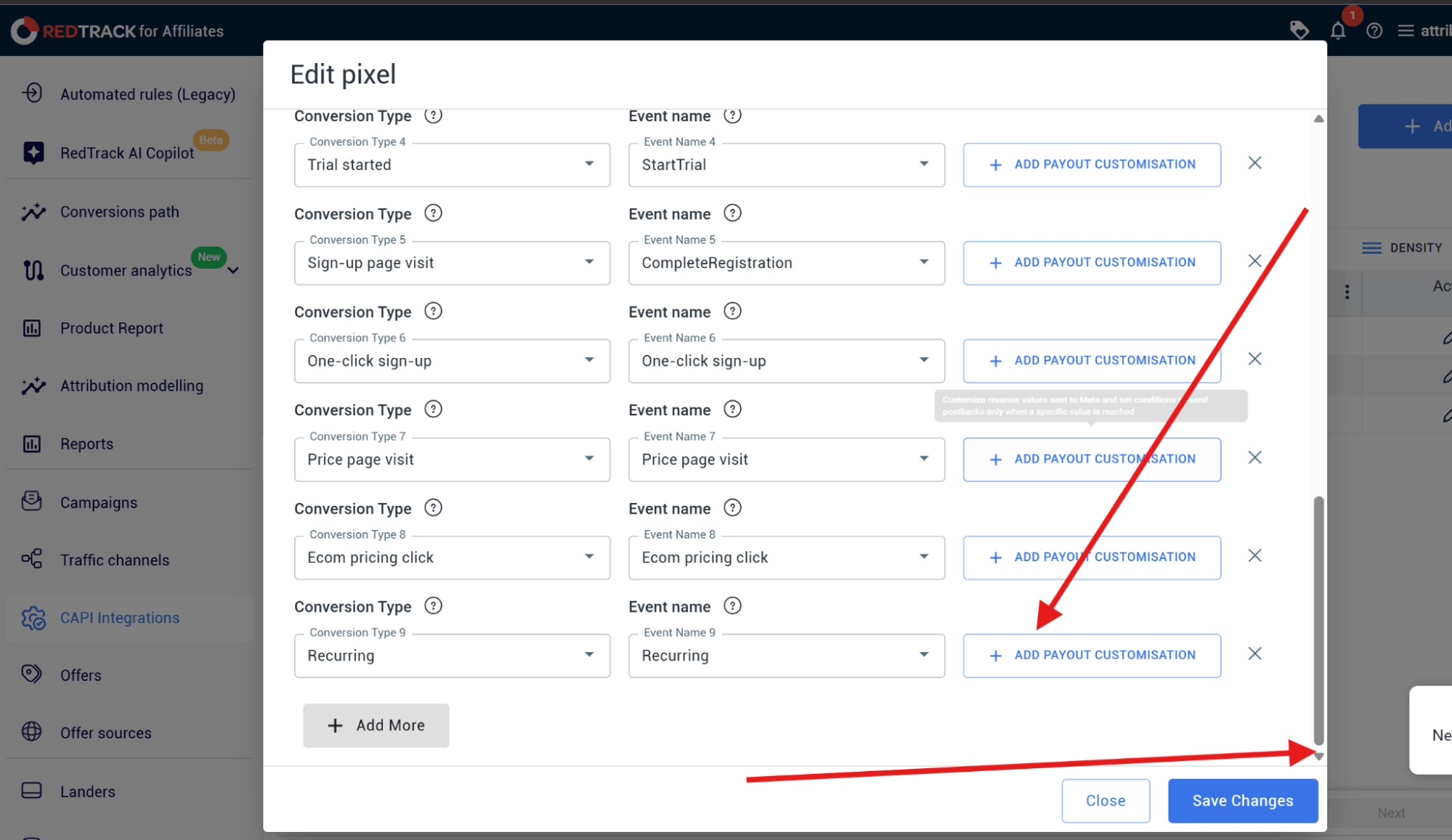
- Scroll down to the conversion type you want to configure:
- This could be Purchase, Recurring, Lead, Price Page Visit, or Signup.
- Then click +Add Payout Customization
Step 3: Configure the Conditions/Rules
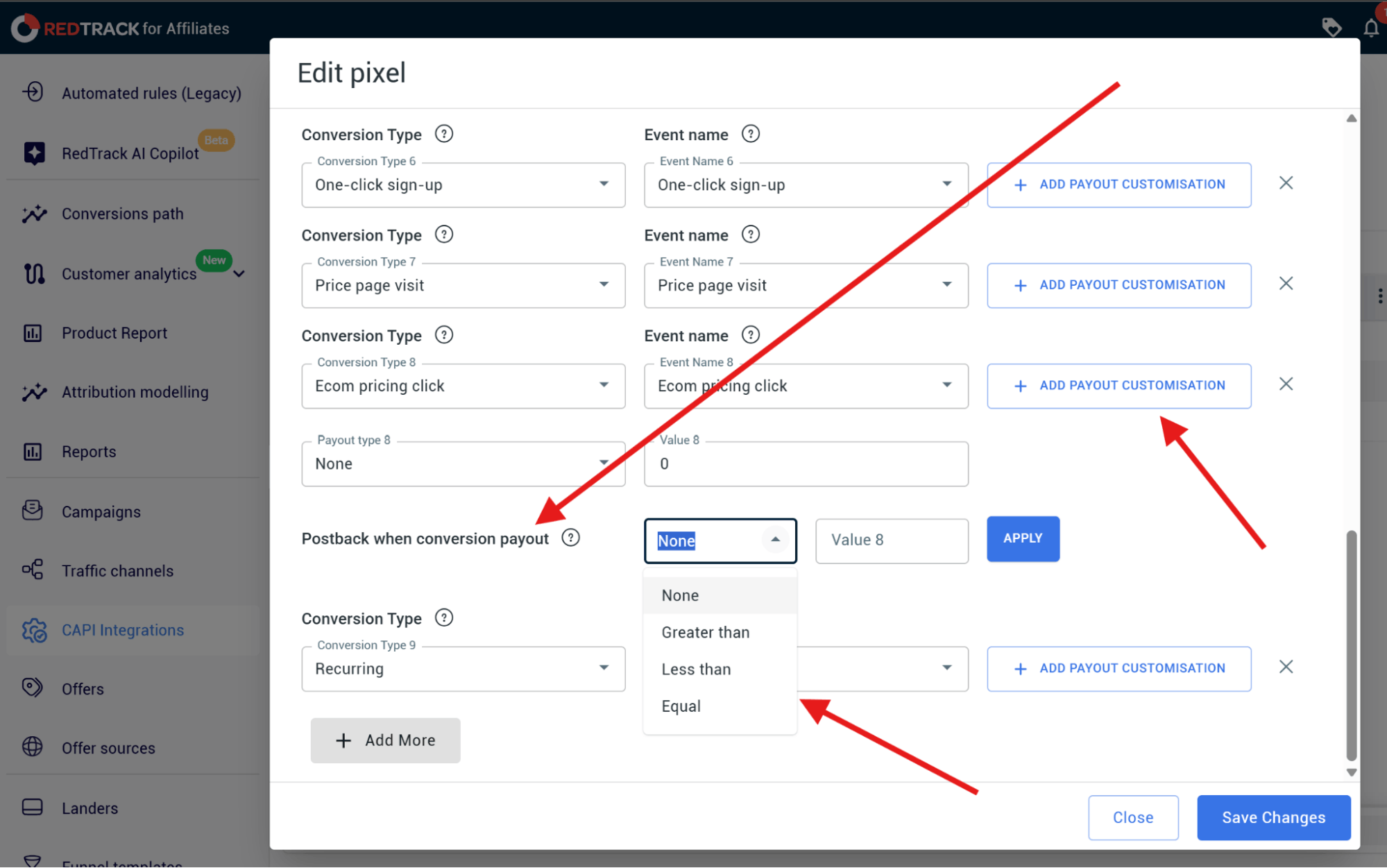
- In the payout customization panel that expands, find the Postback when conversion payout row

- Click the operator dropdown and select from:
- Greater than
- Less than
- Equal
- Then, enter your threshold value in the Value fiel.d
- Click Apply
- Then, click Save Changes, and the filter becomes active immediately.

- Repeat this process for any other conversion types you want to apply a filter to
Step 4: Monitor your results
Over the next few weeks, monitor the following figures:
- Average order value
- ROAS trends
- Repeat purchase rates
- Audience quality
- CPA stability
Use RedTrack to Stop Meta Learning Invalid Data
All the conversions you feed back to Meta tell its algorithm which customers to target next. If you continue to forward every type of conversion (the good and the bad), you’re telling Meta to optimize for an average of everything. But that’s not what you’re after, is it?
What you want to target is the best of the best. You want your ads to target high-value customers. Those who will buy once and keep coming back. For that kind of optimization, you need to start filtering out the junk in your conversion events.
That’s what RedTrack does. With conditional postback filtering, you get to tell Meta exactly which conversations to learn from. Within RedTrack’s conversion tracking software and conversion attribution software, you choose the filters and set the numbers that will only pass on quality learning signals over to Meta.
Over time, you’ll get cleaner audience modelling, high customer quality, stronger long-term ROAS, and you’ll be able to make smarter budget allocations.
So if you want Meta to learn from your best customers only, sign up for RedTrack’s 14-day free trial or book a demo with one of our people to find out more about the tool that can revamp your performance marketing.


