
When you count on ad platforms for attribution data, you’re basically putting all your trust in the same companies that are trying to sell you more traffic.
So, platform bias is pretty much a given because each platform can only see the performance of the traffic that it sells you. As a result, they tend to over-credit themselves for conversions.
And in most cases, they overestimate their own performance. What you end up with is duplicated data, bloated performance numbers, and insights that aren’t worth following.
To make the right optimization decisions for your business, you need to be able to see the wider picture, and that means unbiased, multi-channel attribution reporting that actually shows you the full journey a customer takes.
Challenge: Getting Unbiased Attribution Data & Accurate Reports
Marketing attribution is basically determining which marketing activities (campaigns, channels, or ads) contribute to and deliver conversions for your business.
Most marketers get their attribution data from individual ad platforms; however, this creates a credibility problem. Because these ad platforms (think Google Ads and Meta Ads) act as both the source of traffic and the provider of measurement data, this creates a conflict of interest.
Since they have a financial incentive to prove their own platform’s effectiveness and superiority, they generally over-credit their own ads and channels for conversions that may have realistically occurred on a competing ad platform anyway.
Why Accurate & Unbiased Data is Important
The reason why accurate and unbiased attribution is important is that it helps you identify which marketing efforts actually drive revenue.
When you know which ads, campaigns, and channels are delivering the best results, you can then:
- Optimize the ones that are delivering results
- Cancel the ones that don’t
- Adjust your budget distribution accordingly
Why can’t You Get Accurate Attribution From Ad Platforms?
Each ad platform tracks attribution and clicks based on its own set of data and rules.
We’ve already mentioned the conflict of interest problem when it comes to getting attribution reporting data from the same platforms where you place your ads, but let’s go a little deeper into this issue.
Because these platforms only have the data and interactions that took place on their platform, you get zero insight into the entire customer journey.
Your ad platforms don’t actually know if one user interacted with other ad platforms before they made a purchase from an ad link on their platform.
But the reality is, a user may have seen and clicked on ads in Google, Reddit, or whatever other platform before they actually converted from a Meta ad.
So as soon as a user clicks on an ad platform’s ad, they take the credit for that conversion, regardless of all the touchpoints that may have taken place before this click.
And every platform does this.
So you’ll have one conversion being owned by multiple platforms (meaning you have duplicated data that needs to be cleaned).
Here’s a scenario of a standard customer journey online.
Let’s say a customer signed up for a RedTrack trial. Here’s what their customer journey looked like:
- They saw a Facebook ad, clicked on it, explored the product, and left the website.
- The next day, they opened Google, typed ‘ad tracking’ into the search, and clicked on several ads that popped up for different tools, each of which they clicked (including RedTrack), they viewed the websites, and then left again.
- A couple of days later, the same user spoke to some colleagues about what they felt were good ad tracking tools on the market, and the colleague mentioned RedTrack.
- The next day, the user intentionally goes and types “RedTrack ad tracking” into Google, enters the website, and signs up for the free trial.
The reality is that every one of the above channels would credit the conversion to themselves. So across your channels, this one conversion would be claimed by Meta Ads, Google Ads, and organic brand search.
This creates multiple problems for marketers trying to make sense of which ad campaigns or platforms are actually bringing in customers and proving to be successful.
- You have mixed messages and duplicated conversion data, where one conversion is attributed to multiple platforms.
- You have no way of applying different attribution models, which can provide more detailed insights into which area of the marketing funnel is working well and which needs improvement.
Now, if you can’t apply a particular attribution model (First-touch, Last-touch, Mixed, or U-shaped), you won’t be able to track and analyze your conversion data in the way that makes the most sense for your business.
For example:
- If you’re interested in which channel brought your brand to the user’s attention first, you’d want to look at the First-Touch attribution model. In the case of our example above, it was Meta Ads, and the conversion credit should be attributed to Meta.
- If you’re more interested in finding out how effective your remarketing campaign efforts are, you would probably use the Last-Touch attribution model. In this case, you’d credit the conversion to last touch, which is organic brand search.
Now, because ad platforms can’t see the entire customer journey, performance marketers turn to multi-channel attribution tools like RedTrack to solve the problem of biased conversion data and inaccurate marketing reports.
Solution: Use RedTrack, an Agnostic, Unbiased Attribution Tool
The great thing about RedTrack is that it’s completely platform agnostic.
When it comes to attribution, it maps the entire customer journey. You get everything from first to last click, and every interaction in between. So, it provides a complete picture (unlike individual ad platforms, which each take attribution credit for themselves at whichever point it occurred).
Once captured, RedTrack stores all the raw conversion data across all your ad platforms. You can then jump into RedTrack and use that raw data to create customized attribution reports for six different attribution models, including:
- First Touch – Attributes 100% of conversion to the first interaction. Best to identify brand awareness and demand generation.
- Last Touch – Attributes 100% of conversion to the last interaction.Best for BoFu optimization and short sales cycles.
- Linear – Distributes conversion credit equally across all touchpoints. Best for a balanced, multi-channel strategy where you believe every touch matters equally.
- Time Decay – Gives more credit to interactions closer to the final conversion. Best for moderate sales cycles or promotional campaigns with a sense of urgency.
- U-Shaped – Assigns 40% to the first, 40% to the last, and 20% to the middle touches. Best for strategies where you believe discovery and closing are equally important.
- Custom – Allows for customized weight distribution for specific scenarios. Best for business with unique sales cycles where you can adjust how credit is distributed across touchpoints.
How to do Unbiased Attribution Reports in RedTrack
Initially, whenyou set up your RedTrack account, you choose which attribution model you want to set as your default. This will set where and how you want your conversions to be attributed. You can select which campaign or traffic source you want your initial conversions report to represent.
However, if you want to compare conversions by different attribution models, you can go through the following steps.
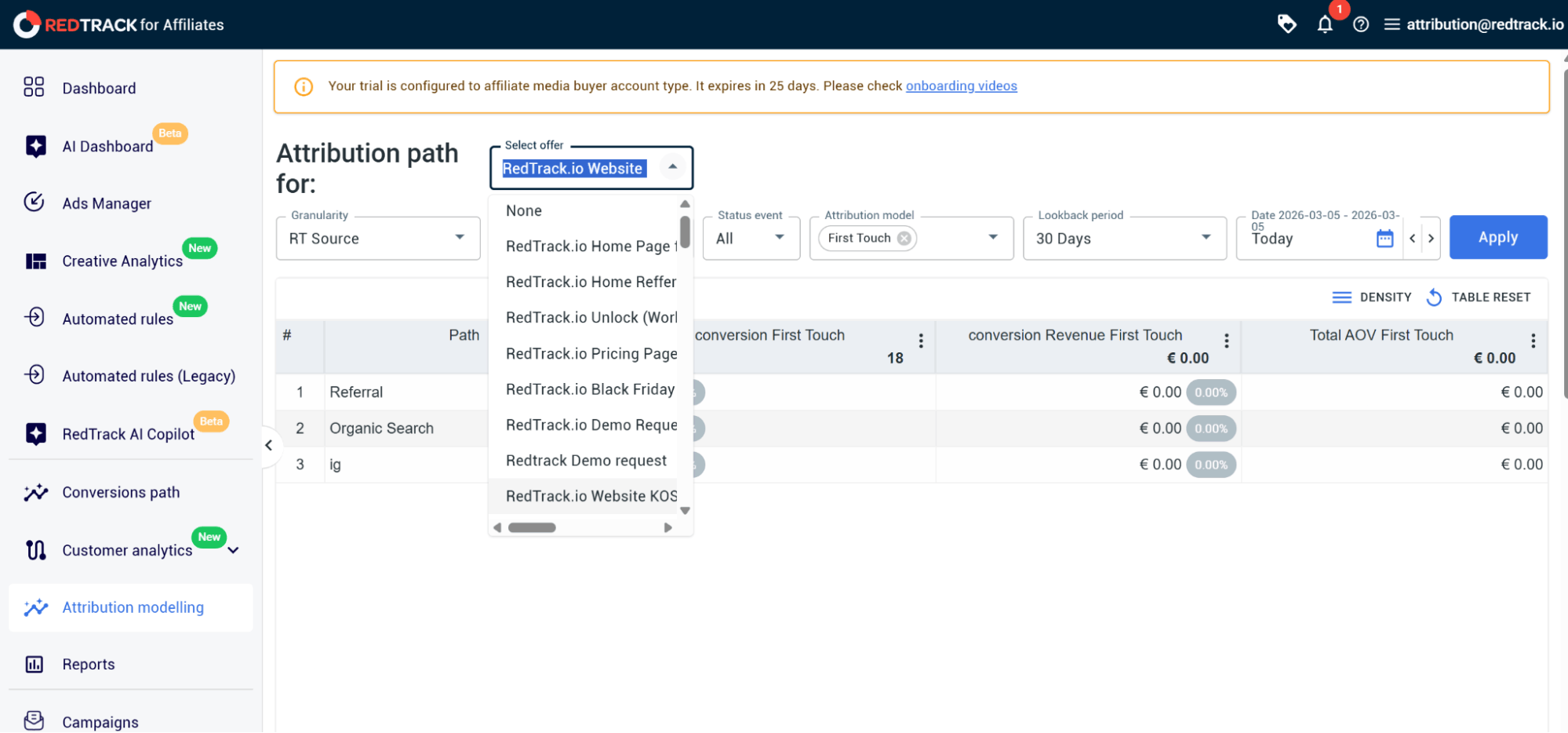
Step 1: Create your attribution report
From your RedTrack dashboard navigation menu:
- Navigate to Attribution Modelling.
In the Select Offer drop-down, select the website you want the report for.
Step 2: Set the granularity for your report
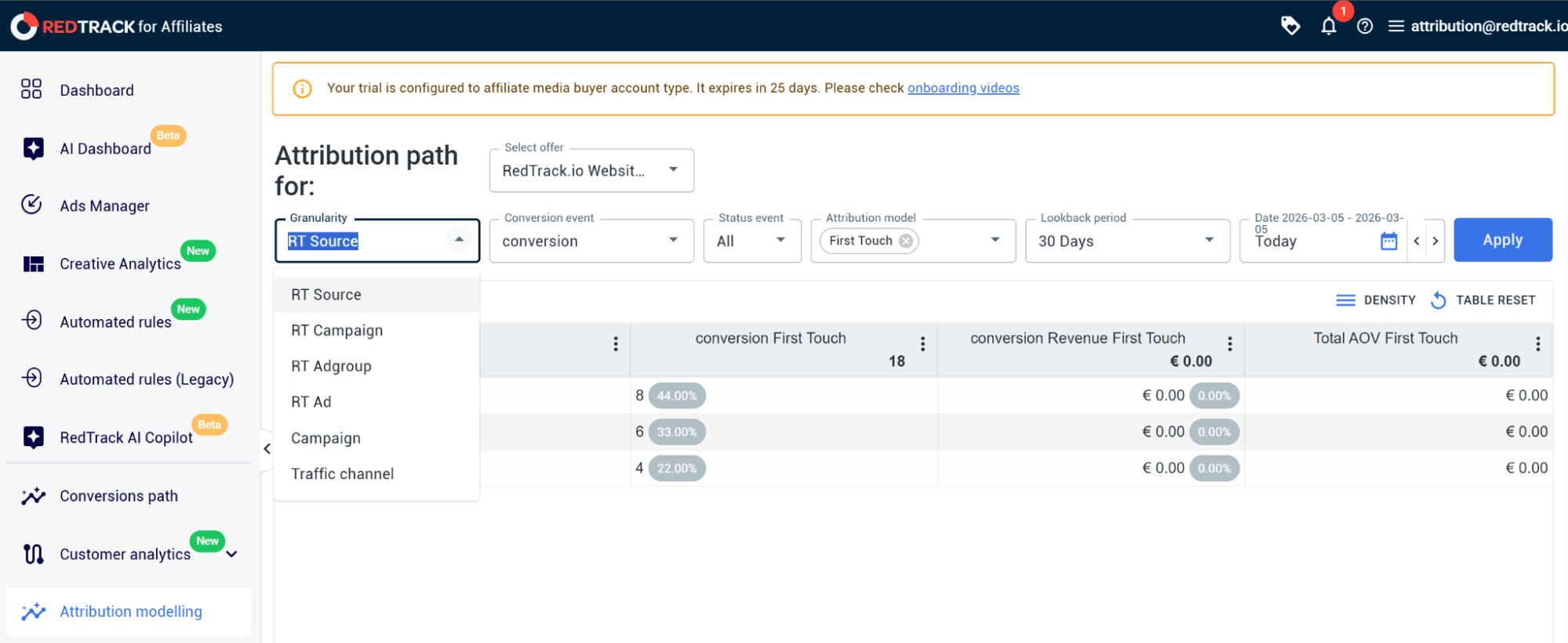
Next, you need to set the granularity of how you want to attribute the conversions according to different attribution models.
You have multiple options in the drop-down menu, including source, campaign, ad group, ad, and traffic channel.
- Select the granularity from the Granularity drop-down.
By choosing the Traffic Channel, you’d select the highest level.
Step 3: Select the conversion event
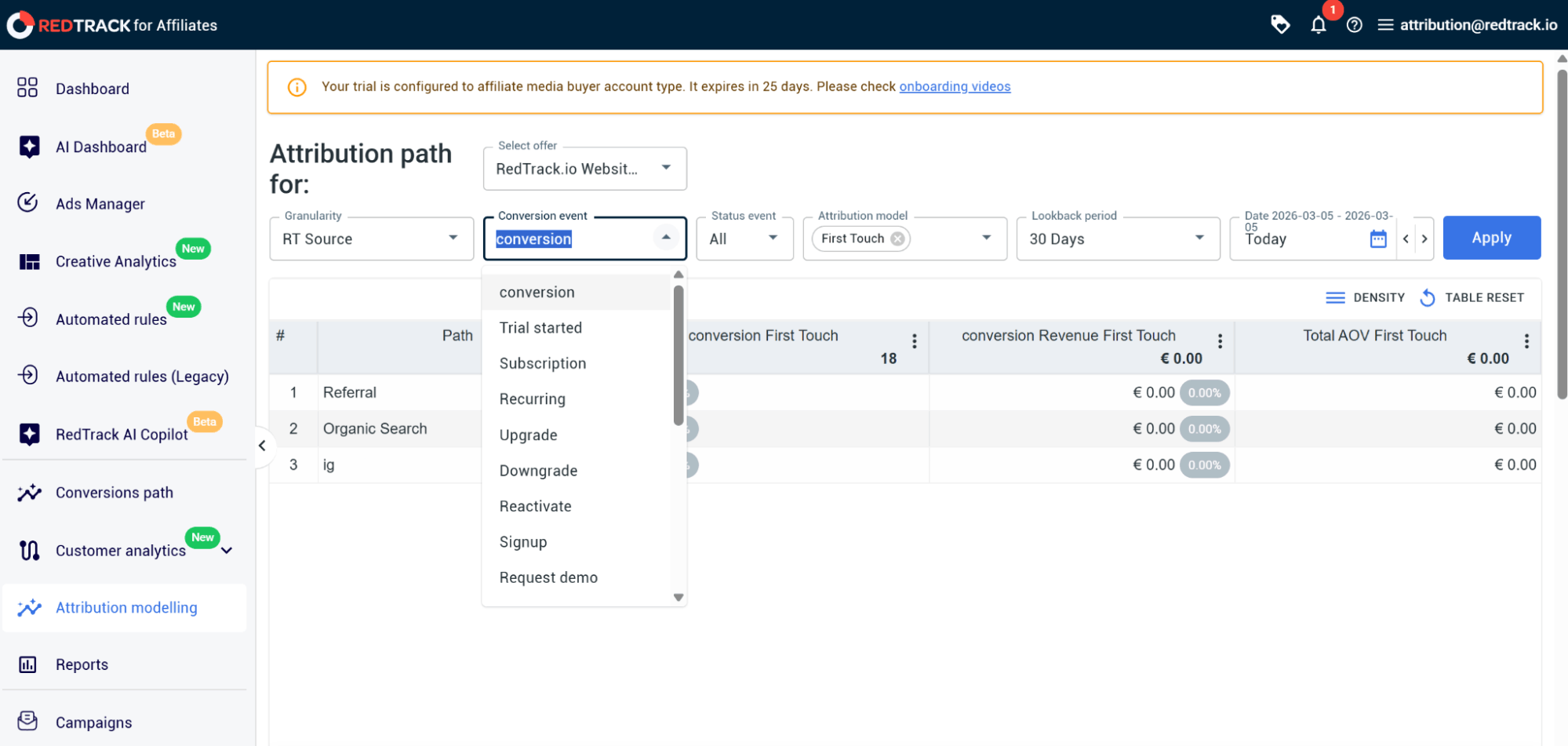
Here, again, you have a drop-down option for a variety of conversion events, which you would have defined earlier in the setup of your campaigns and account. The tool lets you define up to 20 different conversion events.
- Click on the Conversion Event drop-down and select the event you want to track for this report.
Move on to the Status Event drop-down and select whether you want the report to cover New, Repeated, or All events.
Step 4: Select the attribution model you want to follow
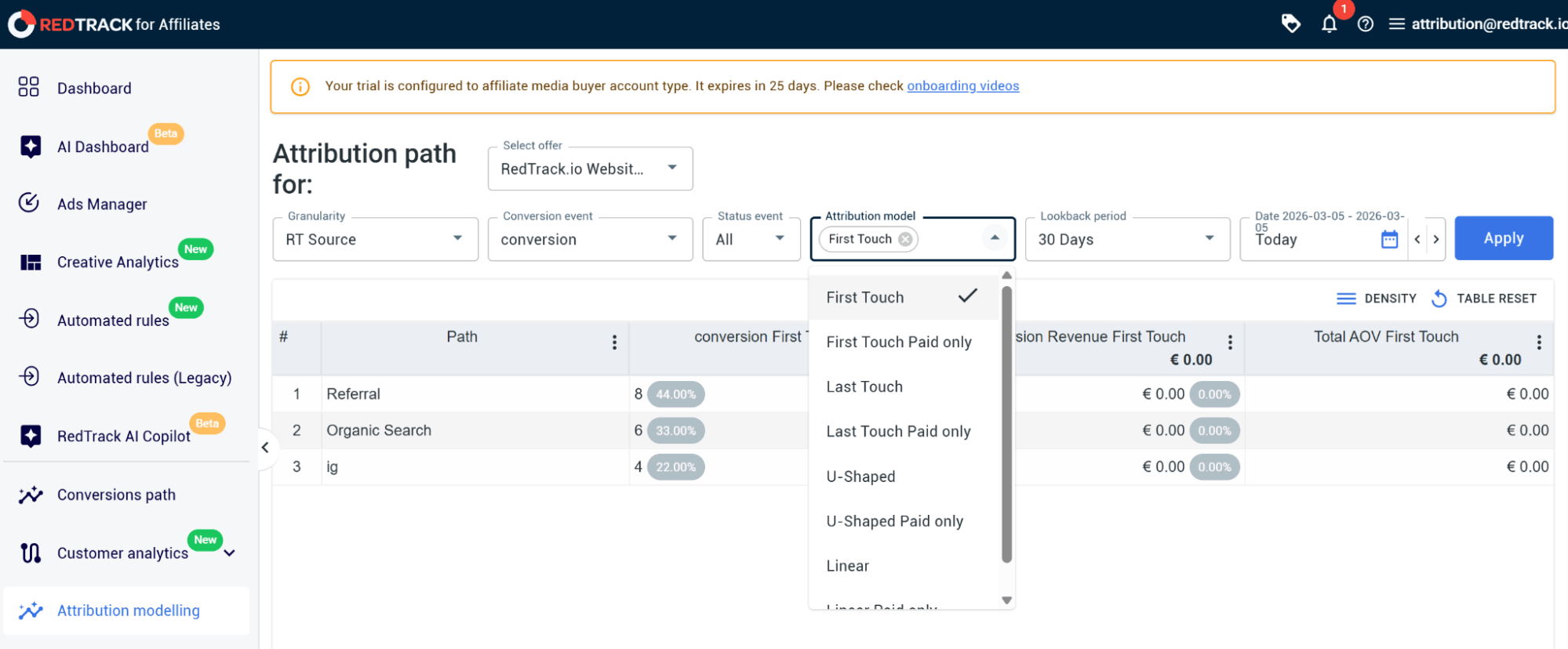
All the attribution models provide real-time data, and you can go in and recreate new reports for the same campaigns, channels, or events, so you can compare conversions across different attribution models.
- Click on the Attribution Model drop-down and select the model you want to use for this report.
Step 5: Set the timeframe for the report
When it comes to selecting the timeframe of your report, you have two sections you need to define.
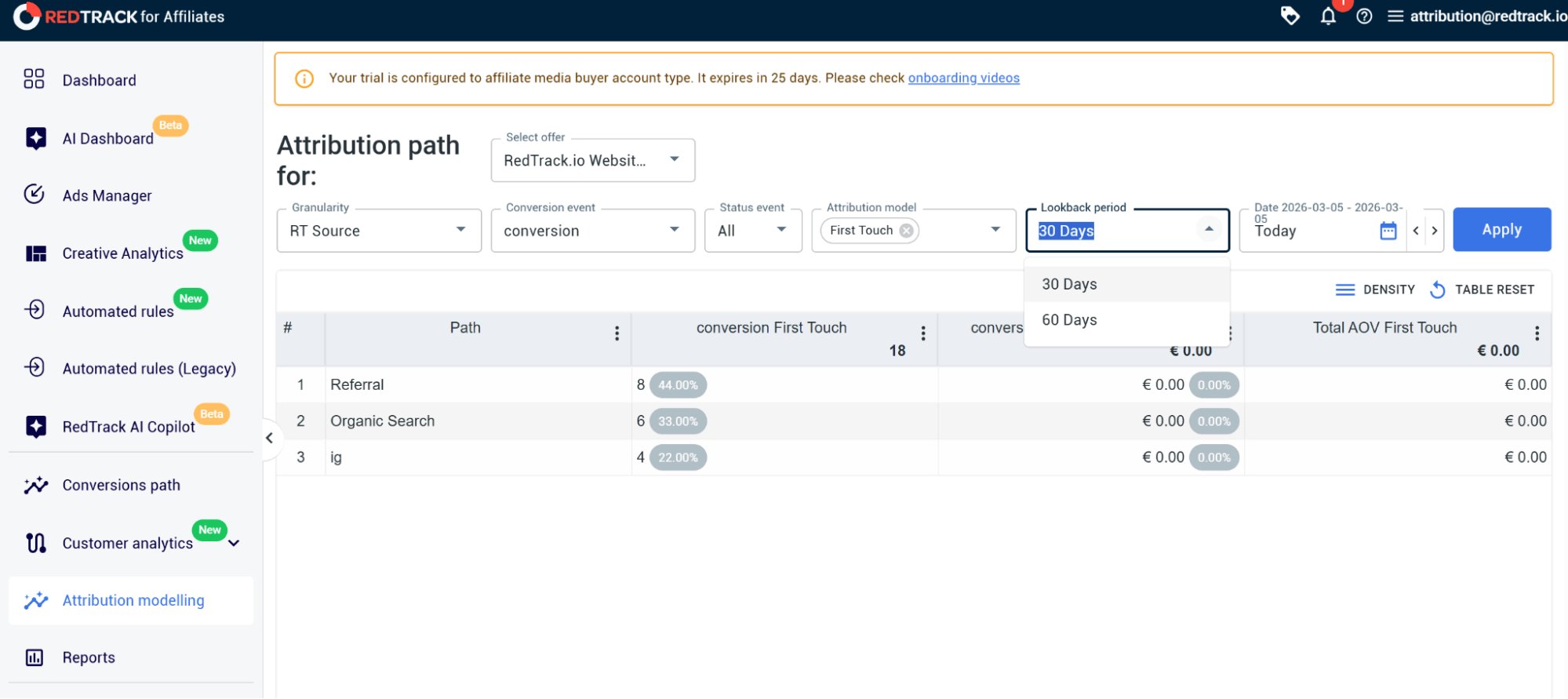
The first is the Lockback Period drop-down, which lets you choose between 30 or 60 days. This captures how deep into the past you want to attribute the conversions. (The bigger the lockback period, the more clicks your report has to work with and consider.)
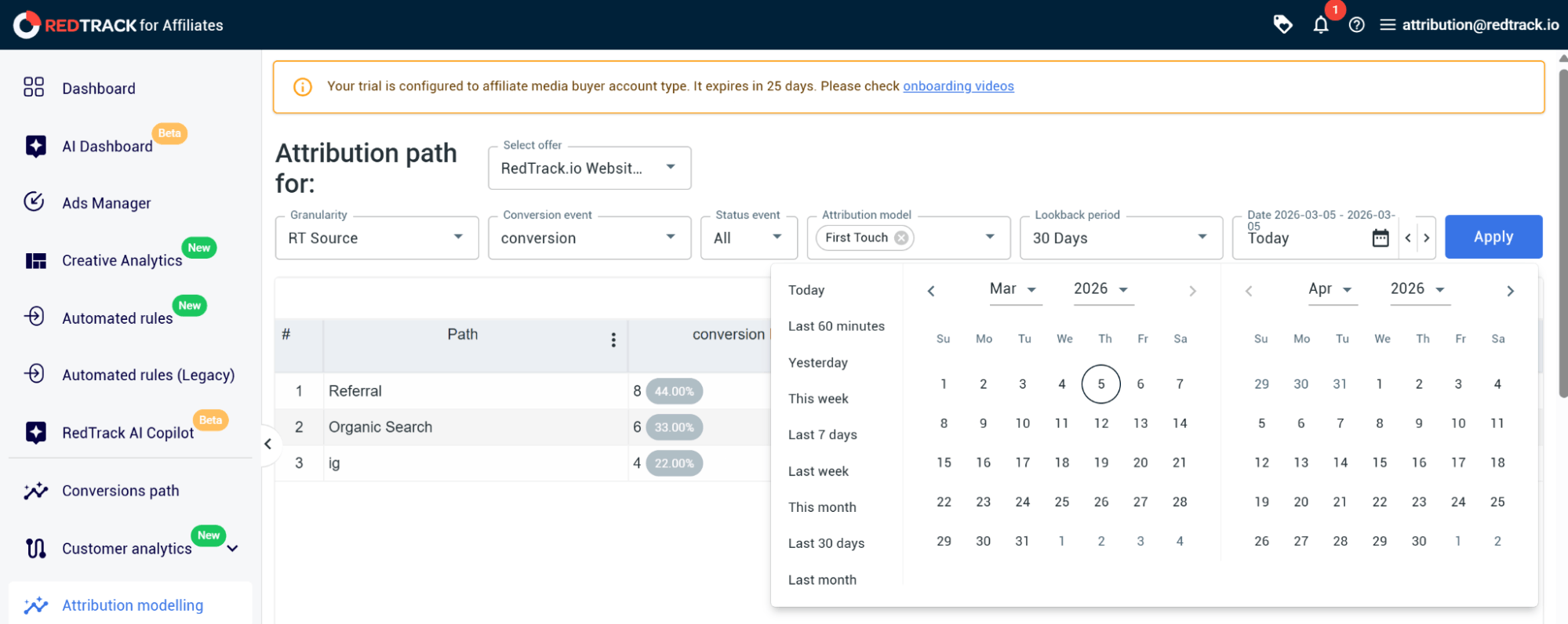
The second is the Calendar Time Period, where you can select the conversions that happened for a set calendar date period that you want to cover in this report.
Step 6: Run the report and analyze your attribution data
The last step is to run the report and analyze your attribution data.
- Click on Apply.
- View which platforms have brought in what proportion of conversions.
- Adjust your ad channel budgets according to the results the report has produced to optimize ad spend.
RedTrack: The Unbiased, Real-Time Tool You Need For Accurate Attribution
Unbiased attribution is fundamental if you want to make smart decisions that lead to sustainable growth for your business.
The problem with getting attribution reports from individual ad platforms is that it gets skewed. You only see the performance perspective from the platform selling you ads. And that’s a problem.
But what if you could see the whole picture, across Meta, Google, and all the other touchpoints in your customer’s journey?
That’s what you get with RedTrack: raw conversion data from all your channels, and then you also get the flexibility to pick an attribution model that suits your strategy.
This flexibility is key because it means you can look at different marketing efforts, from brand awareness to remarketing, multi-touch funnels, and more. The result is accurate reporting, a clearer view of where your money’s going, and the confidence to make decisions that’ll actually drive growth.
If you want to scale your paid ads efforts and drive revenue, you need a multi-channel conversion tracking tool that gives you unbiased attribution data and multi-dimensional attribution modelling options.
Book a demo with one of the RedTrack team members to find out more about how the tool can help you get more out of your ad spend.And if you’re ready to test the tool, sign up for our 14-day free trial.


