
The advertising world is changing fast. Between disappearing third-party cookies, stricter browser policies, and growing privacy laws, marketers are scrambling to find reliable ways to measure performance. That’s where a new approach comes in – and the first question many ask is: what is server side tracking?
In simple terms, server-side tracking is a method of collecting and processing user data through your own server instead of relying solely on browser-based scripts and pixels. This shift gives you more accurate data, stronger privacy controls, and faster websites – all of which are critical in today’s performance-driven landscape.
For media buyers, agencies, and e-commerce brands, the implications are massive. By owning the pipeline of data that powers optimization, you get back control of attribution, keep your reporting accurate, and stay prepared for a cookieless future.
Understanding Server Side Tracking
Server-side tracking is changing the way performance marketers, eCom brands, and agencies handle data.
Instead of relying only on JavaScript and browser pixels (which are increasingly blocked, stripped, or delayed), server-side tracking runs events through your own server first. From there, the cleaned data gets forwarded to platforms like Google, Meta, TikTok, or your analytics tools.
Think of it as moving your tracking from a fragile browser environment into a controlled server environment. When someone clicks an ad, fills a form, or makes a purchase, that event goes to your server. You decide how to validate it, what to enrich, and what finally gets passed on to the platforms optimizing your campaigns.
Why does this matter? Three big reasons:
- More accurate data – By bypassing browser limits and ad blockers, you can recover up to 20–30% of conversion data that client-side pixels typically lose.
- Stronger privacy controls – Your server acts like a checkpoint. You choose what to share, anonymize sensitive details, and keep compliant with GDPR/CCPA before sending anything out.
- Faster websites – Fewer third-party scripts running in the browser means quicker page load times and smoother user experiences.
The bottom line? Server-side tracking isn’t just a technical upgrade.
It’s becoming the way for businesses to keep accurate attribution, full data ownership, and reliable reporting in today’s privacy-first world.
The Problem with Client-Side Tracking
Client-side tracking (pixels, scripts, and tags firing in the browser) has powered digital marketing for 20+ years. But today, it’s collapsing under its own weight. What once worked fine is now leaving marketers with blind spots, broken attribution, and wasted ad spend.
Here’s what’s killing it:
Ad blockers are everywhere
Almost half of internet users (43% globally, 50%+ in some groups) run ad blockers. These tools don’t just stop ads – they kill your tracking scripts too. For eCom brands and media buyers, that can mean 10–30% of conversions never get tracked. Imagine trying to scale campaigns when a third of your data is missing.
Browsers are shutting the door
Safari’s Intelligent Tracking Prevention (ITP) limits third-party cookies to just 7 days. Firefox has its own version, and Chrome is rolling out stricter privacy defaults every quarter. Even if your scripts load, they’re working with crippled cookie windows that distort attribution and make retargeting harder.
The cookie collapse
By 2024, third-party cookies are gone in Chrome – the browser with 65%+ market share. That’s the nail in the coffin for traditional tracking models. Without a pivot to first-party and server-side data, marketers risk losing their ability to measure conversions, build audiences, and optimize campaigns.
Tracking slows websites down
Every extra pixel or third-party script adds drag: more HTTP requests, more JavaScript parsing, and slower page loads. That hurts UX and SEO – users bounce, Google downgrades your site, and you lose revenue on both ends.
The takeaway? If you’re still relying only on client-side tracking, you’re basically flying blind. Your campaigns are running on incomplete, inaccurate, and delayed data – making optimization guesswork instead of science.
How Server Side Tracking Works
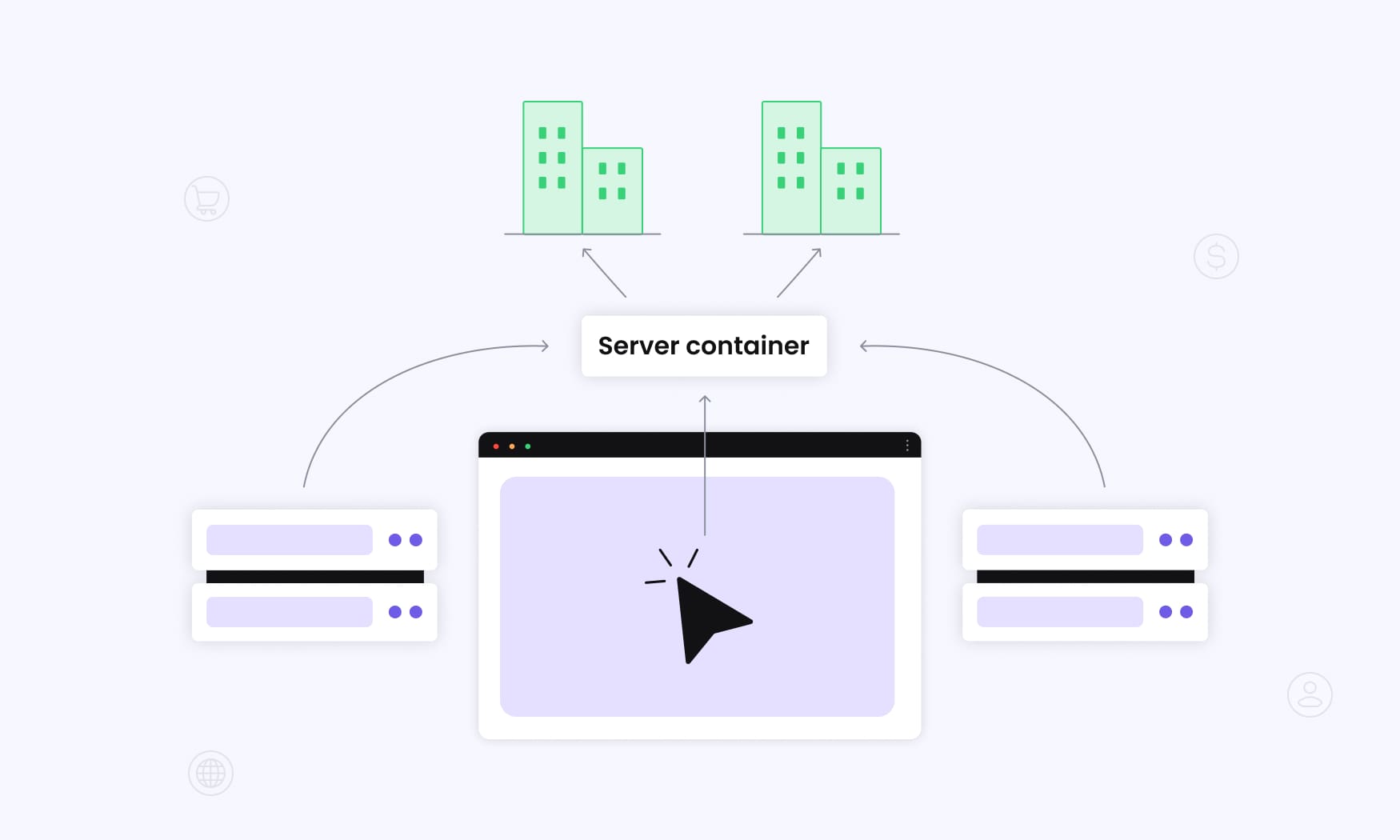
Server-side tracking reimagines how user interaction data travels from your website to analytics and ad platforms. Instead of firing directly from the user’s browser to dozens of third parties, the data flows through a controlled pipeline managed by your own web server.
The Data Journey
When someone interacts with your site – browsing, adding products to a cart, or checking out – a lightweight script captures the event. But instead of instantly pinging Google Analytics, Meta, or TikTok, that event data first moves to your web server (sometimes called a tagging server).
Your server becomes the “traffic controller.” It validates the event, enriches it with context (like customer value from your CRM), and even strips or anonymizes sensitive info for compliance. Only then does it start sending tracked data to your analytics and ad platforms through secure API connections.
The Technical Foundation
This workflow is powered by server-side tagging, often managed via tools like Google Tag Manager Server-Side. Setting it up usually involves:
- A cloud-hosted server (Google Cloud Platform, AWS, or similar) running continuously as the hub for incoming events and outbound API calls.
- First-party domain setup so all collection happens on your own domain – not a third-party one that browsers or ad blockers can easily block.
- API integrations replacing fragile JavaScript connections, ensuring cleaner, faster, and more secure sending of tracked data across platforms.
Technical Architecture Overview
Modern server-side tracking runs on advanced tag management systems built for server environments. Google Tag Manager Server-Side (sGTM) leads the way here, giving marketers a familiar interface while delivering the backend power needed for enterprise-scale data processing.
Cloud Infrastructure Requirements
A solid setup needs dedicated computing resources that can handle both your site’s traffic volume and the data coming from each user’s device. Platforms like Google Cloud Platform and Amazon AWS provide pre-configured environments tuned for tracking workloads, complete with auto-scaling that flexes resources up or down as demand shifts.
The infrastructure usually includes:
- Load balancing to absorb traffic surges during campaigns or peak shopping days.
- Redundant storage to prevent data loss during updates or downtime.
- Global edge locations to cut latency and speed up event delivery no matter where your users are.
Data Pipeline Architecture
The data pipeline is the beating heart of server-side tracking. Raw event data goes through several stages:
- Validation to confirm accuracy,
- Enrichment to add business context (like LTV from your CRM),
- Transformation to match platform requirements, and
- Routing to send the right data to the right tool.
This lets you manage data with precision. For example, you can push conversion data to Google Ads while feeding engagement metrics to your CRM – all while making sure sensitive details from a user’s device stay anonymized inside your controlled environment.
Security and Compliance Integration
Security is baked into the architecture. SSL certificates ensure encrypted transfers, access controls define who can edit configurations, and audit logs record every touchpoint for compliance reporting. Together, these safeguards protect user data across the entire collection and processing flow.
Client-Side vs Server-Side Tracking Comparison
Seeing the practical differences between client-side and server-side setups makes it clear why so many businesses are moving past pixels – even if it means more upfront effort.
| Aspect | Client-Side Tracking | Server-Side Tracking |
| Data Collection Location | User’s browser executes scripts | Your own server processes data |
| Ad Blocker Impact | 10-30% data loss common | Minimal impact on data collection |
| Cookie Management | Limited to 7 days (Safari ITP) | Extended lifespans up to 1-2 years |
| Website Performance | Multiple scripts slow page load | Lighter browser load, faster pages |
| Data Control | Limited control once sent | Full control over data processing |
| Implementation Complexity | Simple script installation | Requires server setup and maintenance |
| Monthly Costs | Typically free | $50-500+ depending on traffic |
| Privacy Compliance | Challenging with third-party scripts | Built-in privacy controls |
| Data Accuracy | Decreasing due to browser restrictions | Significantly more complete data |
The Privacy Control Advantage
Server-side tracking gives you full control over tracking user interactions and deciding what actually gets shared with external platforms. You can enforce rules that strip personally identifiable information before anything leaves your server, while still sending rich journey insights to your internal analytics tools.
This level of control is crucial in a privacy-first world. Under GDPR and similar laws, consent management isn’t optional. With server-side tracking, it’s easier to respect user preferences by sharing only the data you have consent for – while still maintaining accurate conversion reporting.
Cost vs. Value Analysis
On the surface, client-side tracking looks “free.” But when 20–30% of conversions go untracked, the hidden costs pile up: broken attribution, wasted ad budgets, and missed optimization opportunities that can add up to thousands each month.
Yes, server-side tracking comes with setup and hosting costs. But because you’re capturing a complete view of user interactions, most businesses see ROI within just a few months. Accurate data means better decisions, better optimization, and better returns.
Key Benefits of Server Side Tracking
Server-side tracking isn’t just about plugging data leaks. It changes how you see your customers, how you optimize campaigns, and how ready you are for a privacy-first future. With cleaner data and more control, businesses can finally move from guesswork to confident, ROI-driven decisions.
Dramatically Improved Data Accuracy
Companies that switch to server-side tracking often see a 20–40% lift in tracked conversions and user interactions. Why? Because it removes the weak links in client-side setups. Ad blockers can’t stop server-to-server calls, browser privacy settings don’t interfere with your own collection, and first-party data sidesteps third-party cookie limits.
Accuracy goes beyond just counting conversions. With server-side tracking, you capture reliable details like the user agent and device context directly from the server, ensuring cleaner attribution data and stronger optimization signals.
The impact is immediate: marketing teams finally trust their attribution, finance teams see revenue reported with confidence, and product teams get a complete picture of behavior that actually drives smarter changes.
Superior Website Performance
Switching to server-side tracking can cut down 60–80% of browser-side JavaScript load, which directly speeds up your site. With fewer third-party scripts fighting for resources, web pages load faster, Google’s Core Web Vitals improve, and users get a smoother browsing experience.
And speed isn’t just nice to have – it converts. Even a 100-millisecond improvement in page load time can lift conversion rates by 1–3% for e-commerce brands. For many businesses, the performance boost from server-side tracking alone covers implementation costs through higher engagement and better conversions.
Future-Proof Data Strategy
The end of third-party cookies isn’t a question of if – it’s already happening. As browsers roll out stricter privacy rules and block more tracking methods, server-side tracking becomes the reliable foundation businesses can’t afford to skip.
With server-side in place, your first-party data strategy turns into a real competitive edge. While others struggle with gaps in attribution and missing conversions, you’ll keep feeding clean, consistent data to your ad platforms and analytics.
Marketers who adopt early say the same thing: they feel confident about their tracking even as the rest of the industry loses visibility. That’s the kind of stability that lets you focus on scaling campaigns instead of worrying about what data you can trust tomorrow.
Enhanced Security and Data Protection
When you process sensitive user data on your own servers instead of firing it straight to multiple third-party platforms, you immediately cut down security risks. You set the rules – from encryption standards to access permissions and data retention – across the entire tracking pipeline.
This matters even more for businesses working with high-stakes data: payments, healthcare details, or anything falling under strict regulations. With server-side tracking, you stay compliant with industry requirements while still getting the deep analytics you need to optimize campaigns and prove ROI.
Privacy and Compliance Advantages
Regulations like GDPR and CCPA demand “data protection by design” – meaning privacy isn’t something you tack on later, it has to be built into your systems from the start.
That’s exactly where server-side tracking shines. Because all events first pass through your own server, you gain natural enforcement points to apply consent rules, anonymize data, and decide what gets shared externally. In practice, that means easier compliance without giving up the ability to track the full customer journey.
Granular Consent Management
Server-side tracking takes consent handling way beyond the basic cookie banner. Instead of a one-size-fits-all switch, your server can dynamically adjust what’s shared based on user choices in real time.
For example, if someone says yes to analytics but no to advertising, your data management rules can send their behavior data into Google Analytics while completely blocking it from Meta or Google Ads audiences.
This kind of precision keeps you compliant, protects user trust, and still lets you get the most value from the data people are comfortable sharing.
Data Minimization in Practice
Modern privacy laws push businesses to collect only the data they truly need – nothing extra. Server-side tracking makes that simple by letting you filter, anonymize, or drop sensitive details before they’re passed to third-party platforms.
For example, your server can strip IP addresses, hash email fields, or block sensitive product categories from ad platforms – while still preserving that information for your internal analytics. That way, your teams are still accessing data for insights, but external vendors only see what’s strictly necessary.
The result? You stay compliant with data minimization requirements while keeping the analytics power your business depends on.
First-Party Data Ownership
Server-side tracking strengthens your first-party data strategy by making sure every interaction flows through systems you own and control. In a world where third-party data is becoming less reliable – and more expensive – that ownership is priceless.
The benefit goes way beyond attribution. By keeping the pipeline under your control, you not only improve data security but also build a long-term asset that powers the entire business. Customer service teams get richer context, product teams gain more accurate usage insights, and business intelligence has a complete view of the customer journey to work with.
Owning your data means owning your future – and server-side tracking makes that possible.
Implementation Methods and Options
There’s more than one way to roll out server-side tracking. The right choice depends on your team’s technical skills, your budget, and how much control you want over the setup. By understanding the main approaches, you’ll be able to pick an implementation path that fits your business – instead of wrestling with a solution that doesn’t match your needs.
Google Tag Manager Server-Side Implementation
For many businesses, Google Tag Manager Server-Side (sGTM) is the first step into server-side tracking. It runs on Google’s infrastructure, giving marketing teams a familiar interface if they’re already used to traditional GTM.
The setup typically involves provisioning a Google Cloud Platform server, configuring your sGTM container, and migrating existing tags into the new server environment. For straightforward sites, this can take 2–4 weeks, while more complex, multi-platform setups often stretch closer to 8 weeks.
Technical requirements include setting up your domain to route tracking requests through your own server, configuring SSL certificates for secure data flow, and managing API credentials to connect with analytics and ad platforms. Teams with the right skills can handle this in-house, but many companies turn to agencies for support – especially if they want direct access to expert guidance during the initial rollout.
Managed SaaS Solutions
Another option is to go with a fully managed SaaS platform. These solutions take care of everything – infrastructure, updates, and technical maintenance – so you don’t have to. Tools like Elevar, JENTIS, and others focus on e-commerce or specific verticals, offering a turnkey setup that gets you live quickly.
The trade-off is cost. Managed SaaS tends to be more expensive than self-hosted setups, with pricing usually starting around $200 per month and climbing to $1,000+ for higher traffic or advanced features. But in return, you get ongoing support, automatic updates, and pre-built integrations with marketing platforms, without relying on multiple third party vendors to stitch things together.
Custom Server Development
Some large enterprises choose to build their own server-side tracking infrastructure from scratch. This route integrates directly with existing data systems and offers greater control over every step of the process.
The upside is flexibility. A custom build lets businesses design complex data processing logic, connect to proprietary platforms, and meet strict compliance standards that off-the-shelf tools might not support.
The downside? It requires heavy development resources and ongoing maintenance. Unless your business has a dedicated tech team with bandwidth for this, a full custom setup can be expensive and slow to adapt when tracking requirements change.
Hybrid Approaches
For many businesses, the sweet spot is a hybrid setup. This means using a managed solution for the standard tracking needs while layering on custom development for the specialized requirements.
The advantage is you get the best of both worlds – quick time-to-value for core functionality, plus the flexibility to build out custom extensions when your business needs something unique. It’s a practical way to balance speed, cost, and greater control without going fully custom from day one.
RedTrack vs SaaS and Self-Hosted Options
Most businesses face a core decision: do you want to take on the complexity of self-hosted tracking, or do you prefer the convenience of a SaaS solution?
RedTrack gives you the best of both worlds.
With RedTrack, you don’t need to provision servers, manage SSLs, or build custom integrations. It’s a cloud-based platform designed for performance marketers, ecommerce brands, and agencies who want server-side accuracy without the headaches of ongoing infrastructure management.
At the same time, you keep full flexibility. RedTrack supports server-to-server tracking, Conversion API sync with Meta, Google, TikTok, and 200+ integrations. You can add custom logic through our API, automate campaign decisions with rules, and send enriched data back to ad platforms for better optimization.
Instead of choosing between speed (SaaS) and control (self-hosted), RedTrack gives you both.
You get enterprise-grade server-side tracking with the ease of a managed solution – so your team spends time scaling profitable campaigns, not maintaining servers.
Common Use Cases and Industries
Server-side tracking can improve performance in almost any business, but some industries see the biggest gains. In sectors where data accuracy, compliance, and efficiency directly impact revenue, the shift to server-side isn’t just helpful – it’s a game-changer.
Understanding these real-world use cases makes it easier to see whether server-side tracking is the right fit for your business model.
E-commerce Platforms
E-commerce has been one of the fastest adopters of server-side tracking – and for good reason. When your revenue depends on accurate data, losing conversions to ad blockers or browser limits is simply too costly.
Shopify stores that add server-side tracking typically see a 25–35% jump in tracked conversions. That means better ad optimization, clearer customer lifetime value calculations, and more confidence in campaign scaling decisions.
WooCommerce and Magento sellers see similar gains, especially if they run complex catalogs or multiple payment gateways. Server-side setups also make it easier to apply advanced attribution models that connect the dots across devices and longer sales cycles – areas where browser-based tracking usually fails.
For subscription-driven businesses, the value grows even more. Extended cookie lifespans allow you to track customer behavior across 30–90 days, giving you a complete picture of retention patterns and campaign performance that directly impacts recurring revenue.
B2B Lead Generation
For B2B companies running HubSpot, Salesforce, or similar CRMs, server-side tracking is a lifesaver. Long sales cycles mean prospects interact with your brand over weeks – sometimes months – and client-side tracking often drops the thread. That makes it tough to know which campaigns actually drove the lead.
With server-side tracking, you can build stronger lead scoring models that merge CRM insights with behavioral data. Marketing-qualified leads arrive with a fuller context, giving sales teams better intel to prioritize accounts and tailor outreach.
It’s especially powerful for account-based marketing. When you’re tracking engagement at the account level, server-side accuracy makes it easier to separate genuine interest from casual browsing – so your teams spend less time chasing noise and more time moving real opportunities forward.
Financial Services and Healthcare
For regulated industries like banking, insurance, and healthcare, the main driver for server-side tracking isn’t ad optimization – it’s compliance and security. These businesses need to capture rich behavioral data without exposing sensitive customer information.
With server-side tracking, personally identifiable information stays within your controlled environment. You still get powerful analytics, but nothing sensitive ever touches third-party ad platforms. That makes it easier to satisfy strict regulatory standards while still fueling business intelligence.
There’s also a performance upside: fraud detection and risk modeling improve when you’re working with full datasets. Server-side tracking provides the complete behavioral picture machine learning models need – all under strong security controls.
Media and Publishing
For digital publishers, the biggest challenge is that a large share of readers block ads – and with them, tracking scripts. That means traditional setups undercount engaged audiences.
Server-side tracking solves this by restoring visibility into reader behavior, helping you understand which content drives real engagement. With that insight, you can refine editorial strategies, boost on-site monetization, and improve subscription funnels.
It’s especially valuable for paywall models. Knowing exactly which articles nudge readers toward subscribing requires tracking the full customer journey – something client-side pixels are increasingly too fragile to deliver.
Conclusion – The Future of Tracking Ads
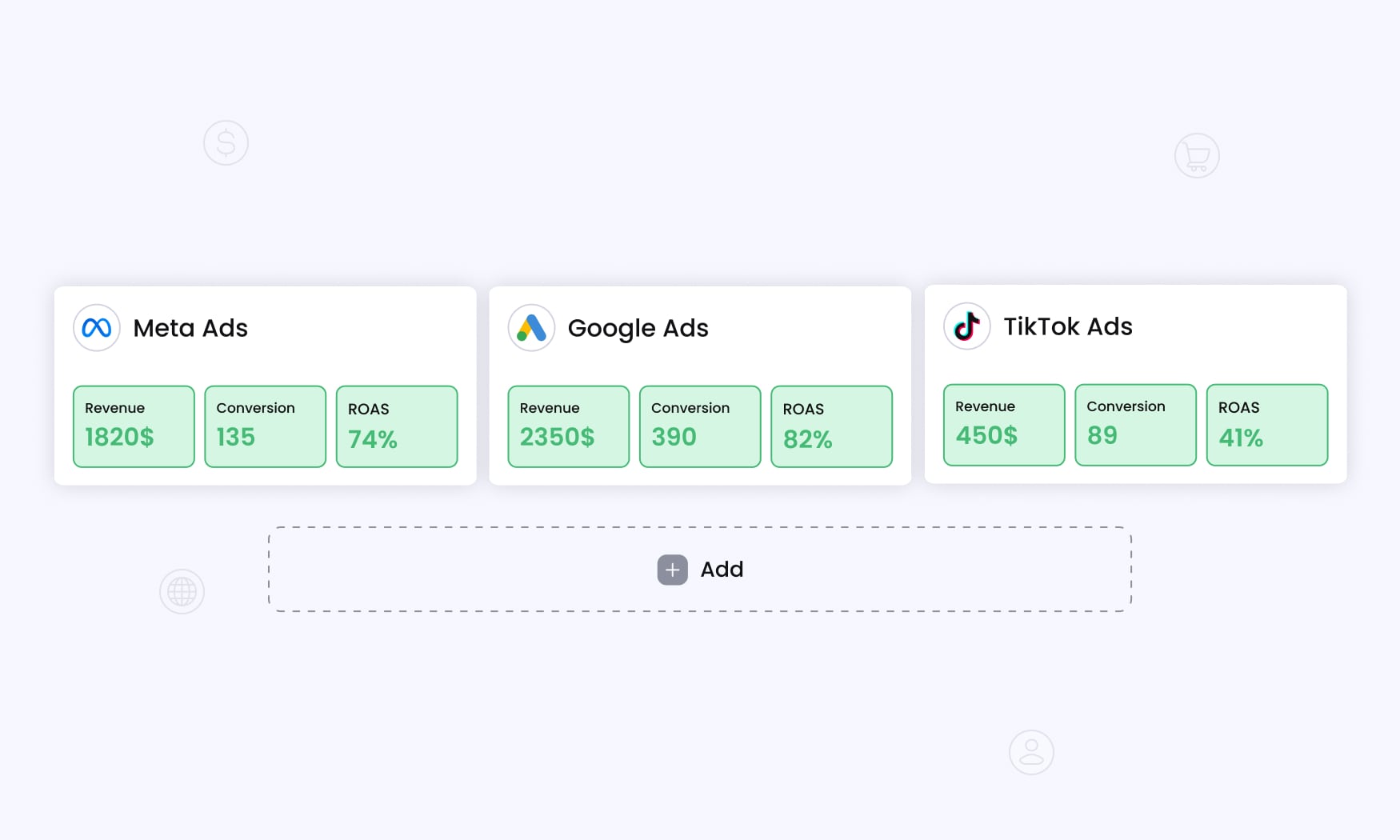
The advertising industry is in the middle of its biggest transformation since the rise of programmatic.
With third-party cookies disappearing, privacy laws tightening, and browsers taking an aggressive stance on tracking, the future of digital advertising will belong to brands and agencies that own their data – not those renting visibility from platforms.
The old world of pixels and client-side scripts was convenient, but it was never built for the privacy-first web we live in today.
Every day, more conversions vanish into blind spots caused by ad blockers, stricter browser rules, and fragmented attribution models. For performance marketers, that means wasted budget, skewed ROI reports, and fewer chances to scale. The only way forward is rebuilding tracking around first-party data pipelines.
That’s why implementing server side tracking has become less of an option and more of a requirement. Instead of relying on fragile browser environments, businesses now run event data through their own website server first. This model provides a secure checkpoint where data can be validated, anonymized, and enriched before it’s passed on to ad platforms.
The result?
Cleaner attribution, faster sites, and full control over what gets shared – all while respecting user privacy.
But here’s the challenge: most marketers don’t want to become cloud engineers just to keep their tracking alive. Provisioning servers, scaling infrastructure, and maintaining integrations with 10+ ad platforms is a heavy lift. This is where the role of a modern tracking platform becomes critical.
Platforms like RedTrack are built for this future.
Instead of weeks spent configuring a Google Tag Manager server-side container or custom AWS setup, RedTrack gives you an out-of-the-box solution with 200+ integrations, conversion API syncs for Meta, Google, and TikTok, and automation rules that let you act on data in real time. You still benefit from the accuracy of server-to-server tracking, but without having to maintain your own website servers or worry about infrastructure costs.
More importantly, the future of ad tracking isn’t just about data collection – it’s about data ownership.
RedTrack ensures your conversions, revenue, and attribution data live in your environment first. That independence is crucial when ad platforms optimize campaigns based on the data you feed them. Better data in means better results out – higher ROAS, smarter budget allocation, and faster scaling.
The next few years will draw a sharp line between advertisers who adapt and those who don’t. The ones who thrive will be those who see tracking not as a technical nuisance, but as a competitive advantage. With server-side pipelines, privacy built-in, and a tracking platform designed to empower performance marketers, the future is less about surviving browser changes – and more about unlocking new growth.
The future of tracking ads is already here. The question is whether you’ll keep patching pixels – or take control with server-side accuracy, smarter automation, and platforms like RedTrack leading the way.
Try RedTrack now or let us walk you through all ins and outs!


